NMC user interface is taking a long time to launch
Summary: NMC is taking 4 to 5 minutes to open the log-in page.
This article applies to
This article does not apply to
This article is not tied to any specific product.
Not all product versions are identified in this article.
Symptoms
- NMC is taking 4 to 5 minutes to open the log-in page.
- Java trace log (C:\Users\<user>\AppData\LocalLow\Sun\Java\Deployment\log\javaws_<some numbers>.trace) shows a connection time-out error.
network: Connecting socket://ocsp.entrust.net:80 with proxy=DIRECT
security: Failing over to CRLs: java.net.SocketTimeoutException: connect timed out
network: Connecting socket://crl.entrust.net:80 with proxy=DIRECT
com.sun.deploy.security.RevocationChecker$StatusUnknownException: java.net.SocketTimeoutException: connect timed out
Suppressed: com.sun.deploy.security.RevocationChecker$StatusUnknownException: sun.security.provider.certpath.PKIX$CertStoreTypeException: java.net.SocketTimeoutException: connect timed out
Caused by: sun.security.provider.certpath.PKIX$CertStoreTypeException: java.net.SocketTimeoutException: connect timed out
Caused by: java.net.SocketTimeoutException: connect timed out
Cause
The slow response time is caused by the NMC client lacking an internet or external connection. When the NMC UI is launched, Java attempts to contact the Entrust web page to verify the certificates. After several failed attempts, it times out.
Resolution
Disable the revocation check in Java.
- Open the Java Control Panel. Go to the Advanced tab - Perform TLS Certificate revocation checks on.
- For NRE: Go to C:\Program Files\NRE\java\jre#.#.#_###\bin\javacpl.exe
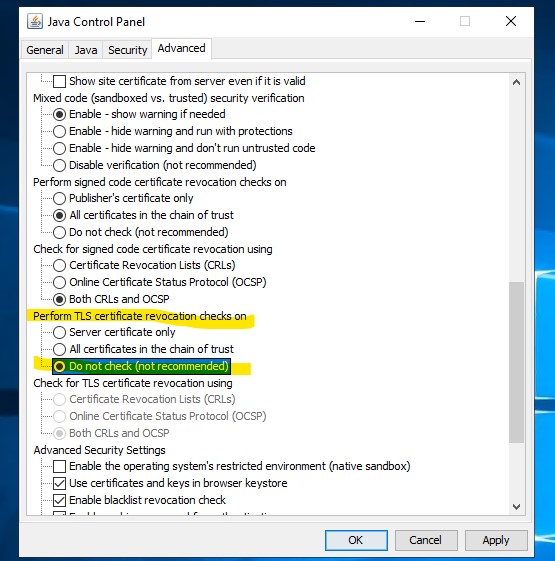
- Launch the NMC user interface.
Additional Information
Article Properties
Article Number: 000287639
Article Type: Solution
Last Modified: 28 Feb 2025
Version: 1
Find answers to your questions from other Dell users
Support Services
Check if your device is covered by Support Services.