Avamar: FLR을 사용하여 VM 백업에서 파일을 복원할 수 없음
Summary: 프록시가 백업 타겟 DNS 이름을 확인할 수 없기 때문에 FLR을 사용하여 VM 백업에서 파일을 복원할 수 없습니다.
This article applies to
This article does not apply to
This article is not tied to any specific product.
Not all product versions are identified in this article.
Symptoms
N/A
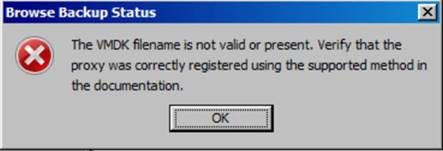
- FLR을 사용하여 VM 백업을 탐색하는 동안 장애가 발생하면 아래 오류 메시지가 표시됩니다.
- 탐색 중인 VM도 FLR 제한에 도달하지 않습니다.
- 프록시의 FLR 로그를 확인하면 /usr/local/avamarclient/bin/logs 디렉토리에 있는 MountMgr.log 파일에서 프록시가 백업 타겟 서버(DD)에서 백업 목록을 가져올 수 없고 해당 서버가 없다는 아래의 오류 메시지가 표시됩니다.
[MM - DEBUG] TID=140213502355139 MID=30870: sAssetPath = /mnt/dunion/<vCenter_name>/VirtualMachines/<VM_name_UUID>/by-number/0000149 [MM - DEBUG] TID=140213502355139 MID=30871: sClientId = [MM - DEBUG] TID=140213502355139 MID=30872: sMountedAvFS = /mnt/dunion/<vCenter_name>/VirtualMachines/<VM_name_UUID>/by-number/0000149/VMFiles [MM - ERROR] TID=140213502355139 MID=30873: HLPR_ListOfDirectories failed for /mnt/dunion/<vCenter_name>/VirtualMachines/<VM_name_UUID>/by-number/0000149/VMFiles [MM - FUNC] TID=140213502355139 MID=30874: IVmdkManager::GetAllAvailableDiskIndexes LEAVE [MM - ERROR] TID=9923 MID=30875: Unable to find backed up VMDK images for: /mnt/dunion/<vCenter_name>/VirtualMachines/<VM_name_UUID>/by-number/0000149
- 백업이 존재하는 경우라도 Avamar 유틸리티 노드에서 아래와 같이 확인한 경우:
mccli backup show --name=/<vCenter_name>/VirtualMachines/<VM_name_UUID>
0,23000,CLI command completed successfully.
Created LabelNum Size Retention Hostname Location Consistent Level Tier
------------------- -------- -------- --------- ---------------------------------- -------- ---------------- ------
yyyy-mm-dd hh:mm PM 149 ##.# GB D <AVAMAR_FQDN> Local file Active
0,23000,CLI command completed successfully.
Created LabelNum Size Retention Hostname Location Consistent Level Tier
------------------- -------- -------- --------- ---------------------------------- -------- ---------------- ------
yyyy-mm-dd hh:mm PM 149 ##.# GB D <AVAMAR_FQDN> Local file Active
- 또한 다음과 같이 /usr/local/avamar/var 디렉토리에 있는 axionfs.cmd 파일에 올바른 Avamar IP가 이미 있음을 알 수 있습니다.
--server=xxx.xxx.xxx.xxx
--id=restoreonly
--password=#################################
--fuseoptions='-s -r -f -o allow_other,use_ino'
--primarybackupdir=by-number
--inactivity_timeout=172800
--encrypt=tls
--encrypt-strength=high
(END)
--id=restoreonly
--password=#################################
--fuseoptions='-s -r -f -o allow_other,use_ino'
--primarybackupdir=by-number
--inactivity_timeout=172800
--encrypt=tls
--encrypt-strength=high
(END)
Cause
-
/usr/local/avamar/var 디렉토리에 위치한 axionfs_xxxxxxx_xxxx_xxxx_xxxxxxxxxxxx.log의 최신 파일에서 다음과 같은 오류를 볼 수 있듯이 사용 중인 프록시는 DataDomain FQDN 또는 백업 타겟 서버를 확인할 수 없습니다.
axionfs Info <10539>: Connecting to Data Domain Server "DD_FQDN"(1) (LSU: avamar-xxxxxxxxxx, User: "ddboost")
[axionfs] netsys::getaddrinfo failed for DD_FQDN: Name or service not known
axionfs Error <10541>: Failed to resolve Data Domain Server name "DD_FQDN" to an IP address. Data Domain login FAILED
axionfs Error <10512>: Problem logging into the DDR server index:1
axionfs Error <11014>: Could not open DDR for /, #146
[axionfs] context::loop: Nothing pending on server, only internal work (pending all=4, ext=0, int=0)
axionfs Warning <19046>: Unable to get ddr_files.xml for clientid <VM_CID> and backupid <backupid>
axionfs Warning <19047>: Unable to retrieve DDR info for 'VMConfiguration'
axionfs Error <41308>: Cannot iterate contents of '': Unable to set location information in direlem_iter for 'VMConfiguration'
[axionfs] netsys::getaddrinfo failed for DD_FQDN: Name or service not known
axionfs Error <10541>: Failed to resolve Data Domain Server name "DD_FQDN" to an IP address. Data Domain login FAILED
axionfs Error <10512>: Problem logging into the DDR server index:1
axionfs Error <11014>: Could not open DDR for /, #146
[axionfs] context::loop: Nothing pending on server, only internal work (pending all=4, ext=0, int=0)
axionfs Warning <19046>: Unable to get ddr_files.xml for clientid <VM_CID> and backupid <backupid>
axionfs Warning <19047>: Unable to retrieve DDR info for 'VMConfiguration'
axionfs Error <41308>: Cannot iterate contents of '': Unable to set location information in direlem_iter for 'VMConfiguration'
Resolution
이 문제를 해결하려면 다음 단계를 수행하십시오.
- Avamar 프록시가 프록시에서 아래 명령을 실행하여 FQDN을 확인할 수 있는지 확인합니다.
- nslookup <datadomain_FQDN>
- nslookup <datadomain_IP>
- DataDomain에 대한 유효한 출력이 없는 경우 프록시의 /etc/resolve.conf 파일을 편집하고 올바른 DNS 이름을 추가하십시오.
- 프록시의 /etc/hosts 파일에 DataDomain의 FQDN 및 IP를 추가하십시오.
Affected Products
AvamarProducts
Avamar, Avamar Client for VMwareArticle Properties
Article Number: 000067854
Article Type: Solution
Last Modified: 06 Nov 2025
Version: 3
Find answers to your questions from other Dell users
Support Services
Check if your device is covered by Support Services.