Avamar:无法从使用 FLR 的虚拟机备份中恢复文件
Summary: 由于代理无法解析备份目标 DNS 名称,因此无法从使用 FLR 的虚拟机备份中恢复文件。
This article applies to
This article does not apply to
This article is not tied to any specific product.
Not all product versions are identified in this article.
Symptoms
不适用
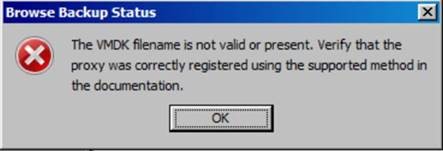
- 浏览使用 FLR 的虚拟机备份时,如果失败,则显示以下错误消息:
- 即使是我们正在浏览的虚拟机也没有达到任何 FLR 限制。
- 通过检查代理上的 FLR 日志,我们可以看到 /usr/local/avamarclient/bin/logs 目录内 MountMgr.log 文件中的错误消息,指明代理无法从备份目标服务器 (DD) 获取备份列表,并且该列表不在那里:
[MM - DEBUG] TID=140213502355139 MID=30870: sAssetPath = /mnt/dunion/<vCenter_name>/VirtualMachines/<VM_name_UUID>/by-number/0000149 [MM - DEBUG] TID=140213502355139 MID=30871: sClientId = [MM - DEBUG] TID=140213502355139 MID=30872: sMountedAvFS = /mnt/dunion/<vCenter_name>/VirtualMachines/<VM_name_UUID>/by-number/0000149/VMFiles [MM - ERROR] TID=140213502355139 MID=30873: HLPR_ListOfDirectories failed for /mnt/dunion/<vCenter_name>/VirtualMachines/<VM_name_UUID>/by-number/0000149/VMFiles [MM - FUNC] TID=140213502355139 MID=30874: IVmdkManager::GetAllAvailableDiskIndexes LEAVE [MM - ERROR] TID=9923 MID=30875: Unable to find backed up VMDK images for: /mnt/dunion/<vCenter_name>/VirtualMachines/<VM_name_UUID>/by-number/0000149
- 如果存在备份,我们会从 Avamar 实用程序节点看到如下内容:
mccli backup show --name=/<vCenter_name>/VirtualMachines/<VM_name_UUID>
0,23000,CLI command completed successfully.
Created LabelNum Size Retention Hostname Location Consistent Level Tier
------------------- -------- -------- --------- ---------------------------------- -------- ---------------- ------
yyyy-mm-dd hh:mm PM 149 ##.# GB D <AVAMAR_FQDN> Local file Active
0,23000,CLI command completed successfully.
Created LabelNum Size Retention Hostname Location Consistent Level Tier
------------------- -------- -------- --------- ---------------------------------- -------- ---------------- ------
yyyy-mm-dd hh:mm PM 149 ##.# GB D <AVAMAR_FQDN> Local file Active
- 此外,我们还可以看到正确的 Avamar IP 已位于 /usr/local/avamar/var 目录内的 axionfs.cmd 文件中,如下所示:
--server=xxx.xxx.xxx.xxx
--id=restoreonly
--password=#################################
--fuseoptions='-s -r -f -o allow_other,use_ino'
--primarybackupdir=by-number
--inactivity_timeout=172800
--encrypt=tls
--encrypt-strength=high
(END)
--id=restoreonly
--password=#################################
--fuseoptions='-s -r -f -o allow_other,use_ino'
--primarybackupdir=by-number
--inactivity_timeout=172800
--encrypt=tls
--encrypt-strength=high
(END)
Cause
-
正在使用的代理无法解析 Data Domain FQDN 或备份目标服务器,因为我们可能会在 /usr/local/avamar/var 目录下的最新 axionfs_xxxxxxx_xxxx_xxxx_xxxxxxxxxxxx.log 中看到以下错误:
axionfs Info <10539>: Connecting to Data Domain Server "DD_FQDN"(1) (LSU: avamar-xxxxxxxxxx, User: "ddboost")
[axionfs] netsys::getaddrinfo failed for DD_FQDN: Name or service not known
axionfs Error <10541>: Failed to resolve Data Domain Server name "DD_FQDN" to an IP address. Data Domain login FAILED
axionfs Error <10512>: Problem logging into the DDR server index:1
axionfs Error <11014>: Could not open DDR for /, #146
[axionfs] context::loop: Nothing pending on server, only internal work (pending all=4, ext=0, int=0)
axionfs Warning <19046>: Unable to get ddr_files.xml for clientid <VM_CID> and backupid <backupid>
axionfs Warning <19047>: Unable to retrieve DDR info for 'VMConfiguration'
axionfs Error <41308>: Cannot iterate contents of '': Unable to set location information in direlem_iter for 'VMConfiguration'
[axionfs] netsys::getaddrinfo failed for DD_FQDN: Name or service not known
axionfs Error <10541>: Failed to resolve Data Domain Server name "DD_FQDN" to an IP address. Data Domain login FAILED
axionfs Error <10512>: Problem logging into the DDR server index:1
axionfs Error <11014>: Could not open DDR for /, #146
[axionfs] context::loop: Nothing pending on server, only internal work (pending all=4, ext=0, int=0)
axionfs Warning <19046>: Unable to get ddr_files.xml for clientid <VM_CID> and backupid <backupid>
axionfs Warning <19047>: Unable to retrieve DDR info for 'VMConfiguration'
axionfs Error <41308>: Cannot iterate contents of '': Unable to set location information in direlem_iter for 'VMConfiguration'
Resolution
要解决此问题:
- 通过在代理上运行以下命令,确保 AVamar 代理能够解析 FQDN:
- nslookup <datadomain_FQDN>
- nslookup <datadomain_IP>
- 如果没有针对 Data Domain 的有效输出,请在代理上编辑 /etc/resolve.conf 文件并添加正确的 DNS 名称。
- 将 Data Domain 的 FQDN 和 IP 添加到代理的 /etc/hosts 文件中。
Affected Products
AvamarProducts
Avamar, Avamar Client for VMwareArticle Properties
Article Number: 000067854
Article Type: Solution
Last Modified: 06 Nov 2025
Version: 3
Find answers to your questions from other Dell users
Support Services
Check if your device is covered by Support Services.