NetWorker: File System Client Backup failing with pseudo_saveset error "Invalid client parallelism parameter"
Summary: This article will help troubleshoot File System Backup Failure.
This article applies to
This article does not apply to
This article is not tied to any specific product.
Not all product versions are identified in this article.
Symptoms
File System Backup Fails with "Invalid client parallelism parameter".
Action Logs shows the following:
Action Logs shows the following:
181407:save: Step (1 of 5) for PID-4412: Save has been started on the client 'Incorrect_Client_Hostname'.
174412:save: Step (2 of 5) for PID-4412: Running the backup on the client 'Incorrect_Client_Hostname' for the save set 'pseudo_saveset'.
182135:save: Unable to determine the hostname or host alias.
133075:save: new_sdthreadparam_from_path: Invalid client parallelism parameter.
113706:save: save: Call to new_sdthreadparam_from_path to create sd_param is unsuccessful.
--- Job Indications ---
Actual_Client_Hostname:pseudo_saveset: retried 4 times.
Cause
Unable to determine hostname of client will appear if there is a DNS resolution issue. Invalid client parallelism paramter will return if there is an invalid client parallelism set in the client properties in NetWorker.
Resolution
1. Confirm DNS resolution for the client(s) from both the NetWorker server and the client. Forward (FQDN), Reverse, and short-name resolution should return correctly. This is done with the OS nslookup command; however, nsrports can also be used:
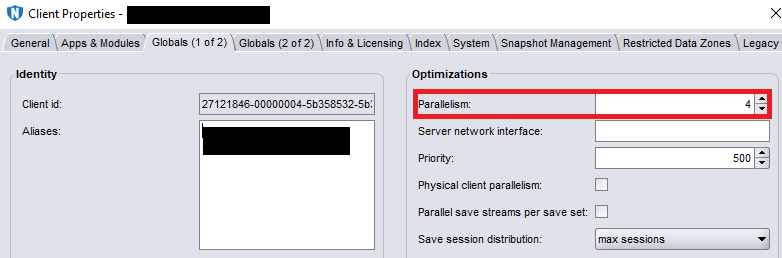
2. The client parallelism is changed from the NMC. Open the client properties and go to the "Globals (1 of 2)" tab:
nsrports -t client_name
Example:
[root@nw_server ~]# nsrports -t client
Forward lookup for client
Query time:              0.001 sec
Canonical name (CNAME):  client.domain.com
Address (A):             10.0.0.10
Connect to port 7938:    Succeeded (0.000 sec)

Reverse lookup for 10.0.0.10
Query time:              0.000 sec
Name:                    client.domain.com
NOTE: The nsrports command also checks client port connectivity on port 7938. Different ports can be checked by adding -p port # to the command.
2. The client parallelism is changed from the NMC. Open the client properties and go to the "Globals (1 of 2)" tab:
NOTE: For most file system clients, the parallelism can be set to 4. For more information on parallelism, see the NetWorker Administration Guide, available through: https://www.dell.com/support/home/product-support/product/networker/docs
Affected Products
NetWorkerProducts
NetWorkerArticle Properties
Article Number: 000060645
Article Type: Solution
Last Modified: 27 Sep 2023
Version: 3
Find answers to your questions from other Dell users
Support Services
Check if your device is covered by Support Services.