How to Test Dell Encryption Enterprise and Dell Encryption Personal with Windows 10 and Windows 11 Feature Updates
Summary: This article covers the methodology for testing Dell Encryption Enterprise (formerly Dell Data Protection | Enterprise Edition) or Dell Encryption Personal (Dell Data Protection | Personal Edition products with Windows 10 and Windows 11 feature updates. ...
This article applies to
This article does not apply to
This article is not tied to any specific product.
Not all product versions are identified in this article.
Instructions
Affected Products:
- Dell Encryption Enterprise
- Dell Encryption Personal
- Dell Data Protection | Enterprise Edition
- Dell Data Protection | Personal Edition
Affected Versions:
- v8.18.0 and later
Testing Dell Encryption Enterprise or Dell Encryption Personal varies between Supported and Unsupported Windows 10 feature updates. For the latest information about supported Windows 10 feature updates, reference Dell Data Security / Dell Data Protection Windows 10 Feature Update Compatibility.
Supported
To test a Windows 10 and Windows 11 feature update that is compatible with Dell Encryption Enterprise or Dell Encryption Personal, reference Dell Encryption Enterprise / Dell Encryption Personal Best Practices: Windows 10 Feature Update / Migration.
Unsupported
Warning:
- Using Dell Encryption Enterprise or Dell Encryption Personal with an unsupported version of Windows 10 and Windows 11 may cause adverse effects, which can include data loss. Dell suggests testing unsupported feature updates on nonproduction devices for application compatibility only.
- Reference Windows as a Service
for more information.
- This KB article from Microsoft outlines the launch date and support dates for Windows 10 and Windows 11 releases: https://docs.microsoft.com/en-us/windows/release-information/
- Reference Windows as a Service
- Dell ProSupport is unable to provide technical support on unsupported versions.
Testing an unsupported Windows feature update, including Insider Previews, varies between:
- Installing Dell Encryption Enterprise or Dell Encryption Personal on Windows 10 and Windows 11
- Updating Windows 10 and Windows 11 on a device with Dell Encryption Enterprise or Dell Encryption Personal
Install
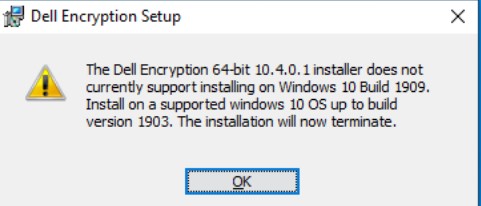
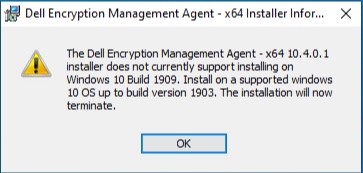
During installation, Dell Encryption Enterprise/ Dell Encryption Personal v8.18.0 and later automatically checks the version of the operating system against an internal marker. If a compatible match is not found, the installation is blocked on that device, with an error message indicating an unsupported operating system version.
Dell Encryption display's the message below when it is installed on an unsupported operating system:
Dell Encryption Management Agent display's the message below when it is installed on an unsupported operating system:
Warning: The next step is a Windows Registry edit:
- Back up the Registry before proceeding, reference How to Back Up and Restore the Registry in Windows
- Editing the Registry can cause the computer to become unresponsive on the next reboot.
- Contact Dell Data Security International Support Phone Numbers for assistance if you have concerns about performing this step.
A local administrator can create a registry key:
HKEY_LOCAL_MACHINE\SOFTWARE\Dell\Dell Data Protection
DWORD: AllowedMaxVersion
Value (Decimal): 1909
In the example, 1909 is used, which would allow Dell Encryption Enterprise or Dell Encryption Personal to install on Windows 10 version 1909 (November 2019 Update) or earlier.
Upgrade
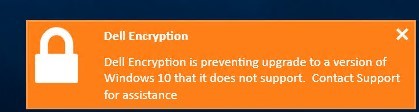
During the operating system update, Dell Encryption Enterprise or Dell Encryption Personal v8.18.0 and later automatically checks the version of the operating system against an internal list of supported versions. If a match is not found, the feature update is blocked, and a notification is presented to the logged in user.
To find the build number of the Windows 10 and Windows 11 feature update that is attempting to install, slow and fast-ring builds display the build number within the installation name.
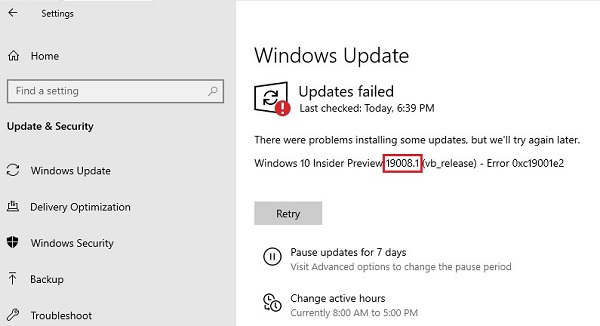
Also, Microsoft maintains a list of builds that are available in various release rings here: https://docs.microsoft.com/en-us/windows-insider/flight-hub/
Warning: The next step is a Windows Registry edit:
- Back up the Registry before proceeding, reference How to Back Up and Restore the Registry in Windows
- Editing the Registry can cause the computer to become unresponsive on the next reboot.
- Contact Dell Data Security International Support Phone Numbers for assistance if you have concerns about performing this step.
Policy-Based Encryption blocks can be overwritten to allow for testing with an unsupported operating system. A registry key enables this ability:
HKLM\Software\Dell\Dell Data Protection\Encryption
REG_SZ: SupportedWindows10Upgrade
Value: <HighestSupportedBuildHere>
This example would allow any Windows 10 and Windows 11 build to install up to 10.0.22500.1 on a device with Policy Based Encryption:
HKLM\Software\Dell\Dell Data Protection\Encryption
REG_SZ: SupportedWindows10Upgrade
Value: 10.0.22500.1
Self-Encrypting Drive management, BitLocker management, and Dell’s Software-Based Full Disk Encryption management blocks what the registry can overwrite, by modifying the appropriate value according to the technology that is in-place on the endpoint:
HKLM\SOFTWARE\Dell\Dell Data Protection\OsUpgradeSupportedVersions
REG_SZ: WinVersion_BLM
Value: <highestsupportedbuildhere>
HKLM\SOFTWARE\Dell\Dell Data Protection\OsUpgradeSupportedVersions
REG_SZ:WinVersion_SED
Value: <highestsupportedbuildhere>
HKLM\SOFTWARE\Dell\Dell Data Protection\OsUpgradeSupportedVersions
REG_SZ: WinVersion_FDE
Value: <highestsupportedbuildhere>
This example would allow any Windows 10 and Windows 11 build to install up to 10.0.22500.1 on a device with BitLocker manager:
HKLM\Software\Dell\Dell Data Protection\Encryption
REG_SZ: WinVersion_BLM
Value: 10.0.22500.1
To contact support, reference Dell Data Security International Support Phone Numbers.
Go to TechDirect to generate a technical support request online.
For additional insights and resources, join the Dell Security Community Forum.
Affected Products
Dell EncryptionArticle Properties
Article Number: 000129461
Article Type: How To
Last Modified: 19 Apr 2026
Version: 15
Find answers to your questions from other Dell users
Support Services
Check if your device is covered by Support Services.