PowerProtect:將 Data Domain 新增至 PP 失敗,並顯示錯誤 400
Summary: 在 PowerProtect Data Manager (PPDM) 中將 Data Domain 新增至保護儲存裝置失敗,並顯示錯誤 400「使用名稱「ddve3.agent.com」的資源已存在。無法建立或修改。以有效的要求再試一次。連絡系統管理員」
This article applies to
This article does not apply to
This article is not tied to any specific product.
Not all product versions are identified in this article.
Symptoms
在 PowerProtect 中將 Data Domain 新增至保護儲存裝置時,會發生下列錯誤 400:
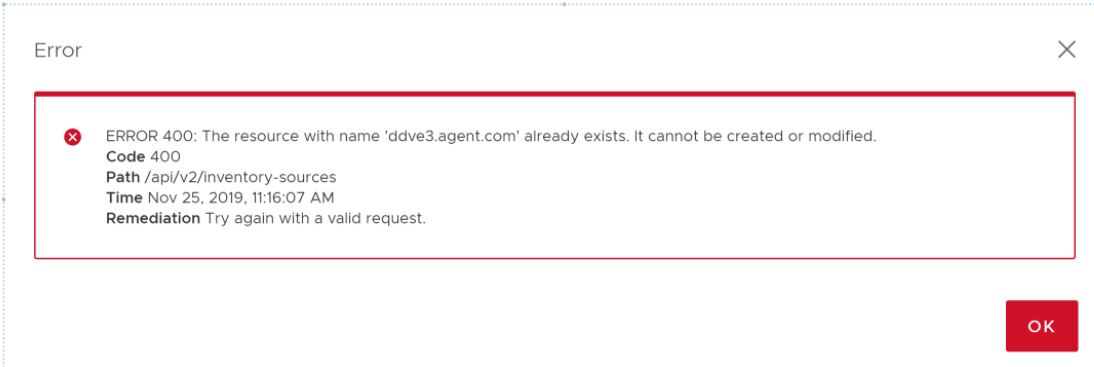
Data Domain 會列在狀態為「Failed」的可用資產清單中。

The resource with name 'ddve3.agent.com' already exists. It cannot be created or modified. Try again with a valid request. Contact system administrator.
Data Domain 會列在狀態為「Failed」的可用資產清單中。
Cause
當SMS在 VMware Configuration Manager 節點上重新啟動時,通常 (例如升級) 或異常 (例如當機) 有下列可能性。
當ECDM使用受限的管理員角色登入PPDM時,許可權和許可權會儲存在SMS記憶體變數「_sms_common_user_priv」中,且不會在其他用戶間清除。
如為在 PPDM 上將屬於 DD 系統管理員使用者角色的存取令牌傳送時,在 VMware Configuration Manager 上建立儲存裝置作為重新部署組態工作的一部分的作業,則會在傳送要求至 SMS 之前的內部,使用相同的許可權 (以變數_sms_common_user_priv設定,如上所述)。
由於第一次使用受限系統管理員儲存許可權,即使管理角色也不允許執行此作業。
Resolution
請聯絡您的支援供應商並參考本知識文章 (184476)。
Dell 技術支援可套用不中斷營運的因應措施。
需要具有相關登入詳細數據的 SSH 存取。
Dell 技術支援可套用不中斷營運的因應措施。
需要具有相關登入詳細數據的 SSH 存取。
Additional Information
注意:由於 DDOS 版本 7.7.5.25、7.10.1.15、7.13.0.0、6.2.1.110 及更新版本的安全性強化,因此僅 Dell 員工可透過 BASH 模式存取「SE 模式」命令
Affected Products
PowerProtect SoftwareArticle Properties
Article Number: 000184476
Article Type: Solution
Last Modified: 11 Dec 2023
Version: 3
Find answers to your questions from other Dell users
Support Services
Check if your device is covered by Support Services.