PowerProtect: Adding Data Domain to PP fails with error 400
Summary: Adding Data Domain to Protection storage in PowerProtect Data Manager (PPDM) fails with error 400 "The resource with the name 'ddve3.agent.com' already exists. It cannot be created or modified. Try again with a valid request. Contact system administrator" ...
This article applies to
This article does not apply to
This article is not tied to any specific product.
Not all product versions are identified in this article.
Symptoms
When adding a Data Domain to Protection storage in PowerProtect, the following error 400 occurs:
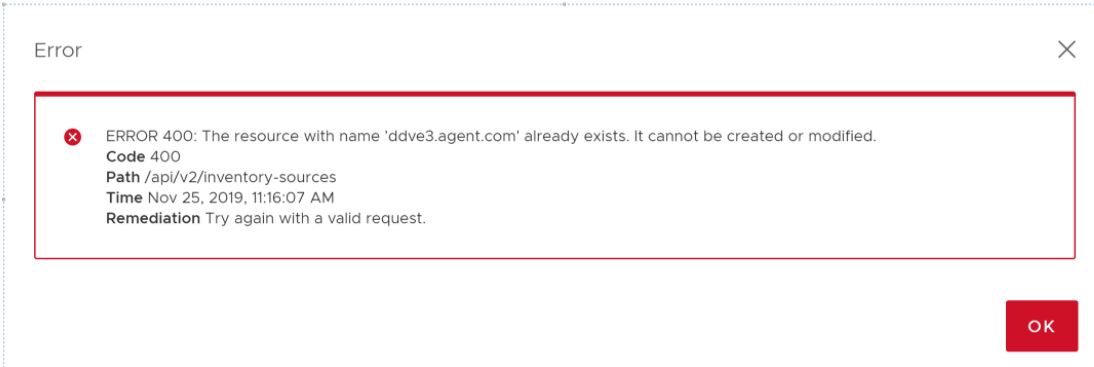
The Data Domain is listed in the list of available assets with a status of "Failed."

The resource with name 'ddve3.agent.com' already exists. It cannot be created or modified. Try again with a valid request. Contact system administrator.
The Data Domain is listed in the list of available assets with a status of "Failed."
Cause
When SMS is restarted on the VMware Configuration Manager node, either normally (such as an upgrade) or abnormally such as a crash) there is a possibility of the following.
When ECDM logs in to PPDM using limited-admin role, the permissions and privileges are saved in SMS memory variable "_sms_common_user_priv" and not cleared across other users.
For operations like creating Storage-unit on VMware Configuration Manager as part of a repl configuration job on PPDM when PPDM sends an access token belonging to a DD-admin user role, internally before sending the request to SMS, same permissions are used, which are set in variable _sms_common_user_priv, as mentioned above.
Since the permissions were first saved using limited-admin, the operation is disallowed even for the admin role.
Resolution
Contact your Support Provider and reference this knowledge article (184476).
A nondisruptive workaround can be applied by Dell Tech Support.
SSH Access with relevant login details will be required.
A nondisruptive workaround can be applied by Dell Tech Support.
SSH Access with relevant login details will be required.
Additional Information
NOTE: Due to security hardening on DDOS versions 7.7.5.25, 7.10.1.15, 7.13.0.0, 6.2.1.110 and above, 'SE mode' commands are accessible by Dell employees via BASH mode ONLY
Affected Products
PowerProtect SoftwareArticle Properties
Article Number: 000184476
Article Type: Solution
Last Modified: 11 Dec 2023
Version: 3
Find answers to your questions from other Dell users
Support Services
Check if your device is covered by Support Services.