Dell S2422HZ and S2722DZ Monitors OSD Volume Indicator Does Not Sync with PC and OS Volume Control
Summary: This article provides information about the operating system and computer volume control that does not sync with the On-screen display volume.
This article applies to
This article does not apply to
This article is not tied to any specific product.
Not all product versions are identified in this article.
Symptoms
OSD Volume Indicator Does Not Sync with the Computer and the Operating System Volume Control
When using the Dell S2422HZ or S2722DZ Monitor, and you select an Audio Playback Device from Windows Sound Taskbar and adjust monitor On-screen display (OSD) volume up and down, the volume bar from the monitor OSD does not sync, move, up and down with the computer and the Operating System volume control.
Affected Monitors:
-
Dell 24 Video Conferencing Monitor - S2422HZ
-
Dell 27 Video Conferencing Monitor - S2722DZ
Cause
If the USB Type-C cable is connected from the monitor to the computer. Two audio paths are named Dell S2422HZ or S2722DZ (Intel (R) Display Audio), and Echo Cancelling Speakerphone from the monitor shows in the Sound Setting Interface.
If you select the audio path Dell S2422HZ or S2722DZ (Intel (R) Display Audio), audio is streamed through HDMI or DP alternate mode. Under this selection, volume control in Monitor OSD does not sync with personal computer Audio.
If you select the audio path Echo Cancelling Speakerphone (S2422HZ or S2722DZ), audio is streamed through USB. Under this selection, volume control in Monitor OSD syncs with personal computer Audio.
Resolution
- Connect the platform (desktop or laptop) to the monitor over USB Type-C to USB Type-C cable.
- Click the Volume Icon in the Windows taskbar notification area.

(Figure 1: Notification Area)
- Select Echo Cancelling Speakerphone (S2422HZ or S2722DZ) from Windows Playback Device.
This audio path is recommended as the default setting, which is required for VoIP and UC conference applications.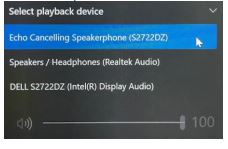
(Figure 2: Playback Device)
- Select Echo Cancelling Speakerphone (S2422HZ or S2722DZ) as output Speaker from Conference Application.
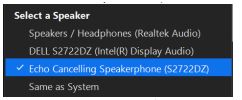
(Figure 3: Output Device)
-
This is normal behavior for all monitors with speaker function.
Note: If only HDMI or DP is connected from monitor to personal computer, only one speaker DELL S2422HZ or DELL S2722DZ is displayed. Microphone and Echo Cancelling Speakerphone are not supported in this selection. This selection is for Audio Playback only. If USB Type-C to Type-C cable or Type-A to Type-C (optional purchase) is connected from monitor to the computer. Select the Echo Cancelling Speakerphone (S2422HZ or S2722DZ) audio path.
Note: Dell S2422HZ/S2722DZ Monitors only shipped with USB Type-C to Type-C cable. If your desktop or laptop does have a Type-C port, you must purchase a Type-A to Type-C cable separately. Webcam and Microphone only work when Type-C to Type-C cable, or Type-A to Type-C is connected from desktop or laptop to monitor. Audio is supported over Type-C to Type-C, HDMI, and DP cable.
Affected Products
Dell S2422HZ, Dell S2722DZArticle Properties
Article Number: 000191537
Article Type: Solution
Last Modified: 22 Apr 2025
Version: 6
Find answers to your questions from other Dell users
Support Services
Check if your device is covered by Support Services.