De NetWorker Client en NetWorker Extended Client Software installeren met behulp van stille installatie in Windows
Summary: Dit KB-artikel bevat instructies voor het installeren van de NetWorker-client en uitgebreide clientpakketten op een Windows-systeem vanaf de opdrachtregel.
This article applies to
This article does not apply to
This article is not tied to any specific product.
Not all product versions are identified in this article.
Instructions
- Download het NetWorker-softwarepakket van de Online Support website https://www.dell.com/support/home/product-support/product/networker/drivers.
- Open vanaf het Windows-clientsysteem een administrator-opdrachtprompt en cd naar het pad waar de installatie binaries zich bevinden.
Voorbeeld van mapinhoud:
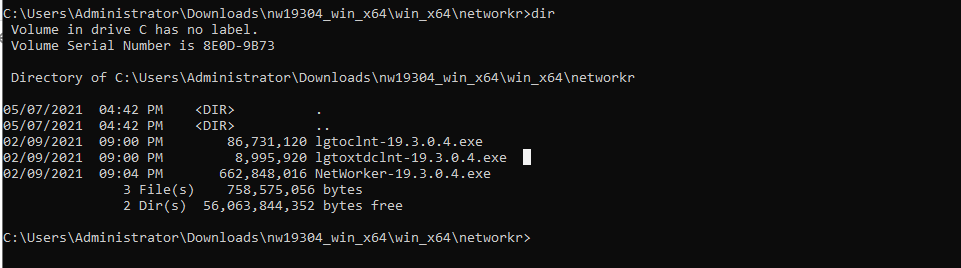
- Voer deze opdracht uit:
lgtoclnt-x.x.x.x.exe /v /s /q ConfigureFirewall=1 StartServices=1 /norestart
- /s /q onderdrukt alle UI-uitvoer.
- /v schakelt uitgebreide modus in.
- /norestart onderdrukt een herstart nadat de installatie is voltooid als de installatie opnieuw moet worden gestart.
Voorbeeld:

- Onder Programma's en onderdelen ziet u het clientpakket dat is geïnstalleerd:

NetWorker Extended Client Installation met stille opties:
- Voer deze opdracht uit:
lgtoxtdclnt-x.x.x.x.exe /v /s /q ConfigureFirewall=1 StartServices=1 /norestart
Voorbeeld:

- Onder Programma's en onderdelen ziet u het uitgebreide clientpakket dat is geïnstalleerd:

- NetWorker Client Services moeten na de installatie automatisch opnieuw worden opgestart.
net stop nsrexecd /y && net start nsrexecd
Affected Products
NetWorkerArticle Properties
Article Number: 000192023
Article Type: How To
Last Modified: 12 May 2026
Version: 6
Find answers to your questions from other Dell users
Support Services
Check if your device is covered by Support Services.