PowerProtect: Backups fail as Agent host cannot be reached or service is not running
Summary: PowerProtect Data Manager (PPDM) Backups fail with error "Protection of these assets was unsuccessful because either the Agent host cannot be reached or the Agent service is not running." ...
This article applies to
This article does not apply to
This article is not tied to any specific product.
Not all product versions are identified in this article.
Symptoms
Agent Backups (file system or database) in PPDM fail for some hosts with the following error:
CRITICAL
ABA0009
Protection of these assets was unsuccessful because either the Agent host cannot be reached or the Agent service is not running.
Details
SQL-Prod-Policy: Unable to backup MICROSOFT_SQL_DATABASE UiPathArchive on Agent host
Cause
Either the Agent service is not running on the host, or the PPDM and the host cannot communicate to the host on port 7000.
Resolution
1. Port check from the SSH session on the PowerProtect Data Manager:
Open a putty session to the PowerProtect Data Manager and run the following command:
curl -kv ip/hostame of client:7000
A failure can result if the agentservice is not running on the host, or if there is a problem on port 7000.
The following shows a connection failure:
An open port with a run service returns the following.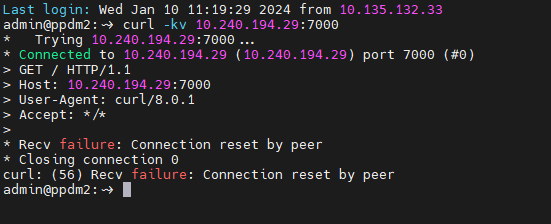
2. Verify that the PowerProtect Agent service is running on the host:
- Click Start, type services.msc, and press [Enter].
- Locate the PowerProtect Agent service.
- Right-click the PowerProtect Agent service and click Start.

- Verify that the PowerProtect Agent service is running.

To verify DNS name resolution and connectivity:
From the host:
- Click Start, type cmd, and press [Enter] to open a command prompt on this host and run the following commands:
- Verify that it can resolve the DNS name and IP address of the PPDM (forward and reverse).
-
nslookup <short name of your PPDM>
nslookup <FQDN of your PPDM>
nslookup <IP address of your PPDM>
- Verify that the host can ping the PPDM by short name, Fully Qualified Domain Name (FQDN), and IP address.
-
ping <short name of your PPDM>
ping <FQDN of your PPDM>
ping <IP address of your PPDM>
From the PPDM:
- Open a PuTTY session and connect to the PPDM and run the following commands:
- Verify that it can resolve the DNS name and IP address of the failing host (forward and reverse).
-
nslookup <short name of failing host>
nslookup <FQDN of of failing host>
nslookup <IP address of of failing host>
- Verify that the PPDM can ping the host by short name, FQDN, and IP address.
Note: The ping command only runs on the PPDM as the root user.
-
su [Enter]
enter root password [Enter]
ping <short name of failing host>
ping <FQDN of failing host>
ping <IP address of failing host>
Article Properties
Article Number: 000193211
Article Type: Solution
Last Modified: 16 Feb 2024
Version: 2
Find answers to your questions from other Dell users
Support Services
Check if your device is covered by Support Services.