How to Uninstall the Secureworks Taegis XDR Agent
Summary: Learn step-by-step instructions to uninstall the Secureworks Taegis XDR agent by following these instructions for Windows, Linux, or macOS.
This article applies to
This article does not apply to
This article is not tied to any specific product.
Not all product versions are identified in this article.
Instructions
The Secureworks Taegis XDR agent may require uninstallation to:
- Troubleshoot the product
- Address operating system incompatibilities
This article covers the steps to uninstall the product.
Affected Product:
- Secureworks Taegis XDR
Affected Operating Systems:
- Windows
- Linux
- macOS
Click XDR Console, Windows, Linux, or macOS for steps to uninstall the Secureworks Taegis XDR agent.
XDR Console
Note: The console uninstall option is only available for Windows-based Taegis agents.
- From the navigation menu, select Endpoint Agents and then click Taegis.

- Select the appropriate hostname.
- Click the ellipsis and then select Uninstall Agent.

- An uninstall log is created on the endpoint in
%PROGRAMDATA%\Secureworks\TaegisAgent\TaegisAgentUninstall.txt.
Windows
The Secureworks Taegis XDR agent on Windows can be uninstalled using the user interface (UI) or the command-line interface (CLI). Click the appropriate process for more information.
UI
- As an administrator, right-click the Windows start menu and then click Run.

- In the Run UI, type
appwiz.cpland then click OK.
- In Programs and Features, select Taegis Agent and then click Uninstall.

CLI
- As an administrator, right-click the Windows start menu and then click Run.
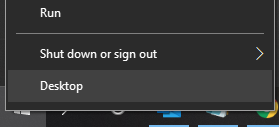
- In the Run UI, type
cmdand then click OK.
- Type
msiexec /x <TAEGISAGENT> /quiet /norestart /l*vx TaegisAgentUninstall.txtand then press Enter. Note:
Note:<TAEGISAGENT>= The path to the Taegis agent MSI file
Linux
Click CentOS, Red Hat Linux, Oracle Linux, Amazon Linux 2, or Ubuntu for steps to uninstall the Secureworks Taegis XDR agent.
CentOS, Red Hat Linux, Oracle Linux, Amazon Linux 2
- Open Terminal.

- Type
yum remove taegis-agent.x86_64 -yand then press Enter.
Ubuntu
- Open Terminal.

- Type
apt remove taegis-agent -yand then press Enter.
macOS
- From the macOS desktop, open the Finder application.
 Note: Optionally, you can use the Option + Command + Space keyboard shortcut to open the Finder application.
 - Click Applications.
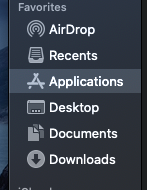
- Locate the app named SecureworksTaegis and then press Control + click to bring up the options list. Select Move to Trash to uninstall the SecureworksTaegis app.

- A notification appears, stating that system extensions are removed if the SecureworksTaegis app is deleted. Click Continue to progress the removal.
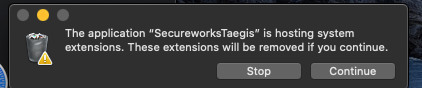
- Populate your administrator level credentials at the macOS evaluation prompt and then click OK.

- Click the Apple icon on the top-left of the screen and then click Restart.

- The application is now removed.
To contact support, reference Dell Data Security International Support Phone Numbers.
Go to TechDirect to generate a technical support request online.
For additional insights and resources, join the Dell Security Community Forum.
Affected Products
SecureworksArticle Properties
Article Number: 000193539
Article Type: How To
Last Modified: 12 Aug 2025
Version: 6
Find answers to your questions from other Dell users
Support Services
Check if your device is covered by Support Services.