BIOS Post Popup “Dell Security Manager” Window and Request Interaction Before Next Process
Summary: This article provides information about the Dell Security Manager prompt when you first boot the system.
This article applies to
This article does not apply to
This article is not tied to any specific product.
Not all product versions are identified in this article.
Symptoms
When you first boot your Dell computer and see the screen prompt that (See Figure.1).
"A BIOS setup change was made to the Secure Boot configuration. Please accept the changes!
If the change are not accepted within the time remaining, the secure boot settings will be reverted to factory defaults, and the computer will reboot.
To accept the changes, please enter the number sequence as below.
Code - 0000
Time remaining (X) seconds"
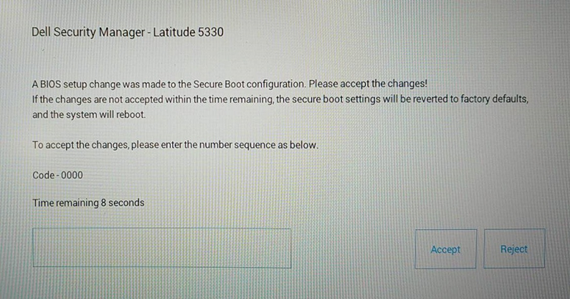
If the change are not accepted within the time remaining, the secure boot settings will be reverted to factory defaults, and the computer will reboot.
To accept the changes, please enter the number sequence as below.
Code - 0000
Time remaining (X) seconds"
Figure.1 Dell Security Manager
Cause
It is caused by the BIOS Setting. The BIOS option of "Enable Microsoft UEFI CA" is set to OFF on Vpro enable configuration computer.
Resolution
Note: It works as design for pre-set "Enable Microsoft UEFI CA" to OFF systems.
- Following the message to enter the PIN code to keep "Enable Microsoft UEFI CA" OFF, the computer will boot into operating system.
-
If you did not enter the PIN code within 15 seconds or choose Reject, the computer will reboot and show the below message after booting. (See Figure.2) It will ask you Press F2 to enter BIOS Setup and "Enable Microsoft UEFI CA" will be changed to ON automatically.
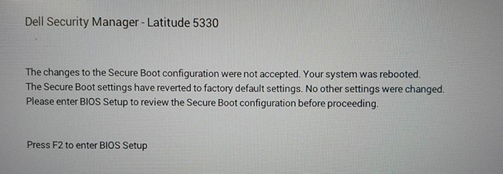
Figure.2 Dell Security Manager Reboot Prompt
Or, you can manually set "Enable Microsoft UEFI CA" to OFF in "Secure Boot" page. (See Figure.3)
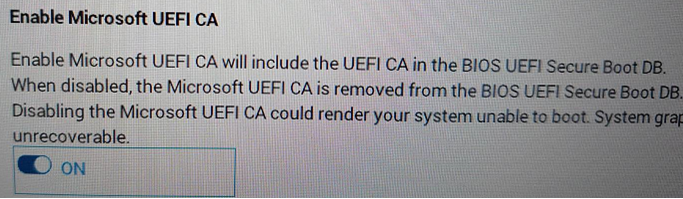
Figure.3 Enable Microsoft UEFI CA
Affected Products
Latitude 5330, Latitude 7330, Latitude 9430Article Properties
Article Number: 000199681
Article Type: Solution
Last Modified: 14 May 2026
Version: 8
Find answers to your questions from other Dell users
Support Services
Check if your device is covered by Support Services.