Dell Optimizer Audio Panel Option Missing and Audio Jack Detection Issue after Windows 10 Installation
Summary: This article discusses the audio panel option missing and audio jack detection issue in Dell Optimizer on Latitude 5320 and 5520 after Windows 10 installation with BIOS 1.17.2 to 1.19.1. ...
This article applies to
This article does not apply to
This article is not tied to any specific product.
Not all product versions are identified in this article.
Symptoms
Affected Products:
- Dell Optimizer
Affected Platforms:
- Latitude 5320
- Latitude 5520
Affected Operating Systems:
- Windows 10 21H2
Affected Versions:
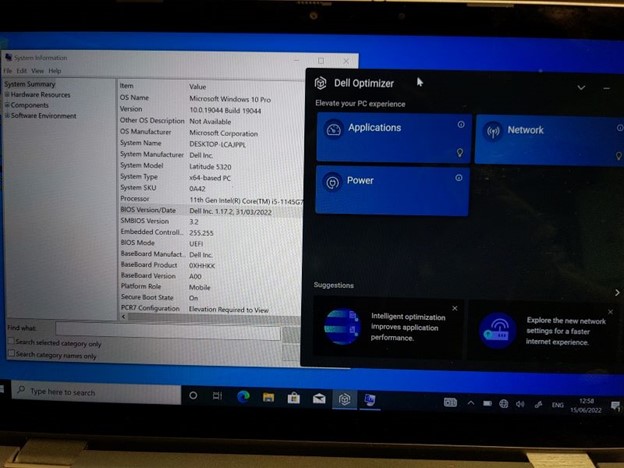
- BIOS v1.17.2 to 1.19.1
- When BIOS versions 1.17.2 to 1.19.1 are installed there appears to be an issue with detection of connected audio jack devices (headsets, headphones, speakers so on), which do not get detected at all, unless the audio device is connected on boot up (and then only until they are removed, not after replugging).
- When Dell Optimizer is installed the Audio Panel and Option pane is missing,
- No Dell Optimizer audio settings and adjustments are available, severely limiting the functionality of the Latitude 5320.
- Dell Optimizer is required for full audio functionality, including microphone input using the audio jack.
Cause
Interplay of BIOS, Audio driver, and Windows installation is the cause of the issue.
Resolution
Update to Bios version 1.20.0.
Affected Products
Dell Optimizer, Latitude 5320, Latitude 5520Article Properties
Article Number: 000200858
Article Type: Solution
Last Modified: 16 Apr 2025
Version: 11
Find answers to your questions from other Dell users
Support Services
Check if your device is covered by Support Services.