Avamar: VMware FLR-gendannelse mislykkes med fejlen "avvmwfile Error <0000>: Kunne ikke gendanne filer via netværk"
Summary: . Avamar: VMware FLR-gendannelse mislykkes med fejlen "avvmwfile Error <0000>: Kunne ikke gendanne filer via netværk"
This article applies to
This article does not apply to
This article is not tied to any specific product.
Not all product versions are identified in this article.
Symptoms
FLR-gendannelse til en VM mislykkes med følgende fejl:
Eller denne CURL-ret: 28
avvmwfile Error : Failed to restore files via network, check proxy log for details
avvmwfile Error : assist_restore error. ret: 157
På proxyen i følgende logfil:
/usr/local/avamarclient/bin/logs/VSphereWebService.logVis denne Curl-fejl: CURL Ret: 7
[VWS - DEBUG] TID=1959 MID=161118: summary.config.vmPathName = [datastore] vmname/vmname.vmx
[VWS - DEBUG] TID=140595754436519 MID=161279: HTTP PUT: Source = /usr/local/avamarclient/bin/BatchDownload.exe
[VWS - DEBUG] TID=140595754436519 MID=161280: HTTP PUT: Target = D:\Users\Administrator\BatchDownload.exe
[VWS - DEBUG] TID=140595754436519 MID=161281: HTTP PUT: Url = https://esxihostname.example.com:443/guestFile?id=2&token=52f03e19-6b09-94c6-35b8-a8a21cb401f62
[VWS - DEBUG] TID=140595754436519 MID=161282: HTTP PUT: Cert =
[VWS - DEBUG] TID=140595754436519 MID=161283: HTTP PUT: DisableSkipHost = false
[VWS - DEBUG] TID=18446744069414586280 MID=161441: CURL Ret: 7, HTTP Ret: 0
Eller denne CURL-ret: 28
[VWS - DEBUG] TID=18446744069414586280 MID=161441: CURL Ret: 28, HTTP Ret: 0
Cause
Dette er firewall-/netværksproblem. Funktionen Gendannelse på filniveau kræver, at TCP 443 åbnes mellem Avamar Proxy og destinations-VM'ens ESXi. Dette krav er dokumenteret i Avamar VMware Guide
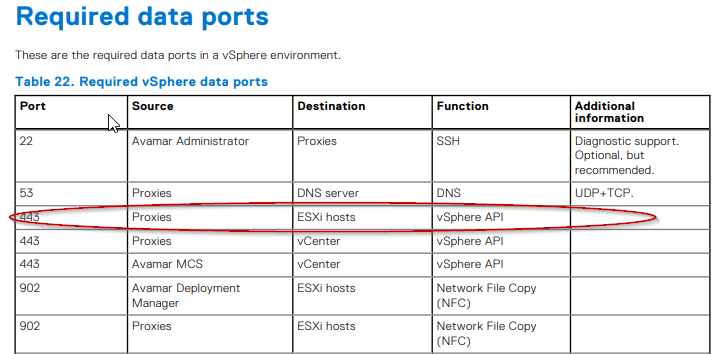
Resolution
Kundens netværksteam skal tilknyttes og kontrollere, om porten er åbnet i henhold til dokumentationen.
For at teste porten er åben, kan følgende kommando udstedes på Avamar proxy:
Eksempel på mislykket output:
Eksempel på vellykket output:
For at teste porten er åben, kan følgende kommando udstedes på Avamar proxy:
curl -kv https://esxihostname.example.com/
Eksempel på mislykket output:
198proxy:/home/admin # curl -kv https://esxihostname.example.com:443  && echo sucess || echo failed
* Rebuilt URL to: https://1.2.3.4:443/
*   Trying 1.2.3.4...
* TCP_NODELAY set
* connect to 1.2.3.4 port 443 failed: Connection refused
* Failed to connect to 1.2.3.4 port 443: Connection refused
* Closing connection 0
curl: (7) Failed to connect to 1.2.3.4 port 443: Connection refused
failed
Eksempel på vellykket output:
198proxy:/home/admin # curl -kv https://10.240.196.10:443 2>/dev/null && echo sucess || echo failedsucess
Affected Products
AvamarArticle Properties
Article Number: 000209737
Article Type: Solution
Last Modified: 26 Jun 2023
Version: 3
Find answers to your questions from other Dell users
Support Services
Check if your device is covered by Support Services.