Avamar:VMware FLRリストアが「avvmwfile Error <0000>: Failed to restore files via network」というエラーが表示されます。
Summary: .Avamar:VMware FLRリストアがエラー「avvmwfile Error」で失敗する <0000>: Failed to restore files via network」というエラーが表示されます。
This article applies to
This article does not apply to
This article is not tied to any specific product.
Not all product versions are identified in this article.
Symptoms
VMへのFLRリストアが次のエラーで失敗します。
または、このCURL Ret: 28
avvmwfile Error : Failed to restore files via network, check proxy log for details
avvmwfile Error : assist_restore error. ret: 157
次のログのプロキシで、次の手順を実行します。
/usr/local/avamarclient/bin/logs/VSphereWebService.log次のCurlエラーを表示します。CURL Ret: 7
[VWS - DEBUG] TID=1959 MID=161118: summary.config.vmPathName = [datastore] vmname/vmname.vmx
[VWS - DEBUG] TID=140595754436519 MID=161279: HTTP PUT: Source = /usr/local/avamarclient/bin/BatchDownload.exe
[VWS - DEBUG] TID=140595754436519 MID=161280: HTTP PUT: Target = D:\Users\Administrator\BatchDownload.exe
[VWS - DEBUG] TID=140595754436519 MID=161281: HTTP PUT: Url = https://esxihostname.example.com:443/guestFile?id=2&token=52f03e19-6b09-94c6-35b8-a8a21cb401f62
[VWS - DEBUG] TID=140595754436519 MID=161282: HTTP PUT: Cert =
[VWS - DEBUG] TID=140595754436519 MID=161283: HTTP PUT: DisableSkipHost = false
[VWS - DEBUG] TID=18446744069414586280 MID=161441: CURL Ret: 7, HTTP Ret: 0
または、このCURL Ret: 28
[VWS - DEBUG] TID=18446744069414586280 MID=161441: CURL Ret: 28, HTTP Ret: 0
Cause
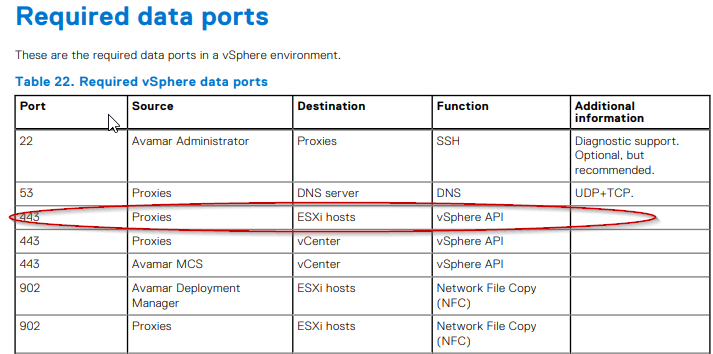
これはファイアウォール/ネットワークの問題です。 ファイル レベルのリストア機能では、AvamarプロキシとターゲットVMのESXiの間でTCP 443を開く必要があります。 この要件については、 Avamar VMwareガイド を参照してください。
Resolution
お客様のネットワーク チームが関与し、ドキュメントに従ってポートが開いているかどうかを確認する必要があります。
ポートが開いているかどうかをテストするには、次のコマンドをAvamarプロキシで発行できます。
失敗した出力の例:
成功した出力の例:
ポートが開いているかどうかをテストするには、次のコマンドをAvamarプロキシで発行できます。
curl -kv https://esxihostname.example.com/
失敗した出力の例:
198proxy:/home/admin # curl -kv https://esxihostname.example.com:443  && echo sucess || echo failed
* Rebuilt URL to: https://1.2.3.4:443/
*   Trying 1.2.3.4...
* TCP_NODELAY set
* connect to 1.2.3.4 port 443 failed: Connection refused
* Failed to connect to 1.2.3.4 port 443: Connection refused
* Closing connection 0
curl: (7) Failed to connect to 1.2.3.4 port 443: Connection refused
failed
成功した出力の例:
198proxy:/home/admin # curl -kv https://10.240.196.10:443 2>/dev/null && echo sucess || echo failedsucess
Affected Products
AvamarArticle Properties
Article Number: 000209737
Article Type: Solution
Last Modified: 26 Jun 2023
Version: 3
Find answers to your questions from other Dell users
Support Services
Check if your device is covered by Support Services.