Avamar: VMware FLR 복원이 실패하고 "avvmwfile Error <0000>: 네트워크를 통해 파일을 복원하지 못했습니다."
Summary: . Avamar: VMware FLR 복원이 실패하고 "avvmwfile Error" 오류가 표시됩니다. <0000>: 네트워크를 통해 파일을 복원하지 못했습니다."
This article applies to
This article does not apply to
This article is not tied to any specific product.
Not all product versions are identified in this article.
Symptoms
VM에 대한 FLR 복원이 실패하고 다음 오류가 발생합니다.
또는 이 CURL Ret: 28
avvmwfile Error : Failed to restore files via network, check proxy log for details
avvmwfile Error : assist_restore error. ret: 157
다음 로그의 프록시에서 다음을 수행합니다.
/usr/local/avamarclient/bin/logs/VSphereWebService.log다음 Curl 오류를 표시합니다. CURL Ret: 7
[VWS - DEBUG] TID=1959 MID=161118: summary.config.vmPathName = [datastore] vmname/vmname.vmx
[VWS - DEBUG] TID=140595754436519 MID=161279: HTTP PUT: Source = /usr/local/avamarclient/bin/BatchDownload.exe
[VWS - DEBUG] TID=140595754436519 MID=161280: HTTP PUT: Target = D:\Users\Administrator\BatchDownload.exe
[VWS - DEBUG] TID=140595754436519 MID=161281: HTTP PUT: Url = https://esxihostname.example.com:443/guestFile?id=2&token=52f03e19-6b09-94c6-35b8-a8a21cb401f62
[VWS - DEBUG] TID=140595754436519 MID=161282: HTTP PUT: Cert =
[VWS - DEBUG] TID=140595754436519 MID=161283: HTTP PUT: DisableSkipHost = false
[VWS - DEBUG] TID=18446744069414586280 MID=161441: CURL Ret: 7, HTTP Ret: 0
또는 이 CURL Ret: 28
[VWS - DEBUG] TID=18446744069414586280 MID=161441: CURL Ret: 28, HTTP Ret: 0
Cause
방화벽/네트워크 문제입니다. 파일 레벨 복원 기능을 사용하려면 Avamar 프록시와 타겟 vm의 ESXi 간에 TCP 443을 열어야 합니다. 이 요구 사항은 Avamar VMware 가이드에 문서화되어 있습니다.
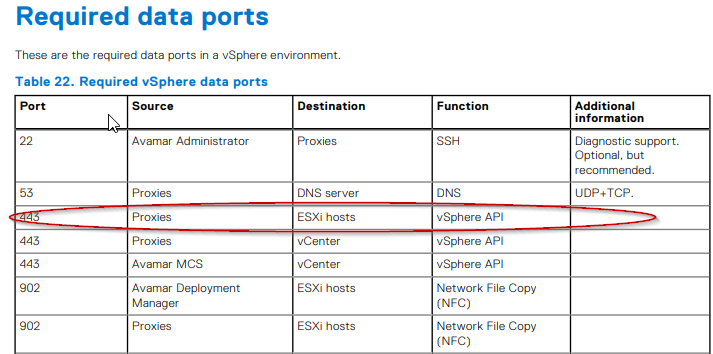
Resolution
고객의 네트워크 팀이 관여하고 설명서에 따라 포트가 열려 있는지 확인해야 합니다.
포트를 열려면 Avamar 프록시에서 다음 명령을 실행할 수 있습니다.
실패한 출력 예:
성공적인 출력 예:
포트를 열려면 Avamar 프록시에서 다음 명령을 실행할 수 있습니다.
curl -kv https://esxihostname.example.com/
실패한 출력 예:
198proxy:/home/admin # curl -kv https://esxihostname.example.com:443  && echo sucess || echo failed
* Rebuilt URL to: https://1.2.3.4:443/
*   Trying 1.2.3.4...
* TCP_NODELAY set
* connect to 1.2.3.4 port 443 failed: Connection refused
* Failed to connect to 1.2.3.4 port 443: Connection refused
* Closing connection 0
curl: (7) Failed to connect to 1.2.3.4 port 443: Connection refused
failed
성공적인 출력 예:
198proxy:/home/admin # curl -kv https://10.240.196.10:443 2>/dev/null && echo sucess || echo failedsucess
Affected Products
AvamarArticle Properties
Article Number: 000209737
Article Type: Solution
Last Modified: 26 Jun 2023
Version: 3
Find answers to your questions from other Dell users
Support Services
Check if your device is covered by Support Services.