VCF 4.x Password Management shows error "Password management operation failed in prevalidation stage"
Summary: This article explains how to perform a password management task in VCF environment when it is not possible with the error: "Password management operation failed in prevalidation stage"
This article applies to
This article does not apply to
This article is not tied to any specific product.
Not all product versions are identified in this article.
Symptoms
When trying to perform a password management task In VCF environment, on the Password Management Tab it shows an error: "Password management operation failed in prevalidation stage" as shown below: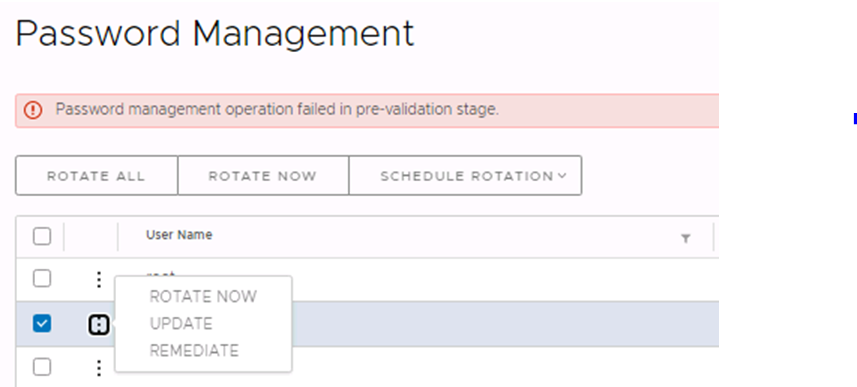
Operations manager logs are not conclusive enough but in the SDDC Manager database that it is possible to see in a hidden table a few prevalidation old tasks in failed state.
To validate the Failed Task. It is necessary to connect to SDDC Manager using SSH and then connect to database operations manager:
1. psql -h localhost -U postgres
2. Connect to operations manager database.
\c operationsmanager
3. List out the prevalidation failed tasks for password management.
select * from passwordmanager.password_operations where transaction_status='PREVALIDATION_FAILED';
Operations manager logs are not conclusive enough but in the SDDC Manager database that it is possible to see in a hidden table a few prevalidation old tasks in failed state.
To validate the Failed Task. It is necessary to connect to SDDC Manager using SSH and then connect to database operations manager:
1. psql -h localhost -U postgres
2. Connect to operations manager database.
\c operationsmanager
3. List out the prevalidation failed tasks for password management.
select * from passwordmanager.password_operations where transaction_status='PREVALIDATION_FAILED';
Cause
There is an auto rotate or password rotate prevalidation task failed listed in the database.
Resolution
In order to fix the issue, follow the below steps:
1. Take a snapshot of SDDC Manager.
2. Connect to Database operations manager:
psql -h localhost -U postgres
\c operationsmanager
3. Delete old prevalidation failed task from the database:
delete from passwordmanager.password_operations where transaction_status='PREVALIDATION_FAILED';
4. Go to the SDDC Manager Web interface and click password management tab. If any old failed task which was not cleaned in the past will be visible.
5. Click Cancel and it should be possible to perform now all password management task.
1. Take a snapshot of SDDC Manager.
2. Connect to Database operations manager:
psql -h localhost -U postgres
\c operationsmanager
3. Delete old prevalidation failed task from the database:
delete from passwordmanager.password_operations where transaction_status='PREVALIDATION_FAILED';
4. Go to the SDDC Manager Web interface and click password management tab. If any old failed task which was not cleaned in the past will be visible.
5. Click Cancel and it should be possible to perform now all password management task.
Additional Information
These solution steps should be applicable on older VCF code too.
Affected Products
Converged Infrastructure, Hyper-converged Systems, VxRail, VxRail E560F VCF, VxRail E560N VCF, VxRail G560 VCF, VxRail G560F VCF, VxRail P570 VCF, VxRail P570F VCFProducts
VMWare Cloud on Dell EMC VxRail E560F, VxRail P580N VCF, VxRail S570 VCF, VxRail V570 VCF, VxRail V570F VCFArticle Properties
Article Number: 000212122
Article Type: Solution
Last Modified: 17 May 2026
Version: 5
Find answers to your questions from other Dell users
Support Services
Check if your device is covered by Support Services.