PPDM How to register a stand alone server in an environment without a domain or DNS
Summary: PowerProtect Data Manager (PPDM) requires asset sources to be registered with the fully qualified domain name (FQDN). This article provides a workaround to register asset sources which are not part of a Domain. ...
This article applies to
This article does not apply to
This article is not tied to any specific product.
Not all product versions are identified in this article.
Instructions
PPDM requires the use of FQDN to register an asset source.
The following error is seen in the Agentsvc\logs\OpAgentSvc*.log:
You can then configure the asset source to add this "fake" domain name as DNS suffix to the hostname:

The following error is seen in the Agentsvc\logs\OpAgentSvc*.log:
[2023-06-19 10:19:32,233 GMT| 2023-06-19 11:19:32,233278 GMT Standard Time| DBGHTTPSERVER| PID-624| TID-952| ERROR] C:\Program Files\DPSAPPS\AgentService\tmp\_MEI27402\HTTPServer.pyc-startWSGIServer()-Line 5054- Unable to begin HTTP process. The problem could be due to FQDN or IP address of the PPDM. Exiting registration process with exit code 7
Steps to resolve the error :
1. Please ensure that the client and PPDM are in same domain.
2. Agentsvc does not support short-names for FQDN for registration.
 Please verify the etc/hosts file for short-names and update it with fully qualified domain names.
3. Restart the agent service and try again.
In order to bypass this scenario, you can create a "fake" domain name.
You can then configure the asset source to add this "fake" domain name as DNS suffix to the hostname:
- Uninstall the PPDM Agent software. Rename the DPSAPPS\Agentsvc\ssl folder.
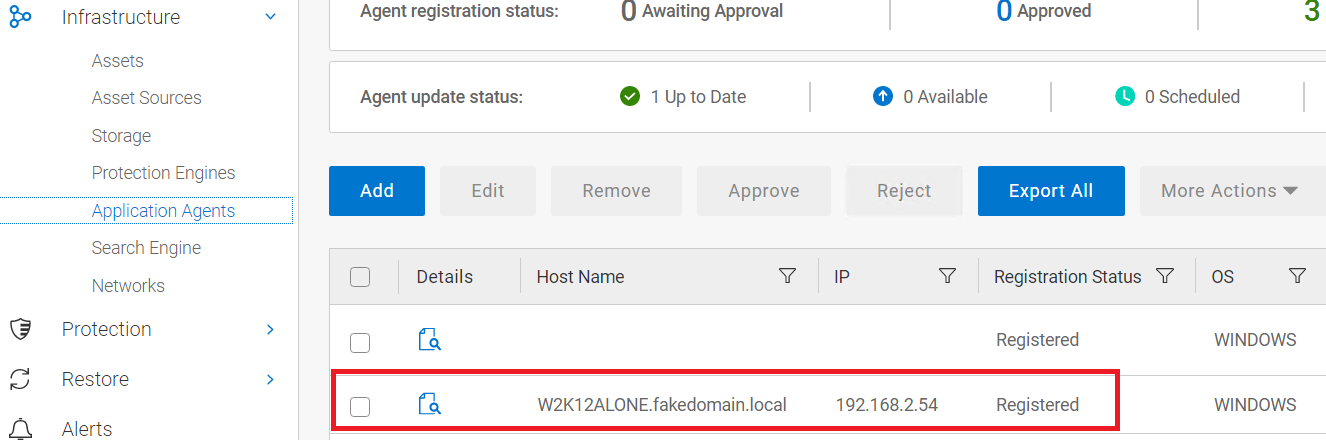
- Add an entry in the host file that points to the server IP, FQDN, and shortname. In this example, our "fake" domain is called fakedomain.local:
192.168.2.54 W2K12ALONE.fakedomain.local W2K12ALONE
- Configure the server to add our fake domain name to its own name:
- Reboot the server to make the change effective.
- Reinstall PPDM Agent and wait until registration is successful.
- Once the server is registered, remove the DNS suffix for the fake domain from the server configuration
- Perform a reboot.
Affected Products
PowerProtect SoftwareArticle Properties
Article Number: 000215108
Article Type: How To
Last Modified: 02 Oct 2023
Version: 2
Find answers to your questions from other Dell users
Support Services
Check if your device is covered by Support Services.