PPDM 如何在没有域或 DNS 的环境中注册独立服务器
Summary: PowerProtect Data Manager (PPDM) 需要使用完全限定的域名 (FQDN) 注册资产源。本文提供了注册不属于域一部分的资产源的解决方法。
This article applies to
This article does not apply to
This article is not tied to any specific product.
Not all product versions are identified in this article.
Instructions
PPDM 需要使用 FQDN 来注册资产源。
Agentvc\logs\OpAgentSvc*.log 中出现以下错误:
然后,您可以将资产源配置为将此“虚假”域名作为 DNS 后缀添加到主机名:

Agentvc\logs\OpAgentSvc*.log 中出现以下错误:
[2023-06-19 10:19:32,233 GMT| 2023-06-19 11:19:32,233278 GMT Standard Time| DBGHTTPSERVER| PID-624| TID-952| ERROR] C:\Program Files\DPSAPPS\AgentService\tmp\_MEI27402\HTTPServer.pyc-startWSGIServer()-Line 5054- Unable to begin HTTP process. The problem could be due to FQDN or IP address of the PPDM. Exiting registration process with exit code 7
Steps to resolve the error :
1. Please ensure that the client and PPDM are in same domain.
2. Agentsvc does not support short-names for FQDN for registration.
 Please verify the etc/hosts file for short-names and update it with fully qualified domain names.
3. Restart the agent service and try again.
要绕过此情景,您可以创建“虚假”域名。
然后,您可以将资产源配置为将此“虚假”域名作为 DNS 后缀添加到主机名:
- 卸载 PPDM Agent 软件。重命名 DPSAPPS\Agentsvc\ssl 文件夹。
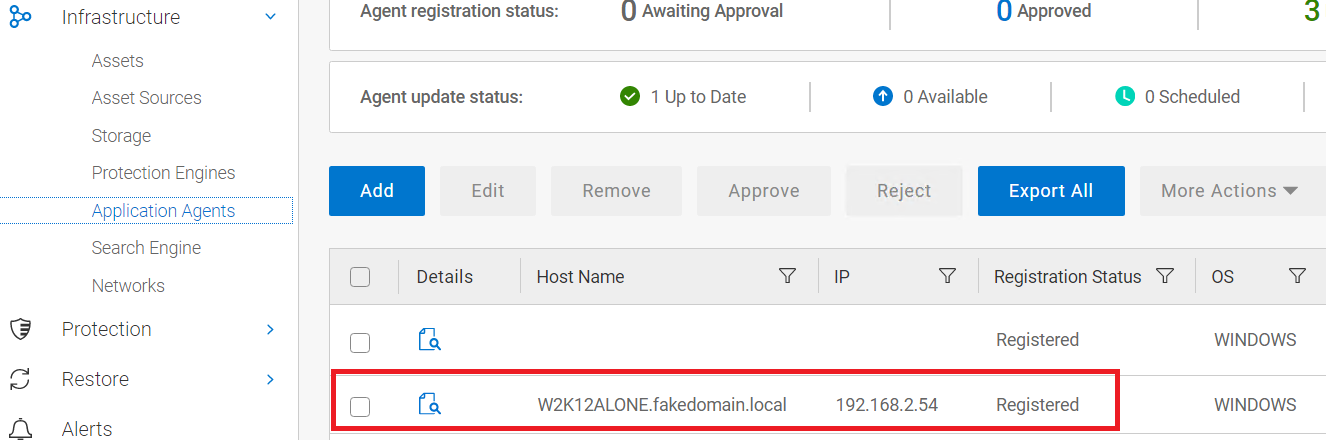
- 在主机文件中添加指向服务器 IP、FQDN 和短名称的条目。在此示例中,我们的“虚假”域称为 虚假域。local:
192.168.2.54 W2K12ALONE.fakedomain.local W2K12ALONE
- 配置服务器以将我们的虚假域名添加到自己的名称:
- 重新启动服务器以使更改生效。
- 重新安装 PPDM Agent 并等待注册成功。
- 注册服务器后,从服务器配置中删除虚假域的 DNS 后缀
- 执行重新启动。
Affected Products
PowerProtect SoftwareArticle Properties
Article Number: 000215108
Article Type: How To
Last Modified: 02 Oct 2023
Version: 2
Find answers to your questions from other Dell users
Support Services
Check if your device is covered by Support Services.