PPDM 도메인 또는 DNS가 없는 환경에서 독립 실행형 서버를 등록하는 방법
Summary: PPDM(PowerProtect Data Manager)을 사용하려면 FQDN(Fully Qualified Domain Name)에 자산 소스를 등록해야 합니다. 이 문서에서는 도메인에 속하지 않은 자산 소스를 등록하는 해결 방법을 제공합니다.
This article applies to
This article does not apply to
This article is not tied to any specific product.
Not all product versions are identified in this article.
Instructions
PPDM은 FQDN을 사용하여 자산 소스를 등록해야 합니다.
다음 오류가 Agentsvc\logs\OpAgentSvc*.log에 표시됩니다.
그런 다음 자산 소스를 구성하여 이 "페이크" 도메인 이름을 DNS 접미사로 호스트 이름에 추가할 수 있습니다.

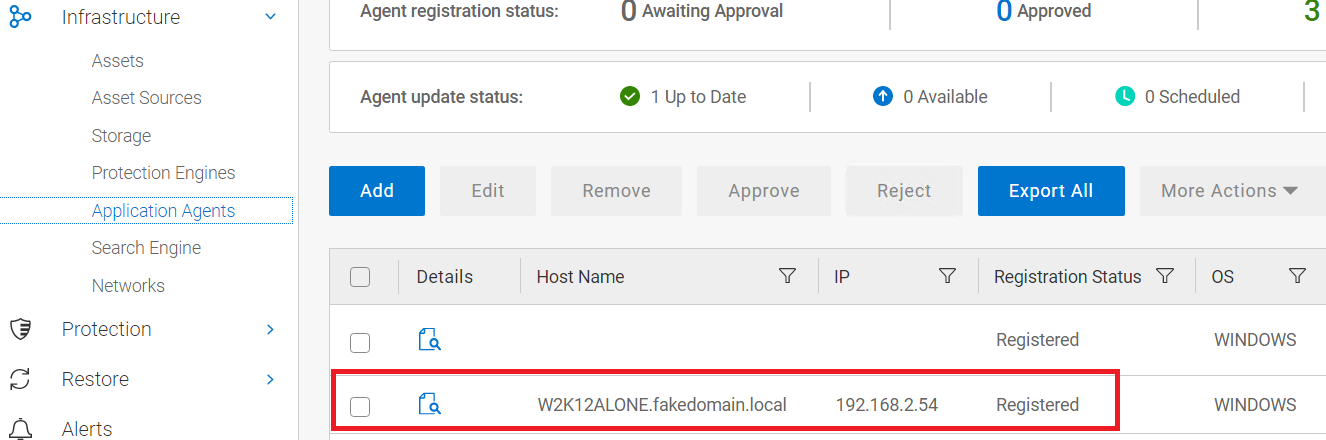
다음 오류가 Agentsvc\logs\OpAgentSvc*.log에 표시됩니다.
[2023-06-19 10:19:32,233 GMT| 2023-06-19 11:19:32,233278 GMT Standard Time| DBGHTTPSERVER| PID-624| TID-952| ERROR] C:\Program Files\DPSAPPS\AgentService\tmp\_MEI27402\HTTPServer.pyc-startWSGIServer()-Line 5054- Unable to begin HTTP process. The problem could be due to FQDN or IP address of the PPDM. Exiting registration process with exit code 7
Steps to resolve the error :
1. Please ensure that the client and PPDM are in same domain.
2. Agentsvc does not support short-names for FQDN for registration.
 Please verify the etc/hosts file for short-names and update it with fully qualified domain names.
3. Restart the agent service and try again.
이 시나리오를 건너뛰려면 "위조" 도메인 이름을 생성할 수 있습니다.
그런 다음 자산 소스를 구성하여 이 "페이크" 도메인 이름을 DNS 접미사로 호스트 이름에 추가할 수 있습니다.
- PPDM 에이전트 소프트웨어를 제거합니다. DPSAPPS\Agentsvc\ssl 폴더의 이름을 변경합니다.
- 서버 IP, FQDN 및 단축 이름을 가리키는 항목을 호스트 파일에 추가합니다. 이 예에서는 "거짓" 도메인을 fakedomain이라고 합니다.로컬:
192.168.2.54 W2K12ALONE.fakedomain.local W2K12ALONE
- 자신의 이름에 우리의 페이지 도메인 이름을 추가하도록 서버를 구성합니다.
- 서버를 재부팅하여 변경 사항을 효과적으로 만듭니다.
- PPDM 에이전트를 재설치하고 등록이 성공할 때까지 기다립니다.
- 서버가 등록되면 서버 구성에서 페이크 도메인의 DNS 접미사를 제거합니다.
- 재부팅을 수행합니다.
Affected Products
PowerProtect SoftwareArticle Properties
Article Number: 000215108
Article Type: How To
Last Modified: 02 Oct 2023
Version: 2
Find answers to your questions from other Dell users
Support Services
Check if your device is covered by Support Services.