PPDM ドメインまたはDNSのない環境でスタンドアロン サーバーを登録する方法
Summary: PowerProtect Data Manager(PPDM)では、資産ソースをFQDN(完全修飾ドメイン名)で登録する必要があります。この文書では、ドメインの一部ではない資産ソースを登録するための回避策について説明します。
This article applies to
This article does not apply to
This article is not tied to any specific product.
Not all product versions are identified in this article.
Instructions
PPDMでは、資産ソースを登録するためにFQDNを使用する必要があります。
Agentsvc\logs\OpAgentSvc*.logに次のエラーが表示されます。
その後、この「偽の」ドメイン名をDNSサフィックスとしてホスト名に追加するように資産ソースを構成できます。
Agentsvc\logs\OpAgentSvc*.logに次のエラーが表示されます。
[2023-06-19 10:19:32,233 GMT| 2023-06-19 11:19:32,233278 GMT Standard Time| DBGHTTPSERVER| PID-624| TID-952| ERROR] C:\Program Files\DPSAPPS\AgentService\tmp\_MEI27402\HTTPServer.pyc-startWSGIServer()-Line 5054- Unable to begin HTTP process. The problem could be due to FQDN or IP address of the PPDM. Exiting registration process with exit code 7
Steps to resolve the error :
1. Please ensure that the client and PPDM are in same domain.
2. Agentsvc does not support short-names for FQDN for registration.
 Please verify the etc/hosts file for short-names and update it with fully qualified domain names.
3. Restart the agent service and try again.
このシナリオを回避するために、「偽の」ドメイン名を作成できます。
その後、この「偽の」ドメイン名をDNSサフィックスとしてホスト名に追加するように資産ソースを構成できます。
- PPDMエージェント ソフトウェアをアンインストールします。DPSAPPS\Agentsvc\sslフォルダーの名前を変更します。
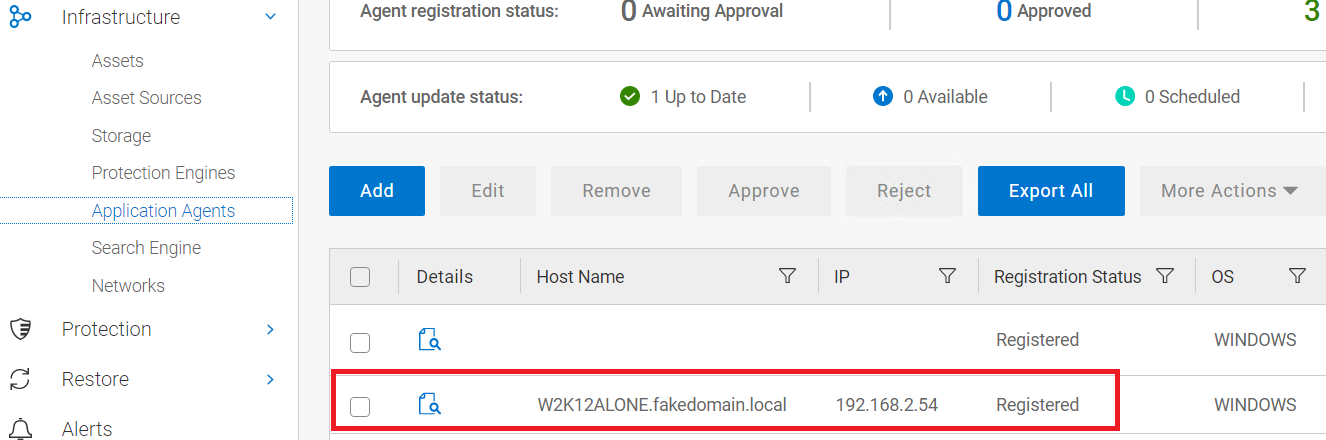
- ホスト ファイルに、サーバーIP、FQDN、短い名前をポイントするエントリーを追加します。この例では、「偽」ドメインを「 fakedomain」と呼びます。local:
192.168.2.54 W2K12ALONE.fakedomain.local W2K12ALONE
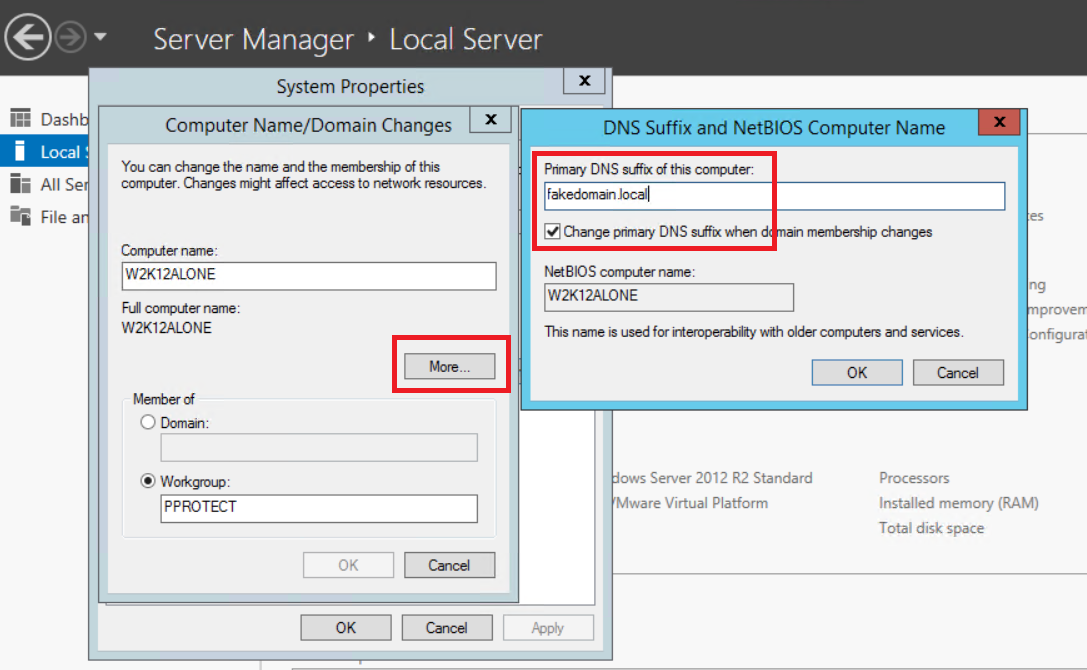
- 偽のドメイン名を自分の名前に追加するようにサーバーを設定します。
- 変更を有効にするには、サーバーを再起動します。
- PPDMエージェントを再インストールし、登録が成功するまで待ちます。
- サーバーが登録されたら、偽のドメインのDNSサフィックスをサーバー構成から削除します。
- 再起動を実行します。
Affected Products
PowerProtect SoftwareArticle Properties
Article Number: 000215108
Article Type: How To
Last Modified: 02 Oct 2023
Version: 2
Find answers to your questions from other Dell users
Support Services
Check if your device is covered by Support Services.