PPDM: come registrare un server standalone in un ambiente senza dominio o DNS
Summary: PowerProtect Data Manager (PPDM) richiede che le fonti di asset siano registrate con il nome di dominio completo (FQDN). Questo articolo fornisce una soluzione alternativa per registrare le origini asset che non fanno parte di un dominio. ...
This article applies to
This article does not apply to
This article is not tied to any specific product.
Not all product versions are identified in this article.
Instructions
PPDM richiede l'utilizzo di FQDN per registrare un'origine degli asset.
Il seguente errore viene visualizzato in Agentsvc\logs\OpAgentSvc*.log:
di dominio "fake".È quindi possibile configurare l'origine dell'asset per aggiungere questo nome di dominio "fake" come suffisso DNS al nome host:
Il seguente errore viene visualizzato in Agentsvc\logs\OpAgentSvc*.log:
[2023-06-19 10:19:32,233 GMT| 2023-06-19 11:19:32,233278 GMT Standard Time| DBGHTTPSERVER| PID-624| TID-952| ERROR] C:\Program Files\DPSAPPS\AgentService\tmp\_MEI27402\HTTPServer.pyc-startWSGIServer()-Line 5054- Unable to begin HTTP process. The problem could be due to FQDN or IP address of the PPDM. Exiting registration process with exit code 7
Steps to resolve the error :
1. Please ensure that the client and PPDM are in same domain.
2. Agentsvc does not support short-names for FQDN for registration.
 Please verify the etc/hosts file for short-names and update it with fully qualified domain names.
3. Restart the agent service and try again.
Per ignorare questo scenario, è possibile creare un nome
di dominio "fake".È quindi possibile configurare l'origine dell'asset per aggiungere questo nome di dominio "fake" come suffisso DNS al nome host:
- Disinstallare il software dell'agent PPDM. Rinominare la cartella DPSAPPS\Agentsvc\ssl .
- Aggiungere una voce nel file host che punti all'IP del server, all'FQDN e al nome breve. In questo esempio, il nostro dominio "fake" è chiamato fakedomain.in locale:
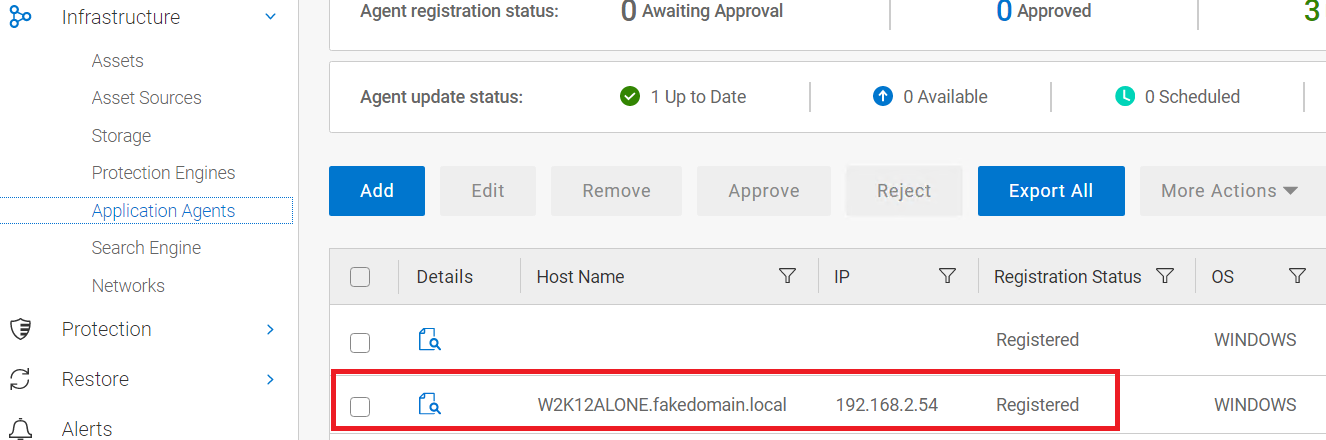
192.168.2.54 W2K12ALONE.fakedomain.local W2K12ALONE
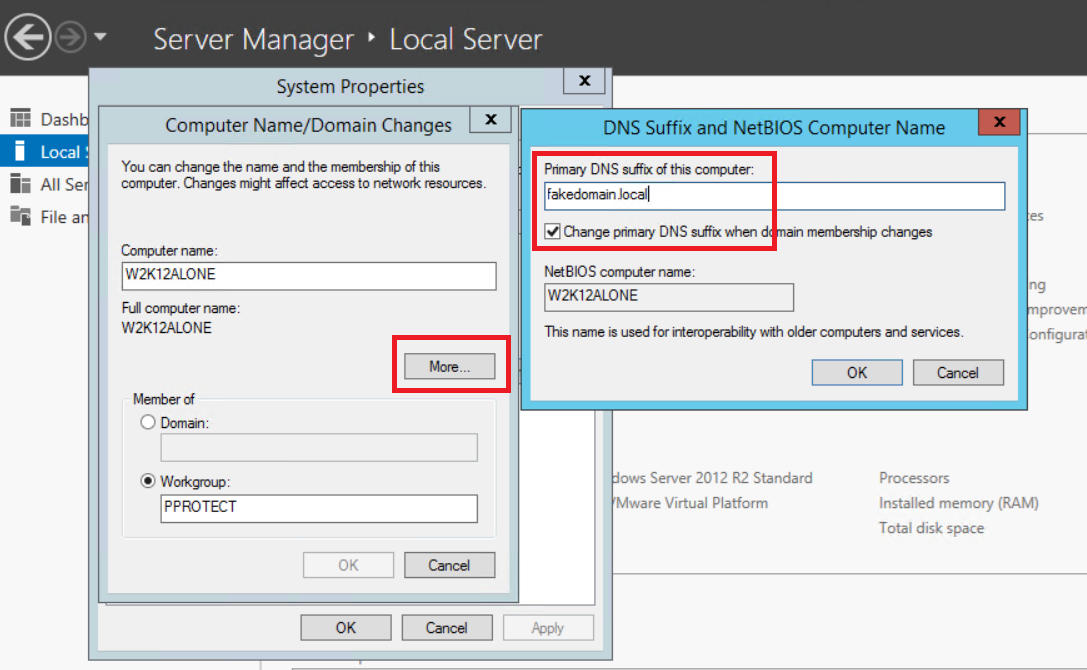
- Configurare il server per aggiungere il nostro fake nome di dominio al proprio nome:
- Riavviare il server per rendere effettiva la modifica.
- Reinstallare l'agent PPDM e attendere che la registrazione venga completata correttamente.
- Una volta registrato il server, rimuovere il suffisso DNS per il dominio fake dalla configurazione del server
- Eseguire un riavvio.
Affected Products
PowerProtect SoftwareArticle Properties
Article Number: 000215108
Article Type: How To
Last Modified: 02 Oct 2023
Version: 2
Find answers to your questions from other Dell users
Support Services
Check if your device is covered by Support Services.