Dell Headsets do not Answer Microsoft Teams Calls by Pressing the Call Control Button
Summary: The following article provides information about Dell headsets not answering Microsoft Teams calls by pressing the Call control button.
This article applies to
This article does not apply to
This article is not tied to any specific product.
Not all product versions are identified in this article.
Symptoms
Affected Products:
- Dell Pro Wireless Headset WL3024
- Dell Pro Wired Headset WH3024
- Dell Pro Plus Wireless ANC Headset WL5024
- Dell Pro Plus Wired ANC Headset WH5024
A Dell Pro Wireless Headset WL3024, Dell Pro Wired Headset WH3024, Dell Pro Plus Wireless ANC Headset WL5024, and Dell Pro Plus Wired ANC Headset WH5024 user might contact Dell Technologies because of the following behavior during Teams calls.
- Dell Pro Wireless Headset WL3024 and Dell Pro Plus Wireless ANC Headset WL5024 cannot answer incoming Teams calls from a third-party client using type-c dongle.
- Dell Pro Wireless Headset WL3024 and Dell Pro Plus Wireless ANC Headset WL5024 cannot answer incoming Microsoft Teams calls from a third-party client.
In an ongoing Teams meeting, the call control button on the Dell Pro Wired Headset WH3024 and Dell Pro Plus Wired ANC Headset WH5024, and the multimedia button on the Dell Pro Wireless Headset WL3024 and Dell Pro Plus Wireless ANC Headset WL5024 on the headset does not accept any new incoming calls.
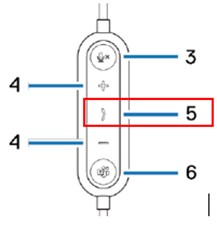
| Button | Function |
|---|---|
| 3 | Microphones mute button |
| 4 | Volume control button |
| 5 | Call control button |
| 6 | Microsoft Teams button |
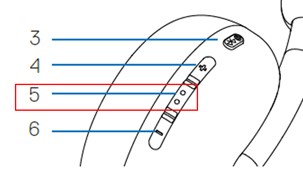
| Button | Function |
|---|---|
| 3 | Power Button (On, Off, BT Pairing) |
| 4 | Volume up |
| 5 | Multimedia |
| 6 | Volume down |
Cause
This is an expected behavior as Microsoft Teams client application does not support answering of third-party incoming calls with headset hookswitch button.
Resolution
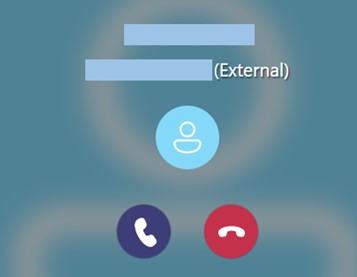
The user can accept or reject the incoming call through the Teams application user interface under such scenario.
Affected Products
Dell Pro Wired Headset WH3024, Dell Pro Plus Wired ANC Headset WH5024, Dell Pro Wireless Headset WL3024, Dell Pro Plus Wireless ANC Headset WL5024Article Properties
Article Number: 000218780
Article Type: Solution
Last Modified: 07 Nov 2025
Version: 7
Find answers to your questions from other Dell users
Support Services
Check if your device is covered by Support Services.