Windows 10 Displays Multiple Playback Devices When Connected to Dell Wireless Headset Using Bluetooth
Summary: Learn why Windows 10 displays multiple playback devices with different names.
This article applies to
This article does not apply to
This article is not tied to any specific product.
Not all product versions are identified in this article.
Symptoms
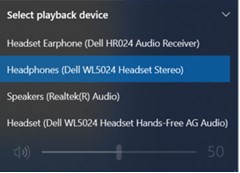
The computer runing Windows 10 may display multiple different playback devices with different names. This is noticed when connected to Dell Wireless Headset using Bluetooth.
Affected Headsets:
- Dell Pro Premium Wireless ANC Headset WL7024
- Dell Pro Plus Wireless ANC Headset WL5024
- Dell Pro Wireless Headset WL3024
Cause
This is to differentiate multiple paths of connections for the headsets.
Resolution
This is working as designed.
Headset Earphone (Dell HR024 Audio Receiver) |
If the dongle is connected, this option appears assuming that both the dongle and Bluetooth connection are used simultaneously. |
Headphones (Dell Pro Plus Wireless ANC Headset WL5024) |
This is the correct selection when connecting the headset using Bluetooth. Choose this option. See the Service Manual of the headset (Connecting the headset > Bluetooth connection) |
Headset (Dell WL5024 Headset Hands-Free AG Audio) |
This is a Bluetooth mono channel device that is primarily used for voice call. Not to be selected as playback device in the playback device list. |
Affected Products
Dell Pro Wireless Headset WL3024, Dell Pro Plus Wireless ANC Headset WL5024, Dell Pro Premium Wireless ANC Headset WL7024Article Properties
Article Number: 000227603
Article Type: Solution
Last Modified: 25 Nov 2025
Version: 6
Find answers to your questions from other Dell users
Support Services
Check if your device is covered by Support Services.