Charge Led Rapidly Flashes Amber and Green When Using Non-Dell Battery
Summary: The battery does not charge, and the LED flashes repeatedly amber and green. This occurs on the Dell Pro Rugged 13 RA13250, Dell Pro Rugged 14 RB14250, Latitude 5430, and Latitude 5430 Rugged. ...
This article applies to
This article does not apply to
This article is not tied to any specific product.
Not all product versions are identified in this article.
Symptoms
There are two errors that can occur when using a non-Dell battery.
- A warning message is triggered, and the battery does not charge when a non-Dell battery is used.
- If the battery is changed to the non-Dell battery without shutting down or rebooting, the LED rapidly flashes through Amber, Green, Amber, Green.
Non-Dell battery error messages:
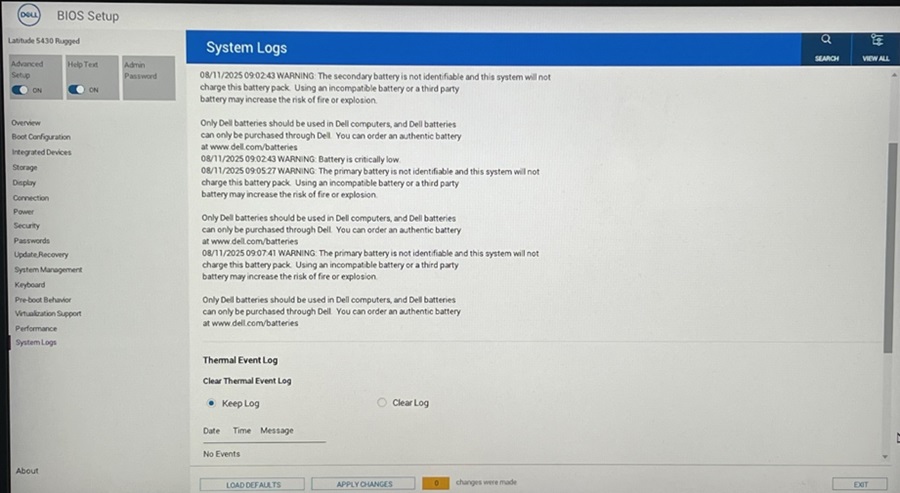
- "WARNING: The primary battery is not identifiable and this system will not charge this battery pack. Using an incompatible battery or a third party battery may increase the risk of fire or explosion. Only Dell batteries should be used in Dell computers, and Dell batteries can only be purchased through Dell. You can order an authentic battery at www.dell.com/batteries"
- "WARNING: The secondary battery is not identifiable and this system will not charge this battery pack. Using an incompatible battery or a third party battery may increase the risk of fire or explosion. Only Dell batteries should be used in Dell computers, and Dell batteries can only be purchased through Dell. You can order an authentic battery at www.dell.com/batteries"
- System Logs will record waring messages as shown below.
Affected Platforms:
- Dell Pro Rugged 13 RA13250
- Dell Pro Rugged 14 RB14250
- Latitude 5430
- Latitude 5430 Rugged
Cause
The Embedded Controller (EC) cannot charge the non-Dell battery as BIOS behavioral spec.
Resolution
The original Dell battery should be used to resolve the error.
Affected Products
Dell Pro Rugged 13 RA13250, Dell Pro Rugged 14 RB14250, Latitude 5430 Rugged, Latitude 5430Article Properties
Article Number: 000362464
Article Type: Solution
Last Modified: 08 Sep 2025
Version: 1
Find answers to your questions from other Dell users
Support Services
Check if your device is covered by Support Services.