Dell Encryption scales improperly with UI resolution
概要: Dell Encryption (formerly Dell Data Protection | Encryption) scales improperly on 4k displays when scaling is set to 250% in Windows 10.
この記事は次に適用されます:
この記事は次には適用されません:
この記事は、特定の製品に関連付けられていません。
すべての製品パージョンがこの記事に記載されているわけではありません。
現象
Note:
- As of May 2022, Dell Endpoint Security Suite Enterprise has reached End of Maintenance. For more information, reference Product Life Cycle (End of Support / End of Life) Policy for Dell Data Security
- As of January 2019, Dell Endpoint Security Suite Pro has reached End of Service. For more information, reference Product Life Cycle (End of Support / End of Life) Policy for Dell Data Security
- As of February 2018, Dell Data Protection | Security Tools has reached End of Service. For more information, reference Product Life Cycle (End of Support / End of Life) Policy for Dell Data Security
- Reference Endpoint Security for additional information about current products.
Affected Products:
- Dell Encryption Enterprise
- Dell Encryption Personal
- Dell Endpoint Security Suite Enterprise
- Dell Data Protection | Enterprise Edition
- Dell Data Protection | Personal Edition
- Dell Endpoint Security Suite Pro
- Dell Data Protection | Security Tools
Affected Versions:
- v8.10 and 8.17
Affected Operating Systems:
- Windows 10 (RTM, 1511, 1607, 1703)
原因
Not Applicable
解決方法
Note: This issue has been resolved in v8.18.
On certain devices that are shipped with UHD (4k) screens, and the UI scaling within Windows 10 is set to 250%, the UI may display improperly and be difficult to navigate within the Dell Data Security Console application.
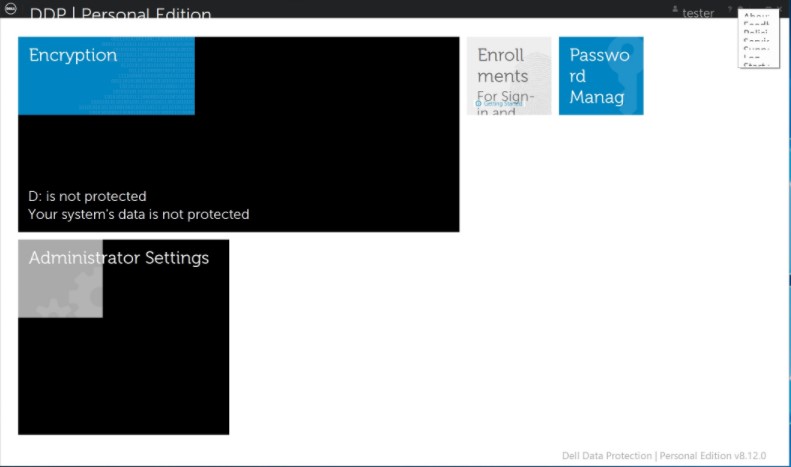
This can be temporarily resolved by running the Dell Data Security Console application in Compatibility Mode for Windows 8.
To enable compatibility mode:
- Right-click the icon and select Properties.

- Select the Compatibility Tab.

- Check that the box for Compatibility mode is labeled Run this program in compatibility mode for: And leave the setting on Windows 8.

- Click Apply and then OK to enforce the changes.
To contact support, reference Dell Data Security International Support Phone Numbers.
Go to TechDirect to generate a technical support request online.
For additional insights and resources, join the Dell Security Community Forum.
対象製品
Dell Encryption, Dell Endpoint Security Suite Pro, Dell Endpoint Security Suite Enterprise文書のプロパティ
文書番号: 000124977
文書の種類: Solution
最終更新: 18 6月 2024
バージョン: 12
質問に対する他のDellユーザーからの回答を見つける
サポート サービス
お使いのデバイスがサポート サービスの対象かどうかを確認してください。