$101.99
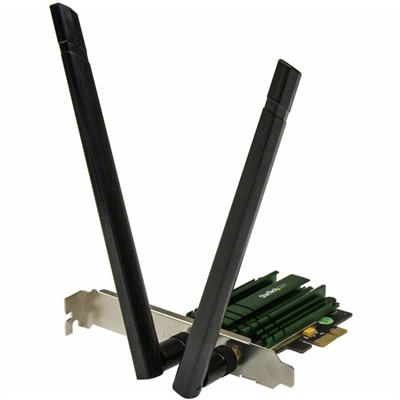
A dual-band PCIe Wi-Fi adapter delivering AC1200 speeds with detachable 2T2R antennas and 802.11a/b/g/n compatibility.
Enhance your laptop's connectivity with our selection of laptop wireless cards, designed to keep you connected wherever you go. Whether you're upgrading an existing device or building a custom setup, these wireless cards provide the seamless internet experience you need for work, gaming, or streaming. Explore options that cater to various needs and budgets, ensuring you find the perfect fit for your lifestyle. With cutting-edge technology and reliable performance, our range of laptop wireless cards offers the ideal solution for maintaining a strong and stable connection in any environment.
A dual-band PCIe Wi-Fi adapter delivering AC1200 speeds with detachable 2T2R antennas and 802.11a/b/g/n compatibility.
Laptop wireless cards provide a practical way to restore, improve, or add wireless connectivity to a laptop. They may be useful when an internal adapter has stopped working, when a replacement laptop card supports newer wireless standards, or when a built-in connection struggles to keep pace with a modern home setup. Internal modules commonly use an M.2 or NGFF form factor and fit into a dedicated slot inside compatible laptops. External USB wireless adapters offer a simpler plug-in alternative for people who prefer not to open the laptop chassis, need a temporary replacement, or want to move an adapter between compatible computers. Both types can support everyday activities such as browsing, video calls, cloud applications, music streaming, online learning, and multiplayer gaming, though performance depends on more than the card alone. The laptop, operating system, antenna arrangement, router, distance from the access point, wall construction, and nearby wireless traffic all influence the connection. A newer card can help a capable computer take better advantage of a newer wireless environment, but it cannot make an older laptop or router perform beyond its supported capabilities. For a compact desk setup, a wireless card can also pair well with accessories such as Wireless Laptop Mice, helping keep the workspace clear of extra cables.
Compatibility is the most important consideration when choosing a laptop wireless card. Before purchasing an internal module, check the exact laptop model and review the service documentation to confirm the supported card size, interface, keying, and antenna connectors. Many modern internal adapters use an M.2 2230-style format, but a similar-looking module may not fit every system, and some laptops restrict which wireless cards can be installed. The existing adapter can often be identified through Windows Device Manager or, on compatible Apple computers, System Information or System Report. Checking the current card provides useful details about its interface, supported standards, and driver requirements. It is also worth confirming whether the laptop has two antenna leads, whether the leads use the connector type required by the replacement, and whether the system has an available slot. A card that supports Wi-Fi 6, Wi-Fi 6E, or Wi-Fi 7 may offer improved efficiency, lower latency, and better performance in a compatible environment, while access to the 6 GHz band depends on the laptop, operating system, regional rules, and router support. Wi-Fi 7 capabilities may also require a sufficiently modern platform and updated software. Advertised maximum speeds are laboratory figures rather than guaranteed file-transfer rates; real-world results are shaped by signal strength, channel width, interference, internet service, and the capabilities of the connected equipment. Bluetooth support is included with many laptop wireless cards, but it should be verified if the laptop will connect to keyboards, headphones, controllers, or other nearby accessories.
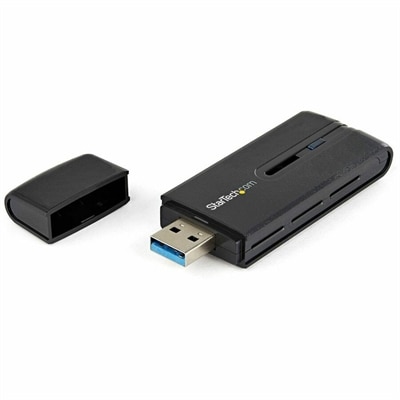
External USB wireless adapters are often the most convenient choice for a straightforward upgrade. They generally connect through a standard USB port and can be installed without removing the laptop’s bottom cover, making them useful for a family computer, a work laptop that needs a quick replacement, or a device whose internal card is difficult to access. Their compact size makes them easy to carry between a home office, classroom, library, or shared workspace, while an adapter with a larger housing or adjustable antenna may provide more flexibility when the laptop is positioned behind a monitor or on a crowded desk. Confirm the required USB type, operating system support, driver availability, and physical clearance around neighboring ports before choosing one. Internal cards can create a cleaner, integrated setup and may be preferable for users who travel frequently, while USB options are appealing when installation simplicity matters most. Whichever format fits the laptop, keep drivers and operating-system updates current, place the computer where its wireless antennas have a clear path, and test performance from the location where the laptop will actually be used. A student moving between rooms, a remote worker joining long video meetings, a household replacing an aging laptop adapter, or a family member receiving a practical technology gift can all benefit from the right wireless card. During the cooler months, when more time may be spent indoors working, studying, streaming, or gaming, a dependable connection can make a laptop feel more responsive and less restrictive. Taking a few minutes to match the card with the laptop, router, operating system, and intended use helps create a more reliable upgrade and avoids the frustration of installing hardware that the computer cannot recognize.
Add the products you would like to compare, and quickly determine which is best for your needs.