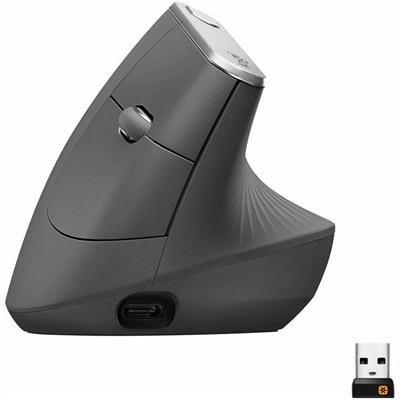
Wireless Laptop Mice
Discover the convenience and freedom that wireless laptop mice bring to your computing experience. Say goodbye to tangled cords and limited mobility, and embrace the seamless functionality of these essential peripherals. Whether you're working from home, traveling for business, or simply need a reliable companion for your laptop, wireless laptop mice offer the perfect blend of portability and performance. With a variety of designs and features to suit every preference, find the ideal wireless mouse to enhance your productivity and comfort.
This product is not available
Check out the following recommendations.




Wireless Laptop Mice
Wireless laptop mice offer a simple way to make a portable computer feel more comfortable and precise, whether you are working at a kitchen table, studying in a quiet library, traveling between meetings, or relaxing with a laptop at home. Compared with a built-in trackpad, a mouse can provide more natural pointer control for selecting text, arranging windows, editing photos, navigating spreadsheets, and browsing through detailed pages. Wireless designs also help keep a workspace clear of cable clutter, which is especially useful when your desk doubles as a dining table or when every inch of space in a laptop bag matters. When comparing wireless laptop mice, start with the way you expect to use one. A slim, lightweight shape is easy to slip into a sleeve beside a laptop and works well for commuting or occasional use away from home. A fuller, contoured shape can offer more support for the palm and thumb during long work sessions, making it a practical choice for remote employees, students, creators, and anyone who spends hours moving between documents and applications. Consider the size of your hand and the grip you naturally use, since a mouse should feel controlled without requiring your fingers to stretch or your wrist to bend at an awkward angle. Color can also help coordinate a personal setup; for a streamlined workspace, browse Black Wireless Mice alongside other options in this category.
Connection type is one of the most important choices when selecting a wireless mouse for a laptop. Bluetooth models connect directly to a compatible computer, which can preserve valuable USB ports for charging accessories, external drives, or other peripherals. They are particularly convenient with thin laptops that have a limited number of ports, and once pairing is complete, reconnecting is usually quick and straightforward. USB receiver models use a small wireless adapter that plugs into a USB port and can provide a familiar plug-and-play setup. They are useful for people who prefer not to manage Bluetooth settings or who move the same mouse between compatible computers. Before choosing, check the laptop’s available ports and confirm whether it supports the required connection; an adapter may be needed if the computer only has a different port style. Battery life is another practical consideration. Some mice use replaceable batteries that can last for months, while rechargeable models can be topped up with a cable between work sessions. An indicator for low power, an accessible charging port, or an efficient automatic sleep function can help prevent interruptions. It is also worth checking the operating range and tracking performance, particularly if you plan to use the mouse from a distance or on surfaces such as a couch cushion, polished table, or compact travel tray. Optical or laser tracking generally works well on many everyday surfaces, but a mouse pad can provide smoother movement and more reliable precision when a desk has a glossy, textured, or uneven finish.
The right feature set depends on the tasks that fill your day. A basic three-button layout is often enough for web browsing, email, school assignments, and routine office work, while programmable buttons can reduce repetitive steps in design software, spreadsheets, presentations, or creative applications. A clickable scroll wheel makes it easier to move through long pages, and some designs include horizontal scrolling for wide documents and timelines. Adjustable sensitivity can help when you need careful control for image editing or quick movement across a large display, while quiet-click switches may be appreciated in shared workspaces, classrooms, libraries, and rooms where others are resting. Multi-device pairing is helpful for someone who moves between a personal laptop and a work computer, allowing one mouse to serve more than one setup without repeatedly switching accessories. Ergonomic details, including a shaped thumb rest, textured side panels, smooth wheel action, and balanced weight, can make a noticeable difference during extended use. Wireless laptop mice can also be thoughtful gifts for students setting up a study area, travelers building a compact mobile office, remote workers refreshing a home workspace, or family members who find a trackpad less comfortable for everyday computing. During the cooler months, when more work and entertainment may happen indoors, a dependable mouse can make a laptop station feel more inviting, from a small desk near a window to a comfortable chair with a lap tray. Keep the recipient’s laptop compatibility, preferred connection, hand size, travel habits, and typical software in mind, and look for a design that feels dependable without adding unnecessary bulk.
FAQs:
A wireless mouse for laptop use offers greater flexibility and freedom of movement, eliminating cable clutter and making it easy to work comfortably from various locations. It’s especially beneficial for those who travel or switch between home and office setups, as it is portable and easy to pair with different devices.
Most wireless laptop mice connect via Bluetooth or a USB receiver. Simply insert the USB dongle into your laptop’s port or enable Bluetooth on your device, then follow the pairing instructions provided with your mouse. Once paired, the mouse should work seamlessly without the need for additional software.
A Dell laptop wireless mouse is ideal for students, professionals, and anyone who values a tidy workspace and easy portability. It’s also a great option for creative users, such as graphic designers or video editors, who need precise control in their daily tasks.
Many modern wireless mice offer multi-device connectivity, allowing you to pair and switch between several laptops or tablets. This feature is particularly useful for users who work across different systems or need to control multiple devices from a single mouse.
Yes, wireless laptop mice are available in a wide range of styles and colors to match your personal preferences and workspace aesthetics. For those interested in a classic look, you can explore options like the Black Wireless Mice collection.