Data Protection Advisor: Error 500 When Previewing a Custom Report
Summary: Data Protection Advisor displays an error 500 occurs when previewing a custom report, although the report runs correctly when scheduled.
This article applies to
This article does not apply to
This article is not tied to any specific product.
Not all product versions are identified in this article.
Symptoms
When a custom report is previewed in Data Protection Advisor (DPA), the following error 500 is displayed:
RendererFactory could not create the RendererParametersXML
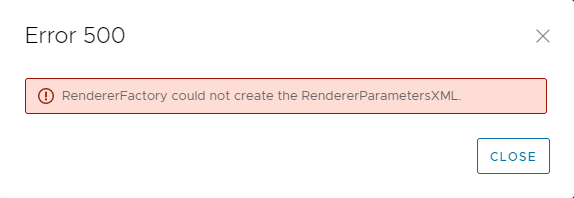
The report runs correctly when scheduled.
This issue occurs only when previewing the report under Custom Report Templates.
The following messages are recorded in the DPA server.log on the Application server:
2022-11-07 15:00:07,170 ERROR [com.emc.dpa.command.reporter.execution.ReportRendererMDB] (Thread-56839) Error getting response from report engine for run id 7d326f70-0ac2-4d48-9b3d-300c306b86ad: com.emc.dpa.
datamodel.render.RendererServiceException: RendererFactory could not create the RendererParametersXML
...
Caused by: com.ctc.wstx.exc.WstxUnexpectedCharException: Unexpected character ' ' (code 32) (missing name?)
at [row,col {unknown-source}]: [3,69]
Cause
This issue occurs when the report title contains the "&" special character.
Note: This is not the name of the custom report template. This is the title of the report, which is configured in the Report Format options.
Resolution
The "&" symbol must be removed from the report title.
- Select the report in Custom Report Templates and click EDIT.
- Click the Preview tab and then click the REPORT FORMAT > TABLE FORMAT.
- In the Table Format screen, remove the "&" symbol from the text in the Title field.
- Save the report and confirm that the preview runs without errors.
Contact Dell Technical Support for further information.
Affected Products
Data Protection AdvisorArticle Properties
Article Number: 000205086
Article Type: Solution
Last Modified: 15 سبتمبر 2026
Version: 6
Find answers to your questions from other Dell users
Support Services
Check if your device is covered by Support Services.