Audio From an External Monitor is Lost if You Leave the Camera
Summary: Information about the audio device being lost on an external monitor when you leave the camera while using the Human Presence Detection (HPD) function.
This article applies to
This article does not apply to
This article is not tied to any specific product.
Not all product versions are identified in this article.
Symptoms
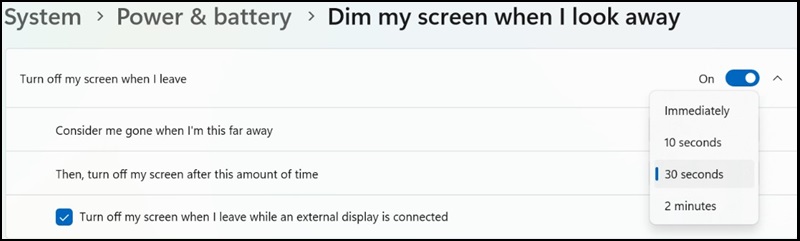
When the HPD function is enabled, an external monitor's screen will turn off after 30 seconds of inactivity, removing the audio device from the system.
Affected Systems:
- Dell 14 Premium DA14250
Cause
The system turns the HD audio power off when the screen is off.
Resolution
Human Presence Detection
You can use the following two options to prevent this issue.
- Method 1: Change the HPD time from the default 30 seconds to 2 minutes.
- Method 2: Clear the "Turn off my screen when I leave while an external display is connected" option.
Affected Products
Dell 14 Premium DA14250Article Properties
Article Number: 000333931
Article Type: Solution
Last Modified: 15 Sept 2025
Version: 2
Find answers to your questions from other Dell users
Support Services
Check if your device is covered by Support Services.