PowerScale OneFS: Mount request from <Client IP> for <Path> failed
Summary: Addressing recurring "Mount request from" alerts.
This article applies to
This article does not apply to
This article is not tied to any specific product.
Not all product versions are identified in this article.
Symptoms
Any overly recurring alert can cause a load on CELOG, which then causes any number of alert/event-related issues.
One of the biggest offenders is the following alert:
One of the biggest offenders is the following alert:
Recurring: Mount request from <Client IP Address> on <Node IP Address> for <Share> failed with errno: <2 or 13>
By properly addressing this alert, we can reduce the load on CELOG and improve alert/event operation and reporting.
Cause
A client triggers these alerts by attempting to access a share that either does not exist as an export or they do not have permission to access.
Security scanners, InsightIQ, or Windows clients that may have Services for Network File System (NFS) enabled commonly trigger these alerts.
Resolution
To properly address these alerts, we must determine who is accessing the stated Share from the offending Client IP Address:
# isi event events list | grep "Mount.*fail" | awk '{print $10}' | sort | uniq -c | sort -rn

 110 xxx.xxx.xxx.57
  63 xxx.xxx.xxx.63
  61 xxx.xxx.xxx.54
  39 xxx.xxx.xxx.55
  37 xxx.xxx.xxx.250
  37 xxx.xxx.xxx.240
  24 xxx.xxx.xxx.61
  23 xxx.xxx.xxx.65
  22 xxx.xxx.xxx.44
  20 xxx.xxx.xxx.45
  19 xxx.xxx.xxx.56
  16 xxx.xxx.xxx.62
And the failure they are experiencing:
# isi event events list | grep "Mount.*fail" |awk '{print $NF}' | sort | uniq -c|sort -rn

 876 STATUS_NOT_FOUND
  63 STATUS_ACCESS_DENIED
With the above information, you can determine who is trying to access the exports and why it is failing thus generating an event.
If addressing the offending clients is not possible, the alerts can be suppressed starting in OneFS 9.3 and above.
In the WebUI, this can be done under Events and Alerts -> Alert Management -> Search for mount in Event Type ID.
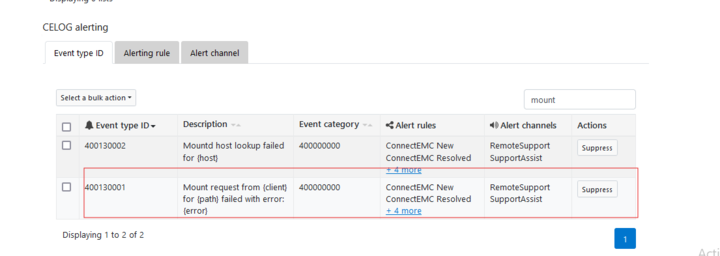
From the CLI the following command could be used:
# isi event suppress modify --suppress=true --id=400130001
Event ID can be seen in the following document on page 54.
Affected Products
PowerScale OneFSProducts
PowerScale OneFSArticle Properties
Article Number: 000040449
Article Type: Solution
Last Modified: 17 Oct 2025
Version: 6
Find answers to your questions from other Dell users
Support Services
Check if your device is covered by Support Services.