Dell EncryptionがUIの解決によって不適切に拡張される
Summary: Dell Encryption(旧Dell Data Protection |Encryption)は、Windows 10でスケーリングが250%に設定されている場合、4Kディスプレイでは正しくスケーリングされません。
This article applies to
This article does not apply to
This article is not tied to any specific product.
Not all product versions are identified in this article.
Symptoms
注:
- 2022年5月をもって、Dell Endpoint Security Suite Enterpriseはメンテナンス終了となりました。詳細については、「Dell Data Securityに関する製品ライフサイクル(サポート終了/ライフサイクル終了)」を参照してください
- 2019年1月をもって、Dell Endpoint Security Suite Proはサービス終了となりました。詳細については、「Dell Data Securityに関する製品ライフサイクル(サポート終了/ライフサイクル終了)」を参照してください
- 2018年2月以降、Dell Data Protection |セキュリティ ツールがサービス終了に達しました。詳細については、「Dell Data Securityに関する製品ライフサイクル(サポート終了/ライフサイクル終了)」を参照してください
- 現在の製品に関する追加情報については、エンドポイント セキュリティページを参照してください。
対象製品:
- Dell Encryption Enterprise
- Dell Encryption Personal
- Dell Endpoint Security Suite Enterprise
- Dell Data Protection | Enterprise Edition
- Dell Data Protection | Personal Edition
- Dell Endpoint Security Suite Pro
- Dell Data Protection | Security Tools
影響を受けるバージョン:
- v8.10および8.17
対象オペレーティング システム:
- Windows 10(RTM、1511、1607、1703)
Cause
-
Resolution
注:この問題は、v8.18で解決されました。
UHD(4k)画面が標準装備されている特定のデバイスで、Windows 10内のUIの表示スケールが250%に設定されていると、UIが正しく表示されないことがあり、Dell Data Security Consoleアプリケーション内でのナビゲートが困難な場合があります。
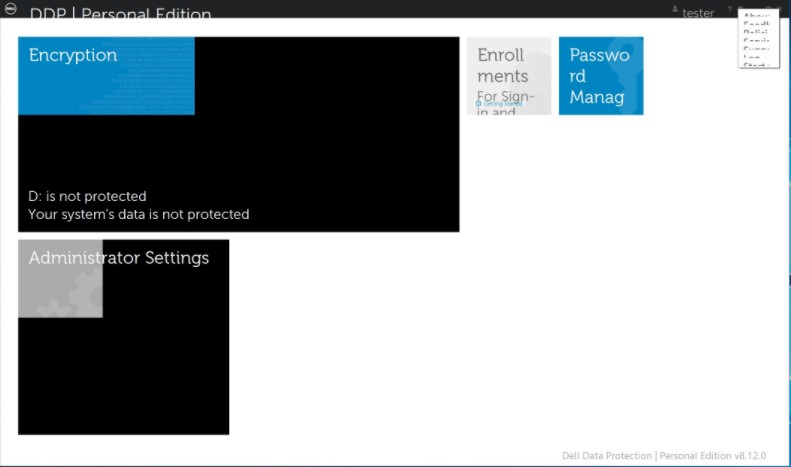
これは、Windows 8の 互換モードで Dell Data Security Consoleアプリケーションを実行することで一時的に解決できます。
互換モードを有効にするには、次の手順を実行します。
- アイコンを右クリックし、[ プロパティ]を選択します。
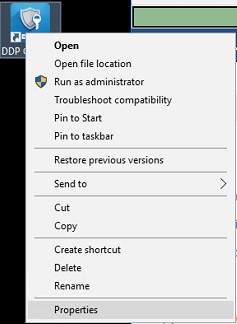
- [互換性]タブを選択します。
![[Compatibility]タブ](https://supportkb.dell.com/img/ka06P00000093scQAA/ka06P00000093scQAA_ja_3.jpeg)
- 互換モードのボックスに「 互換モードでこのプログラムを実行する:」というラベルが付いていることを確認します。設定は[Windows 8]のままにします。
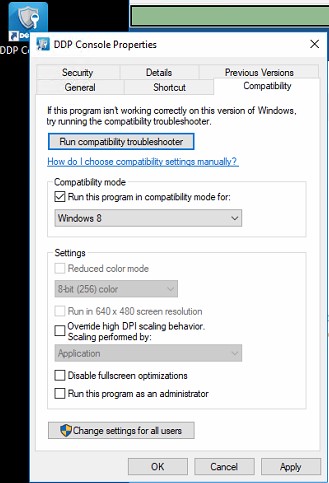
- [Apply]、[OK]の順にクリックして、変更を適用します。
サポートに問い合わせるには、「Dell Data Securityのインターナショナル サポート電話番号」を参照してください。
TechDirectにアクセスして、テクニカル サポート リクエストをオンラインで生成します。
さらに詳しい情報やリソースについては、「デル セキュリティ コミュニティー フォーラム」に参加してください。
Additional Information
Videos
Affected Products
Dell Encryption, Dell Endpoint Security Suite Pro, Dell Endpoint Security Suite EnterpriseArticle Properties
Article Number: 000124977
Article Type: Solution
Last Modified: 18 Jun 2024
Version: 12
Find answers to your questions from other Dell users
Support Services
Check if your device is covered by Support Services.