DPA: unexpected EOF Error when running NetWorker Job Monitor request
Summary: This article addresses the error "unexpected EOF from worker process while running request networker: jobmonitor on NetWorkerHostname" encountered during NetWorker job monitor data collection in Dell Data Protection Advisor (DPA), and provides steps to resolve it. ...
This article applies to
This article does not apply to
This article is not tied to any specific product.
Not all product versions are identified in this article.
Symptoms
NetWorker job monitor data collection in DPA fails with the following error:
-
unexpected EOF from worker process while running request networker: jobmonitor on NetWorkerHostname
Cause
A timeout during data transmission causes the error. This occurs when the volume of data being collected increases beyond what was previously handled, and the default timeout is insufficient to complete the operation.
Resolution
Increase the command timeout for the NetWorker Job Monitor in DPA:
- Log in to DPA.
- Navigate to Inventory > Object Library.

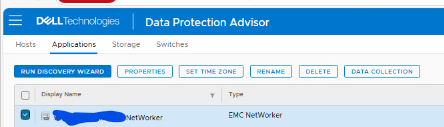
- Select the Applications tab.
- Locate and select the affected NetWorker server.
- Click DATA COLLECTION.
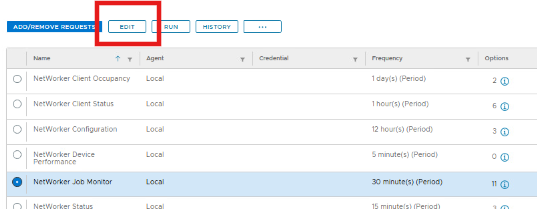
- Select NetWorker Job Monitor, then click EDIT.
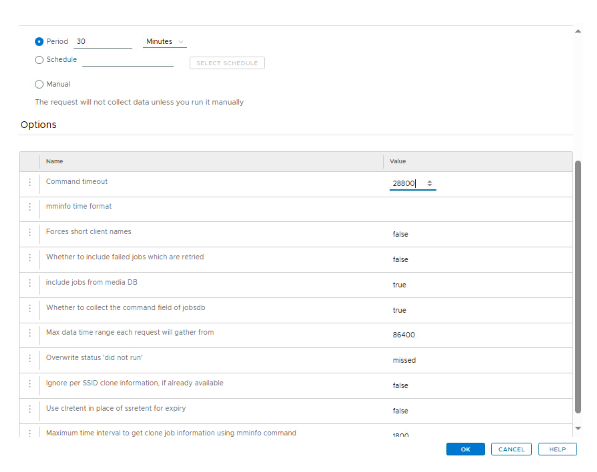
- Under Options, increase the Command Timeout value to
28800seconds. - Click OK twice to save and exit.
Next Steps:
- Wait approximately one hour for the next scheduled collection, or
- Manually run the NetWorker Job Monitor job from the properties window.
If the issue persists after increasing the timeout and rerunning the job, contact Dell Support and raise a Service Request (SR).
Article Properties
Article Number: 000384795
Article Type: Solution
Last Modified: 31 Oct 2025
Version: 1
Find answers to your questions from other Dell users
Support Services
Check if your device is covered by Support Services.