PowerVault ME5:無法使用指定的存取金鑰和 PIN 驗證與 SupportAssist 的連線
Summary: 嘗試將存取金鑰和 PIN 套用至 SupportAssist 時,輸入不正確的值。 輸入正確的值,或檢查 PowerVault ME5 的產品服務編號,使用此產品服務編號產生存取金鑰和 PIN。
This article applies to
This article does not apply to
This article is not tied to any specific product.
Not all product versions are identified in this article.
Instructions
在 PowerVault Manager 中套用存取金鑰和 PIN 啟用 SupportAssist 時,系統管理員可能會收到下列對話方塊訊息: 失敗。無法使用指定的存取金鑰驗證與 SupportAssist 的連線,而 PIN 命令失敗。- 後端伺服器上的授權失敗
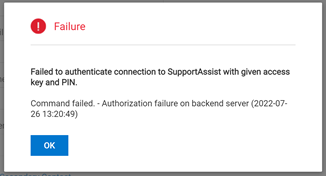
此問題可能因下列其中一個原因而發生:
- 輸入的存取金鑰和 PIN 值不正確
- 已為其他裝置或使用不同的 PowerVault ME5 伺服器標籤產生所使用的存取金鑰和 PIN。
若要解決此故障訊息
- 確認輸入的存取金鑰和 PIN 值正確無誤。
或
- 尋找 PowerVault ME5 的產品服務編號,並為此產生新的存取金鑰。
若要尋找 PowerVault ME5 產品服務編號,請參閱 KB 000196714:ME5:如何找到 PowerVault 機櫃產品服務編號
若要產生 PowerVault ME5 的存取金鑰和 PIN,請參閱 KB 000198043:ME5:如何產生存取金鑰和 Pin 以啟用 SupportAssist
Affected Products
PowerVault ME5012, PowerVault ME5024, PowerVault ME5084Article Properties
Article Number: 000202637
Article Type: How To
Last Modified: 30 Nov 2022
Version: 3
Find answers to your questions from other Dell users
Support Services
Check if your device is covered by Support Services.