Avamar: Downloader Service not pushing downloaded files to an Avamar server
Summary: Avamar Downloader Service is not pushing downloaded files to an Avamar server which is correctly configured, authenticated, and is reachable.
This article applies to
This article does not apply to
This article is not tied to any specific product.
Not all product versions are identified in this article.
Symptoms
An Avamar Downloader Service PC has several Avamar servers that are configured to receive packages. One or more Avamar servers are not successfully receiving those packages.
The Avamar downloader service PC log reports.
11/2/2014 14:50:39 PM [4328] SendManifest failed(hostname=avamar123.customer.com)
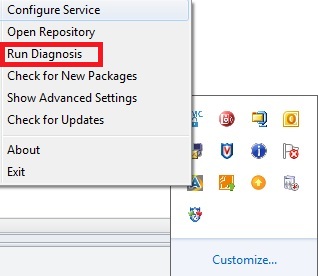
The 'Run Diagnosis' feature is launched by right-clicking the Avamar Downloader Service system tray icon.
The test is allowed to run and the network connectivity check reports that one of the Avamar servers cannot be reached.
"Connecting to Avamar server avamar123.customer.com ... Failed"
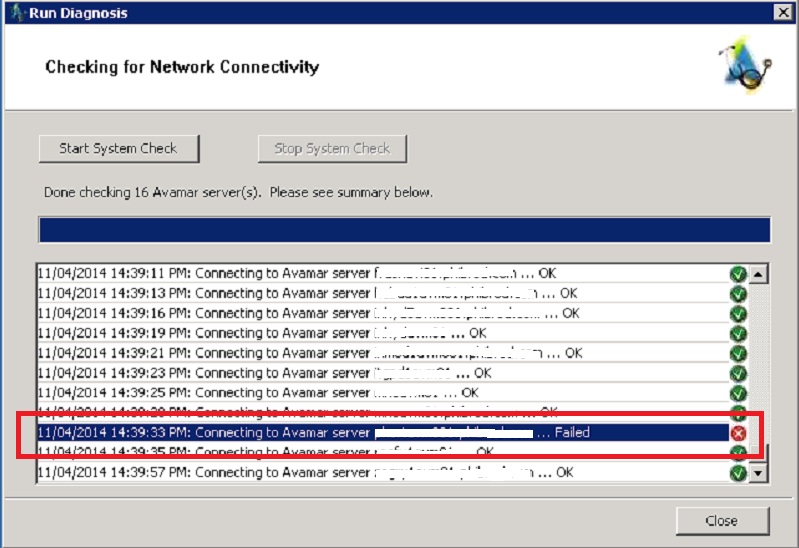
This is not necessarily a TCP/IP reachability issue. The service attempts to log in to each node.
The Avamar system avamar123.customer.com is reachable over the network.
Log in to the utility node of avamar123.customer.com using an SSH client.
Check the Avamar server AVI log (avinstaller.log*) around the time when the "run diagnosis" was performed.
The Avamar server side avinstaller log file shows;
Nov 04, 2014 9:39:33 PM com.avamar.avinstaller.service.SecurityService login
WARNING: User: root or password cannot be authenticated with local system
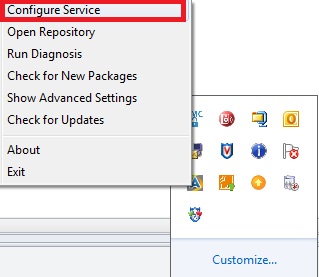
The Avamar Downloader Service must be supplied with the Linux operating system root password in order to work properly.
This can be checked as shown below;
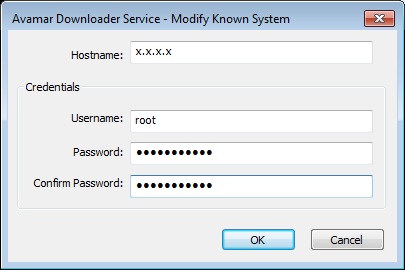
In this case, the Linux operating system root user password used was confirmed to be correct.
The Avamar downloader service PC log reports.
11/2/2014 14:50:39 PM [4328] SendManifest failed(hostname=avamar123.customer.com)
The 'Run Diagnosis' feature is launched by right-clicking the Avamar Downloader Service system tray icon.
The test is allowed to run and the network connectivity check reports that one of the Avamar servers cannot be reached.
"Connecting to Avamar server avamar123.customer.com ... Failed"
This is not necessarily a TCP/IP reachability issue. The service attempts to log in to each node.
The Avamar system avamar123.customer.com is reachable over the network.
Log in to the utility node of avamar123.customer.com using an SSH client.
Check the Avamar server AVI log (avinstaller.log*) around the time when the "run diagnosis" was performed.
The Avamar server side avinstaller log file shows;
Nov 04, 2014 9:39:33 PM com.avamar.avinstaller.service.SecurityService login
WARNING: User: root or password cannot be authenticated with local system
The Avamar Downloader Service must be supplied with the Linux operating system root password in order to work properly.
This can be checked as shown below;
In this case, the Linux operating system root user password used was confirmed to be correct.
Cause
The root cause was not positively identified.
The Avamar system experiencing the issue was the only Avamar system in the 'known hosts' list which had a customized (nondefault) password.
The cause was suspected to be due to one of the following.
1) A problem due to special characters used in the custom password (plus and at signs "+", "@").
2) The AVI service needed restarting after the password change.
The Avamar system experiencing the issue was the only Avamar system in the 'known hosts' list which had a customized (nondefault) password.
The cause was suspected to be due to one of the following.
1) A problem due to special characters used in the custom password (plus and at signs "+", "@").
2) The AVI service needed restarting after the password change.
Resolution
The issue was resolved after:-
- The Avamar server's operating system root password was changed to the standard 'default' password.
- The Avamar server AVI service was restarted with;
- avinstaller.pl --stop
- avinstaller.pl --start
Additional Information
The typical location for the Avamar Downloader Service log file on the PC is;
C:\Program Files\EMC\Avamar Downloader Service\var\log\AvamarDownloaderService.log
The location of the Avamar Installer service files on the Avamar Utility Node is;
/usr/local/avamar/var/avi/server_log/avinstaller.log*
C:\Program Files\EMC\Avamar Downloader Service\var\log\AvamarDownloaderService.log
The location of the Avamar Installer service files on the Avamar Utility Node is;
/usr/local/avamar/var/avi/server_log/avinstaller.log*
Affected Products
AvamarProducts
AvamarArticle Properties
Article Number: 000040978
Article Type: Solution
Last Modified: 06 Feb 2025
Version: 5
Find answers to your questions from other Dell users
Support Services
Check if your device is covered by Support Services.