Some or All Services Fail to Automatically Start on Boot (Linux or Windows)
Summary: During a boot/reboot of any SRM server some or all services do not start.
This article applies to
This article does not apply to
This article is not tied to any specific product.
Not all product versions are identified in this article.
Symptoms
During a boot|reboot of a SRM server some or all services do not start. Services can be successfully started with
On a Linux SRM server additional testing with the startup script, /etc/init.d/apg-service will show that the status command also does not work correctly: 'service agp-services status' will not return the services that failed to started.
'manage-modules.sh|manage-modules.cmd service start <module>'.
On a Linux SRM server additional testing with the startup script, /etc/init.d/apg-service will show that the status command also does not work correctly: 'service agp-services status' will not return the services that failed to started.
Cause
The service startup mode has been set to Manual or Disabled.
Resolution
In Centralized Management->Physical Overview-><SRM server>-><Collector-Manager Modules> check the 'Configure Service' Button. Make sure the Service startup mode is set to Auto.
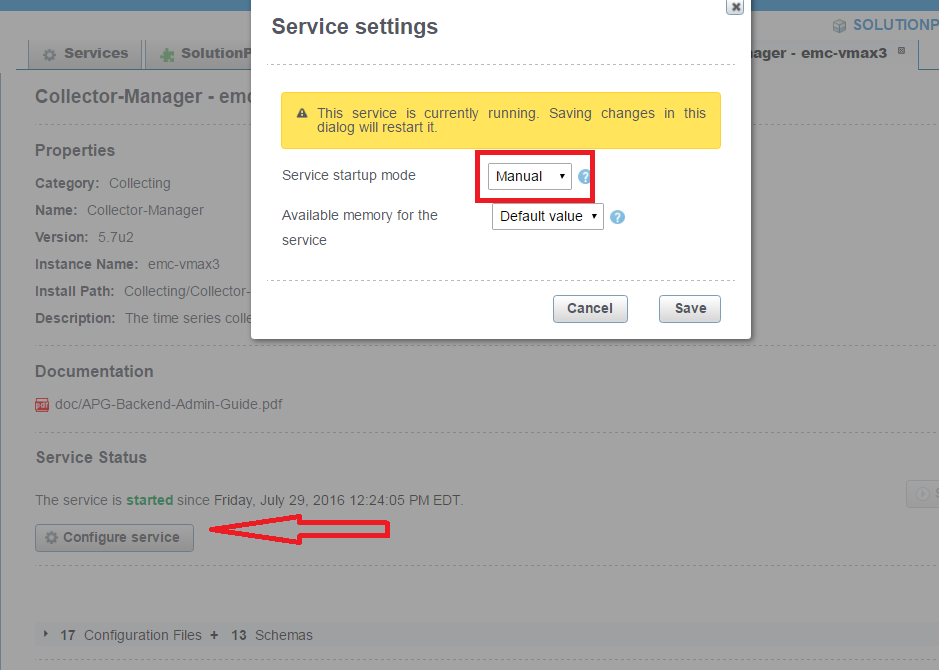
There will also be an /opt/APG/Collecting/Collector-Manager/<collector-manager>/conf/service-user.properties file which shows the the startup mode setting:
cat service-user.properties
#This file has been automatically (re)generated.
#Fri Jul 29 12:24:02 EDT 2016
startup=manual
Additional Information
See KB 000469626, Watch4net | EMC M&R | ViPR SRM - Services do not start up automatically after server reboot (Linux) for additional checks to make on Linux SRM servers.
Affected Products
SRMArticle Properties
Article Number: 000065756
Article Type: Solution
Last Modified: 29 Jul 2025
Version: 4
Find answers to your questions from other Dell users
Support Services
Check if your device is covered by Support Services.