Error downloading key material from the Key Server in Dell Data Protection Enterprise Edition
Summary: This article discusses Dell Data Protection | Enterprise Edition getting error downloading key material from the Key Server.
This article applies to
This article does not apply to
This article is not tied to any specific product.
Not all product versions are identified in this article.
Symptoms
Affected Products:
- Dell Data Protection | Enterprise Edition
Affected Versions:
- v7.0 to 8.0
You can attempt to download the key material from the Key Server using either the Administrative Download Utility CMGAd.exe, or the Shield uninstall program.
You then get an error saying:
The server encountered an error processing the request.
Download failed

Figure 1: (English Only) Dell Encryption error
The device Server output.log shows an error like:

Figure 2: (English Only) Server output.log
Cause
Forensic Administrator access must be enabled for the Device Server and Key Server to distribute encryption keys.
Resolution
Manually edit the file context.properties in Device Server configuration folder (default location C:\Program Files\Dell\Enterprise Edition\Device Server\conf), this is shown in the figure below.
Set the service.forensic.enable=true
>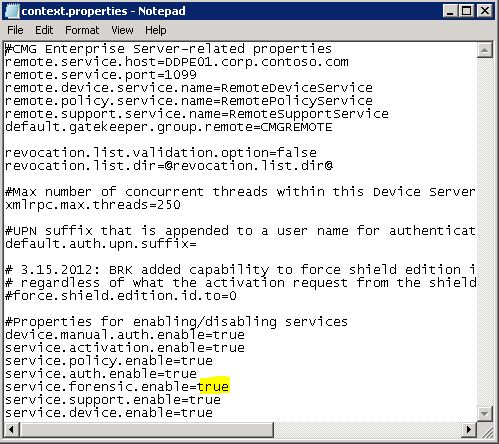
Figure 3: (English Only) service.forensic.enable=true
To contact support, reference Dell Data Security International Support Phone Numbers.
Go to TechDirect to generate a technical support request online.
For additional insights and resources, join the Dell Security Community Forum.
Affected Products
Dell EncryptionArticle Properties
Article Number: 000126040
Article Type: Solution
Last Modified: 03 Oct 2023
Version: 10
Find answers to your questions from other Dell users
Support Services
Check if your device is covered by Support Services.