如何在线提交 ePSA 或 QR 代码以进行额外的故障排除?(英文版)
Summary: ePSA 工具提供的错误代码的格式设为四个数字(1000 或 2000),然后是另一组四个数字。
This article applies to
This article does not apply to
This article is not tied to any specific product.
Not all product versions are identified in this article.
Symptoms
如何在线提交 ePSA 或 QR 代码以进行额外的故障排除?(英文版)
获得ePSA代码之后,您可以在SupportAssist启动前系统性能检查页面上提交服务标签、ePSA 错误和验证代码,以了解如何继续操作。
 注:ePSA 工具提供的错误代码的格式设为四个数字(1000 或 2000),然后是另一组四个数字。
当您知道另一个数字时,请:
- 重新运行自我诊断程序,请务必记下所显示的Service Tag(服务标签)、ePSA error(ePSA错误)和validation(验证)代码。
- 请参阅戴尔知识文库文章戴尔商业类和消费类产品上的错误代码(英文版)。
一些较新的计算机出厂时安装了ePSA诊断程序版本3.0工具。发现问题时,将会显示快速响应代码(QR代码)(图1)。您可以用手机扫描QR代码,这会打开SupportAssist Pre-Boot System Performance Check(SupportAssist启动前系统性能检查)页面,在这里,您可以提交Service Tag(服务标记)、ePSA error(ePSA错误)和validation(验证代码),以了解如何继续操作。
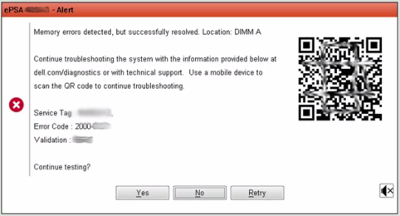
图1:ePSA QR代码示例
QR代码读取器可从Google Play和Apple App Store商店中获得。
有关详情,请参阅戴尔视频 ePSA 启动前系统评估。
Article Properties
Article Number: 000181166
Article Type: Solution
Last Modified: 13 Jan 2021
Version: 2
Find answers to your questions from other Dell users
Support Services
Check if your device is covered by Support Services.