PowerStore: SupportAssist fails to re-enable with error: ServiceLevel Selection same as existing serviceLevel
Summary: SupportAssist may fail to re-enable with the error: Encountered an exception enabling SupportAssist Remote Access: Error Response: ServiceLevel Selection same as existing serviceLevel
This article applies to
This article does not apply to
This article is not tied to any specific product.
Not all product versions are identified in this article.
Symptoms
SupportAssist may fail to re-enable, normally after disabling temporarily for troubleshooting or other reasons, with errors:
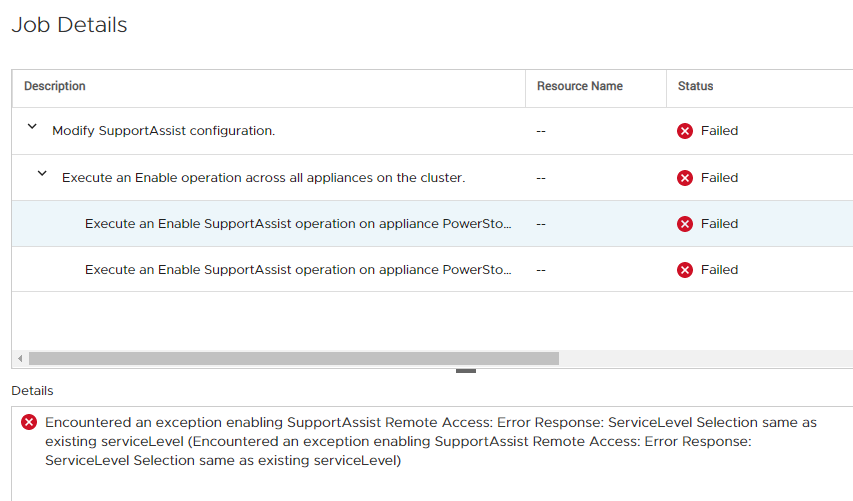
Encountered an exception enabling SupportAssist Remote Access: Error Response: ServiceLevel Selection same as existing serviceLevel (Encountered an exception enabling SupportAssist Remote Access: Error Response: ServiceLevel Selection same as existing serviceLevel)
Example as seen from PowerStore Manager (UI):
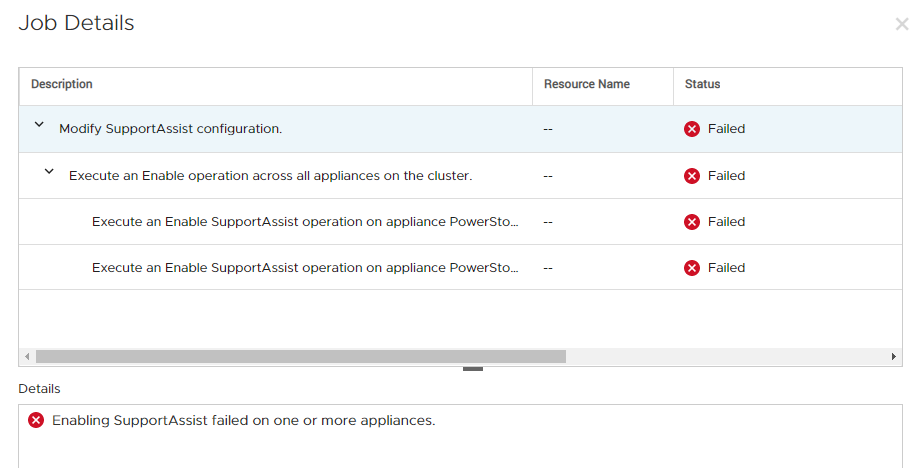
Enabling SupportAssist failed on one or more appliances.
Encountered an exception enabling SupportAssist Remote Access: Error Response: ServiceLevel Selection same as existing serviceLevel (Encountered an exception enabling SupportAssist Remote Access: Error Response: ServiceLevel Selection same as existing serviceLevel)
Example as seen from PowerStore Manager (UI):
Cause
Under rare circumstances the SupportAssist status is not sync'd properly between the management layer and the SupportAssist services.
The SupportAssist engine may maintain a "memory" of being previously configured with a specific config, and when a new attempt to enable with the same config is received, it sends the error message 'ServiceLevel Selection same as existing serviceLevel'.
The SupportAssist engine may maintain a "memory" of being previously configured with a specific config, and when a new attempt to enable with the same config is received, it sends the error message 'ServiceLevel Selection same as existing serviceLevel'.
Resolution
The easiest way around this is to temporarily enable SupportAssist with a different type or config than what was setup before.
For example, if before disabling SupportAssist was configured as Direct Connect with remote access / Remote Support, try to enable it without remote access / Remote Support. Once this is accepted by the system and SupportAssist is enabled with the new config, you can disable and switch to the intended SupportAssist type.
The permanent fix will be delivered in a future release of PowerStoreOS.
For example, if before disabling SupportAssist was configured as Direct Connect with remote access / Remote Support, try to enable it without remote access / Remote Support. Once this is accepted by the system and SupportAssist is enabled with the new config, you can disable and switch to the intended SupportAssist type.
The permanent fix will be delivered in a future release of PowerStoreOS.
Affected Products
PowerStore, PowerStore 1000X, PowerStore 1000T, PowerStore 3000X, PowerStore 3000T, PowerStore 5000X, PowerStore 5000T, PowerStore 7000X, PowerStore 7000T, PowerStore 9000TProducts
PowerStore 9000XArticle Properties
Article Number: 000183691
Article Type: Solution
Last Modified: 02 Mar 2021
Version: 1
Find answers to your questions from other Dell users
Support Services
Check if your device is covered by Support Services.