Dell Pro 키보드 및 마우스 KM5221W용 USB 동글을 찾는 방법
Summary: 다음 단계별 지침에 따라 Dell Pro 키보드 및 마우스 KM5221W USB 동글을 찾는 방법에 대해 알아보십시오.
This article applies to
This article does not apply to
This article is not tied to any specific product.
Not all product versions are identified in this article.
Instructions
Dell Pro 키보드 및 마우스 KM5221W는 키보드와 마우스 모두에 하나의 공통 USB 무선 동글을 사용합니다.
영향을 받는 키보드:
- Dell Pro 키보드 및 마우스 KM5221W
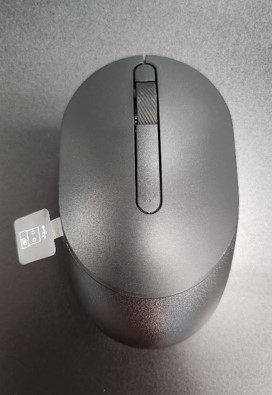
- KM5221W 개봉할 때 마우스에서 튀어나온 USB 동글 레이블을 찾으십시오.
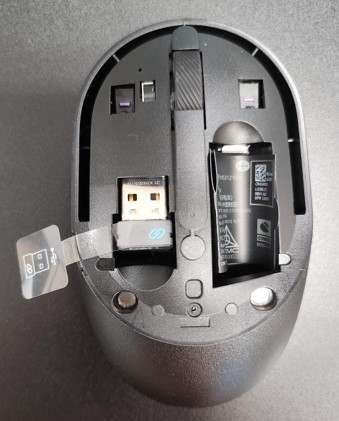
- 마우스 상단 커버를 조심스럽게 제거한 다음 동글을 찾습니다.
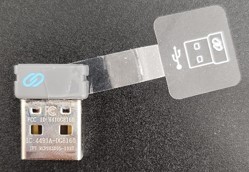
- 마우스 내의 동글 저장소에서 USB 동글을 제거합니다.
- Dell Pro 키보드 및 마우스 KM5221W 지원으로 이동하여 Dell Pro 키보드 및 마우스 KM5221W 빠른 설치 가이드 또는 사용자 가이드를 참조하여 설정을 완료합니다.
Affected Products
Alienware, Dell All-in-One, Dell Pro All-in-One, Dell Pro Max Micro, Dell Pro Max Slim, Dell Pro Max Tower, Dell Pro Micro, Dell Pro Slim, Dell Pro Tower, Dell Slim, Dell Tower, Inspiron, OptiPlex, Vostro, XPS, G Series, Chromebook, G Series
, Alienware, Dell Plus, Dell Pro, Dell Pro Max, Dell Pro Plus, Dell Pro Premium, Inspiron, Latitude, Dell Pro Rugged, Vostro, XPS, Fixed Workstations, Mobile Workstations, Dell Pro Max Micro XE FCM2250, Dell Pro Keyboard and Mouse KM5221W
...
Article Properties
Article Number: 000214907
Article Type: How To
Last Modified: 07 May 2025
Version: 5
Find answers to your questions from other Dell users
Support Services
Check if your device is covered by Support Services.