Dell Networking SONiC 路线图
Summary: 本文通过 Dell Networking SONiC 中的基本示例介绍路由图。
This article applies to
This article does not apply to
This article is not tied to any specific product.
Not all product versions are identified in this article.
Instructions
| 先决条件 我们使用标准接口命名来演示概念。请参阅文章 Dell Networking S 系列:基本接口配置 - SONiC 4.0,了解有关接口命名的更多信息 |
索引
什么是路由图。匹配并设置语句值。
配置语法
创建路由图
匹配语句
Set 语句
Call 语句
删除路由图配置
验证路由图
示例配置
什么是路由图。
Route-Map 用于编辑和控制 OSPF 或 BGP 路由过程中的路由学习。它还在 OSPF 路由过程中生成默认路由方面发挥作用。本质上,路由映射指定允许将指定路由协议中的哪些路由重新分配到目标路由进程中。要筛选用于重新分发的路由,请使用带有 IP 前缀列表和/或 AS 路径列表的路由映射。
下表概述了在单个路由图序列中遇到多个匹配命令时采取的作。
| Route-map 语句 | Prefix list 语句 | 路由匹配/不匹配 | 操作 |
|---|---|---|---|
| Permit | Permit | 匹配 | 路由是允许的,可以执行设置或调用。 |
| Permit | 不匹配 | 继续下一个路由图序列 | |
| Deny | 匹配 | 继续下一个路由图序列 | |
| Deny | 不匹配 | 继续下一个路由图序列 | |
| Deny | Permit | 匹配 | 路由被拒绝。 |
| Permit | 不匹配 | 继续下一个路由图序列 | |
| Deny | 匹配 | 继续下一个路由图序列 | |
| Deny | 不匹配 | 继续下一个路由图序列 |
匹配并设置语句值。
每个 route-map 语句都有两种类型的值:- match 值选择应应用此语句的路由。
- 设置值会修改要重新分发到目标协议中的信息。
如果匹配条件失败,则此语句不适用于路由,则 DELL SONiC 将继续根据路由图中的下一条语句评估路由。继续扫描路由图,直到找到与路由匹配的语句或到达路由图的末尾。
如果存在以下条件之一,则每个语句中的匹配值或设置值可能会丢失或重复多次:
- 如果语句中存在多个匹配条目,则给定路由的所有匹配条目都必须成功,以便该路由与语句匹配(应用逻辑 AND 算法)
- 如果匹配条目在一个条目中看到多个对象,则其中任何一个都应匹配(应用逻辑 OR 算法)
- 如果不存在匹配条目,则所有路由都与语句匹配。
- 如果 route-map permit 语句中不存在设置条目,则在不修改其当前属性的情况下重新分配路由。
- 没有 match 或 set 条目的路由图语句会执行作。空 permit 语句允许在不修改的情况下重新分配其余路由。
- 空 deny 语句不允许重新分发其他路由,因为如果已完成路由映射扫描但未找到显式匹配项,则这是默认作。
配置语法
创建路由图
创建路由图以匹配下一步中列出的路由参数。指定 permit 或 deny 语句以配置如何处理匹配路由。在映射中输入处理语句的顺序号。命令语法
admin@DELLSONiC :~$ sonic-cli
DELLSONiC # configure
DELLSONiC (config)# route-map map-name {permit | deny} {sequence-number}
|
匹配语句
在路由图配置模式下,输入这些匹配语句中的任何一个以选择路由。命令语法
admin@DELLSONiC :~$ sonic-cli
DELLSONiC # configure
DELLSONiC (config)# route-map map-name {permit | deny} {sequence-number}
DELLSONiC(config-route-map)# match {match statement}
|
Possible Match Statements as-path Set routing policy match criteria as-path community Set routing policy match criteria to BGP community evpn Set routing policy match criteria to BGP Ethernet Virtual Private Network ext-community Set routing policy match criteria to BGP extended community interface Set routing policy match criteria to interface ip Set routing policy match criteria ipv6 Set routing policy match criteria local-preference Set routing policy match criteria to local-preference metric Set routing policy match criteria to metric origin Specify BGP origin peer Set routing policy match criteria to peer IP source-protocol Specify source protocol source-vrf Source VRF tag Redistributes routes in the routing table that match the specified tags. |
Set 语句
在路由映射配置模式下,输入这些 set 语句中的任意一个,以更改匹配路由中指定的 BGP 属性。命令语法
admin@DELLSONiC :~$ sonic-cli
DELLSONiC # configure
DELLSONiC (config)# route-map map-name {permit | deny} {sequence-number}
DELLSONiC(config-route-map)# set {Set-statement}
|
Possible Set-Statement as-path Transform BGP AS-path attribute comm-list Set BGP community list (for deletion) community BGP community attribute extcommunity BGP extended community attribute ip IPv4 information ipv6 IPv6 information local-preference BGP local preference path attribute metric Set metric value action for the routing policy origin BGP origin code tag Tag value for routing protocol weight BGP weight for routing table |
Call 语句
如果满足匹配条件,“call”语句允许调用另一个路由图。命令语法
admin@DELLSONiC :~$ sonic-cli
DELLSONiC # configure
DELLSONiC (config)# route-map map-name {permit | deny} {sequence-number}
DELLSONiC (config-route-map)# call {route-map-name}
|
删除配置
确保在删除路由图之前删除任何路由图关联。要删除路由图条目中的已配置值,请输入匹配或设置的无版本命令。
例子
admin@DELLSONiC :~$ sonic-cli
DELLSONiC # configure
DELLSONiC (config)# route-map map-name {permit | deny} {sequence-number}
DELLSONiC (config-route-map)# no match as-path
DELLSONiC (config-route-map)# no set origin
DELLSONiC (config-route-map)# no call
|
admin@DELLSONiC :~$ sonic-cli DELLSONiC # configure DELLSONiC (config)# no route-map map-name |
验证路由图
使用以下命令验证路由图配置。
DELLSONiC# show route-map |
DELLSONiC# show route-map {route-map-name} |
使用以下命令查找应用于邻居的路由映射。
DELLSONiC# show bgp ipv4 unicast neighbors |
DELLSONiC# show bgp ipv6 unicast neighbors |
您还可以在上述命令中使用策略进行 grep 以查看较小的输出。 DELLSONiC#show bgp ipv4 unicast neighbors <neighbor>| find policy |
示例配置
要求:请参阅下面的拓扑。DELL-SONiC-R1 使用 BGP 向 DELL-SONiC-R2 通告三个环回 IP 1.1.1.1/32、2.2.2.2/32 和 3.3.3.3/32。考虑到我们需要将到 1.1.1.1/32 的路由通告为在 DELL-SONiC-R3 上接收源 EGP。
不应更改路由 2.2.2.2/32 和 3.3.3.3/32。
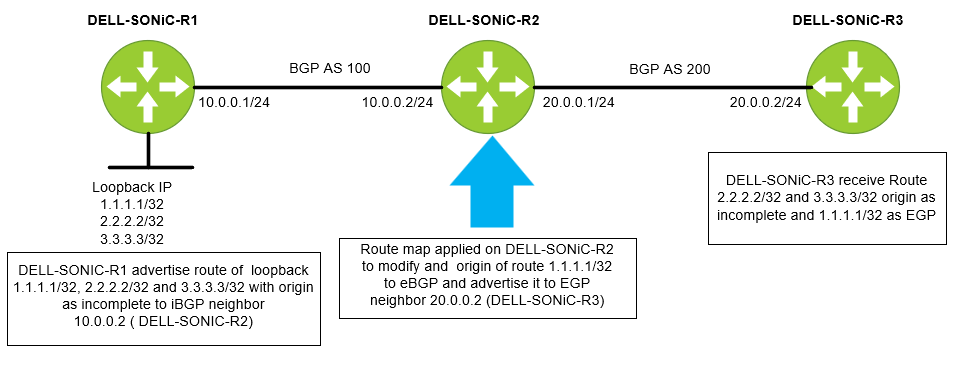
我们首先配置一个前缀列表。让我们将前缀列表命名为 IP-LIST-TO-MODIFY,并允许 1.1.1.1/32 前缀。
DELL-SONiC-R2# configure DELL-SONiC-R2(config)# ip prefix-list IP-LIST-TO-MODIFY seq 1 permit 1.1.1.1/32 DELL-SONiC-R2(config)# exit DELL-SONiC-R2# |
DELL-SONiC-R2# show ip prefix-list
IP prefix list IP-LIST-TO-MODIFY:
     seq 1 permit 1.1.1.1/32
DELL-SONiC-R2# |
让我们在 DELL-SONiC-R2。让我们将路线图命名为 MAP-TO-MODIFICATION
DELL-SONiC-R2# configure DELL-SONiC-R2(config)# route-map MAP-TO-MODIFICATION permit 1 DELL-SONiC-R2(config-route-map)# match ip address prefix-list IP-LIST-TO-MODIFY DELL-SONiC-R2(config-route-map)# set origin egp DELL-SONiC-R2(config-route-map)# exit DELL-SONiC-R2(config)# route-map MAP-TO-MODIFICATION permit 2 DELL-SONiC-R2(config-route-map)# exit DELL-SONiC-R2(config)# exit DELL-SONiC-R2# |
让我们分解配置以进行进一步解释。
Here under sequence 1 the match condition is to match any IP in prefix list IP-LIST-TO-MODIFY where we already have specified 1.1.1.1/32. So when 1.1.1.1/32 IP matches the cation to be taken is set the origin code to egp. DELL-SONiC-R2# configure DELL-SONiC-R2(config)# route-map MAP-TO-MODIFICATION permit 1 DELL-SONiC-R2(config-route-map)# match ip address prefix-list IP-LIST-TO-MODIFY DELL-SONiC-R2(config-route-map)# set origin egp DELL-SONiC-R2(config-route-map)# exit |
The next sequence is to allow all other routes (2.2.2.2/32 and 3.3.3.3/32) without any modification. You can write a separate prefix list for this but for simplicity we are not defining any match entry. If a match entry is not present, all routes are considered match under the sequence. If no set action is specified the default action is redistribute the route without any modification. DELL-SONiC-R2(config)# route-map MAP-TO-MODIFICATION permit 2 DELL-SONiC-R2(config-route-map)# exit DELL-SONiC-R2(config)# exit DELL-SONiC-R2# |
我们来验证路由图配置。
DELL-SONiC-R2# show running-configuration route-map ! route-map MAP-TO-MODIFICATION permit 1 match ip address prefix-list IP-LIST-TO-MODIFY set origin egp ! route-map MAP-TO-MODIFICATION permit 2 DELL-SONiC-R2# |
DELL-SONiC-R2# show route-map
Route map MAP-TO-MODIFICATION:
   permit, sequence 1
    Match clauses:
      ip address prefix-list IP-LIST-TO-MODIFY
    Set clauses:
      route origin EGP
    Call clauses:
    Actions:
      Exit routemap
   permit, sequence 2
    Match clauses:
    Set clauses:
    Call clauses:
    Actions:
      Exit routemap
DELL-SONiC-R2# |
让我们在出站方向将路由图 MAP-TO-MODIFICATION 应用于邻居 DELL-SONiC-R3 (20.0.0.2)
DELL-SONiC-R2(config)# router bgp 100 DELL-SONiC-R2(config-router-bgp)# neighbor 20.0.0.2 DELL-SONiC-R2(config-router-bgp-neighbor)# remote-as 200 DELL-SONiC-R2(config-router-bgp-neighbor)# no shutdown DELL-SONiC-R2(config-router-bgp-neighbor)# address-family ipv4 unicast DELL-SONiC-R2(config-router-bgp-neighbor-af)# route-map MAP-TO-MODIFICATION out ===>Apply the Route-map in outbound direction DELL-SONiC-R2(config-router-bgp-neighbor-af)# end DELL-SONiC-R2# |
我们来验证一下 BGP 配置。
DELL-SONiC-R2# show running-configuration bgp ! router bgp 100 log-neighbor-changes timers 60 180 ! neighbor 10.0.0.1 remote-as 100 ! address-family ipv4 unicast activate ! neighbor 20.0.0.2 remote-as 200 ! address-family ipv4 unicast activate route-map MAP-TO-MODIFICATION out DELL-SONiC-R2# |
我们可以看到在邻居 20.0.0.2 上应用的路由图 MAP-TO-MODIFICATION。
DELL-SONiC-R2# show bgp ipv4 unicast neighbors 20.0.0.2

BGP neighbor is 20.0.0.2, remote AS 200, local AS 100, external link
  BGP version 4, remote router ID 20.0.0.2 , local router ID 20.0.0.1
  BGP state = Established, up for 00:35:59
  Last read 00:00:59, Last write 00:00:59
  Hold time is 180 seconds, keepalive interval is 60 seconds
  Minimum time between advertisement runs is 0 seconds
  Neighbor capabilities:
    4 Byte AS: advertised and received
    AddPath IPv4 Unicast Receive: advertised and received
    Route refresh: advertised and received
    Multiprotocol Extension: advertised and received
    Graceful restart: advertised and received
    Hostname capability advertised (name: DELL-SONiC-R2) received (name: DELL-SONiC-R3)
  Message statistics:
    InQ depth is 0
    OutQ depth is 0
                         Sent        Rcvd
    Opens:               2           2
    Notifications:       0           0
    Updates:             10          4
    Keepalive:           37          37
    Route Refresh:       0           0
    Capability:          0           0
    Total:               49          43

  For address family: IPv4 Unicast
    Address-family enabled
    Prefixes received 0
     Export policy:
    MAP-TO-MODIFICATION
  Connections established 2, dropped 1
  Last reset 00:36:00, Last reset reason Peer closed the session
  Local host: 20.0.0.1, Local port: 57552
  Foreign host: 20.0.0.2, Foreign port: 179
  BGP Connect Retry Timer in Seconds 30


DELL-SONiC-R2# |
验证
让我们看看路由 1.1.1.1/32、2.2.2.2/32 和 3.3.3.3/32 在 DELL-SONiC-R1、DELL-SONiC-R2 和 DELL-SONiC-R3 上的表现。
在 DELL-SONiC-R1 上
DELL-SONiC-R1# show bgp ipv4 unicast
BGP routing table information for VRF default
Router identifier 10.0.0.1, local AS number 100
Status codes: R - removed, S - stale, s - suppressed, * - valid
              h - history, d - damped, > - best, = - multipath, q - queued, r - RIB-failure
Origin codes: i - IGP, e - EGP, ? - incomplete
     Network             Next Hop                                 Metric      LocPref     Weight Path
*>   1.1.1.1/32          0.0.0.0                                  0                       32768      ?
*>   2.2.2.2/32          0.0.0.0                                  0                       32768      ?
*>   3.3.3.3/32          0.0.0.0                                  0                       32768      ?
*>   10.0.0.0/24         0.0.0.0                                  0                       32768      ?
DELL-SONiC-R1# |
DELL-SONiC-R1# show bgp ipv4 unicast 1.1.1.1
BGP routing table entry for 1.1.1.1/32
Paths: (1 available, best #1, table default)
  Local
    0.0.0.0 from 0.0.0.0 (10.0.0.1)
      Origin incomplete, metric 0, weight 32768, valid, best (First path received)
      Last update: 2024-02-21 17:15:48+0000
DELL-SONiC-R1#

DELL-SONiC-R1# show bgp ipv4 unicast 2.2.2.2
BGP routing table entry for 2.2.2.2/32
Paths: (1 available, best #1, table default)
  Local
    0.0.0.0 from 0.0.0.0 (10.0.0.1)
      Origin incomplete, metric 0, weight 32768, valid, best (First path received)
      Last update: 2024-02-21 17:15:48+0000
DELL-SONiC-R1#


We can see the Origin incomplete for 1.1.1.1/32 and 2.2.2.2/32
|
DELL-SONiC-R1# show ip route
Codes:  K - kernel route, C - connected, S - static, B - BGP, O - OSPF
        > - selected route, * - FIB route, q - queued route, r - rejected route
       Destination        Gateway                                                                    Dist/Metric   Last Update
--------------------------------------------------------------------------------------------------------------------------------
 C>*   1.1.1.1/32         Direct                          Loopback0                                  0/0           00:38:32 ago
 C>*   2.2.2.2/32         Direct                          Loopback1                                  0/0           00:38:32 ago
 C>*   3.3.3.3/32         Direct                          Loopback3                                  0/0           00:38:32 ago
C>* 10.0.0.0/24 Direct Eth1/1 0/0 00:38:32 ago |
在 DELL-SONiC-R2 上
DELL-SONiC-R2# show bgp ipv4 unicast
BGP routing table information for VRF default
Router identifier 20.0.0.1, local AS number 100
Status codes: R - removed, S - stale, s - suppressed, * - valid
              h - history, d - damped, > - best, = - multipath, q - queued, r - RIB-failure
Origin codes: i - IGP, e - EGP, ? - incomplete
     Network             Next Hop                                 Metric      LocPref     Weight Path
*>   1.1.1.1/32          10.0.0.1                                 0           100         0          ?
*>   2.2.2.2/32          10.0.0.1                                 0           100         0          ?
*>   3.3.3.3/32          10.0.0.1                                 0           100         0          ?
*>   10.0.0.0/24         10.0.0.1                                 0           100         0          ?
DELL-SONiC-R2# |
DELL-SONiC-R2# show bgp ipv4 unicast 1.1.1.1
BGP routing table entry for 1.1.1.1/32
Paths: (1 available, best #1, table default)
  Local
    10.0.0.1 from 10.0.0.1 (10.0.0.1)
      Origin incomplete, metric 0, localpref 100, valid, internal, best (First path received)
      Last update: 2024-02-21 17:17:25+0000
DELL-SONiC-R2#

DELL-SONiC-R2# show bgp ipv4 unicast 2.2.2.2
BGP routing table entry for 2.2.2.2/32
Paths: (1 available, best #1, table default)
  Local
    10.0.0.1 from 10.0.0.1 (10.0.0.1)
      Origin incomplete, metric 0, localpref 100, valid, internal, best (First path received)
      Last update: 2024-02-21 17:17:26+0000
DELL-SONiC-R2#


We can see the Origin incomplete for 1.1.1.1/32 and 2.2.2.2/32.
|
DELL-SONiC-R2# show ip route
Codes:  K - kernel route, C - connected, S - static, B - BGP, O - OSPF
        > - selected route, * - FIB route, q - queued route, r - rejected route
       Destination        Gateway                                                                    Dist/Metric   Last Update
--------------------------------------------------------------------------------------------------------------------------------
 B>*   1.1.1.1/32         via 10.0.0.1                    Eth1/1                                     200/0         00:39:48 ago
 B>*   2.2.2.2/32         via 10.0.0.1                    Eth1/1                                     200/0         00:39:48 ago
 B>*   3.3.3.3/32         via 10.0.0.1                    Eth1/1                                     200/0         00:39:48 ago
 B     10.0.0.0/24        via 10.0.0.1                                                               200/0         00:39:48 ago
 C>*   10.0.0.0/24        Direct                          Eth1/1                                     0/0           00:40:08 ago
C>* 20.0.0.0/24 Direct Eth1/2 0/0 00:40:08 ago |
在 DELL-SONiC-R3 上
DELL-SONiC-R3# show bgp ipv4 unicast
BGP routing table information for VRF default
Router identifier 20.0.0.2, local AS number 200
Status codes: R - removed, S - stale, s - suppressed, * - valid
              h - history, d - damped, > - best, = - multipath, q - queued, r - RIB-failure
Origin codes: i - IGP, e - EGP, ? - incomplete
     Network             Next Hop                                 Metric      LocPref     Weight Path
*>   1.1.1.1/32          20.0.0.1                                                         0      100 e
*>   2.2.2.2/32          20.0.0.1                                                         0      100 ?
*>   3.3.3.3/32          20.0.0.1                                                         0      100 ?
*>   10.0.0.0/24         20.0.0.1                                                         0      100 ?
DELL-SONiC-R3#

Note the e(highlighted in red). This means the origin is EGP for 1.1.1.1/32.
|
DELL-SONiC-R3# show bgp ipv4 unicast 1.1.1.1/32
BGP routing table entry for 1.1.1.1/32
Paths: (1 available, best #1, table default)
  100
    20.0.0.1 from 20.0.0.1 (20.0.0.1)
      Origin EGP, valid, best
      Last update: 2024-02-21 17:17:27+0000
DELL-SONiC-R3#

We can see 1.1.1.1/32 has Origin EGP.
|
Lets check 2.2.2.2/32 origin

DELL-SONiC-R3# show bgp ipv4 unicast 2.2.2.2
BGP routing table entry for 2.2.2.2/32
Paths: (1 available, best #1, table default)
  100
    20.0.0.1 from 20.0.0.1 (20.0.0.1)
      Origin incomplete, metric , valid, external, best (First path received)
      Last update: 2024-02-21 17:17:26+0000
DELL-SONiC-R3#

We can see Origin incomplete for 2.2.2.2/32. |
DELL-SONiC-R3# show ip route
Codes:  K - kernel route, C - connected, S - static, B - BGP, O - OSPF
        > - selected route, * - FIB route, q - queued route, r - rejected route
       Destination        Gateway                                                                    Dist/Metric   Last Update
--------------------------------------------------------------------------------------------------------------------------------
 B>*   1.1.1.1/32         via 20.0.0.1                    Eth1/2                                     20/0          00:41:27 ago
 B>*   2.2.2.2/32         via 20.0.0.1                    Eth1/2                                     20/0          00:41:27 ago
 B>*   3.3.3.3/32         via 20.0.0.1                    Eth1/2                                     20/0          00:41:27 ago
 B>*   10.0.0.0/24        via 20.0.0.1                    Eth1/2                                     20/0          00:41:27 ago
 C>*   20.0.0.0/24        Direct                          Eth1/2                                     0/0           00:41:39 ago
DELL-SONiC-R3#
|
Affected Products
Enterprise SONiC Distribution, PowerSwitch E3200-ON Series, PowerSwitch N3200-ON, PowerSwitch S5212F-ON, PowerSwitch S5224F-ON, PowerSwitch S5232F-ON, PowerSwitch S5248F-ON, PowerSwitch S5296F-ON, PowerSwitch Z9264F-ON, PowerSwitch Z9332F-ON
, PowerSwitch Z9432F-ON
...
Article Properties
Article Number: 000222196
Article Type: How To
Last Modified: 18 Feb 2026
Version: 9
Find answers to your questions from other Dell users
Support Services
Check if your device is covered by Support Services.