PowerStore VSI services are not all up and running yet after installation
Summary: After installing Virtual Storage Integrator (VSI), the VSI WebUI login screen shows the error: "VSI services are not all up and running yet, please give a few minutes then refresh this page. If the problem persists for more than 15 minutes, please reboot the VSI virtual machine and try again" ...
This article applies to
This article does not apply to
This article is not tied to any specific product.
Not all product versions are identified in this article.
Symptoms
Error at VSI WebUI login screen: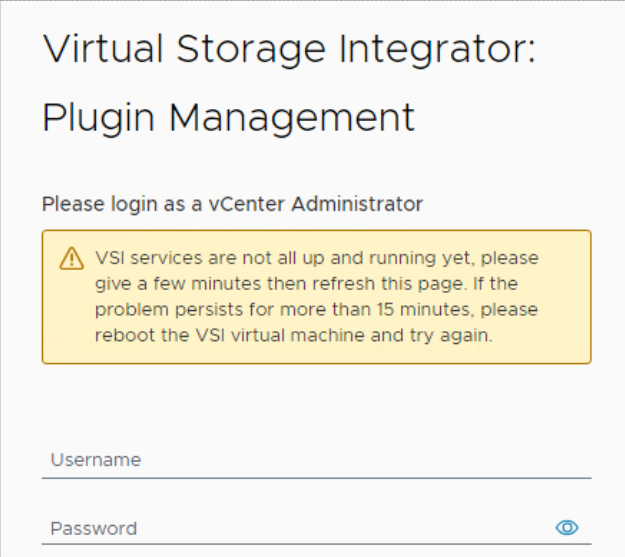
VSI Logs show the following repeating error messages in the "iapi-rest-error" log:
Caused by: java.util.concurrent.ExecutionException: org.redisson.client.RedisConnectionException: java.net.UnknownHostException: Failed to resolve 'redis' [A(1)] after 2 queries
The docker ps command run from VSI Virtual Machine (VM) shows the Redis container in a constant "restarting" condition. The Internet Application Programming Interface (IAPI) container restarts as well causing its uptime to be considerably less than the other containers.
root@photon [ ~ ]# docker ps
CONTAINER ID   IMAGE                                                                       COMMAND                  CREATED          STATUS                          PORTS                                           NAMES
475db176af94   amaas-eos-mw1.cec.lab.emc.com:8125/externals/redis:5.0                      "/bin/bash -c 'redis…"   26 minutes ago   Restarting (1) 17 seconds ago                                                   redis
b423bae65c3e   amaas-eos-mw1.cec.lab.emc.com:8125/dellemc/vsi-proxy:10.6.0-983             "/docker-entrypoint.…"   30 minutes ago   Up 10 minutes                   80/tcp, 0.0.0.0:443->443/tcp, :::443->443/tcp   vsi-proxy
f1c4b6edc1da   amaas-eos-mw1.cec.lab.emc.com:8125/dellemc/iapi:1.16.0-1371                 "/tini -g -v -- /opt…"   3 months ago     Up 12 seconds                   0.0.0.0:32851->8001/tcp, :::32851->8001/tcp     iapi
5c042bbd9a53   amaas-eos-mw1.cec.lab.emc.com:8125/dellemc/vsi-aggregation-service:10.6.0   "docker-entrypoint.s…"   3 months ago     Up 14 minutes                   0.0.0.0:32768->8082/tcp, :::32768->8082/tcp     vsi-aggregation-service
621ee8dab64a   amaas-eos-mw1.cec.lab.emc.com:8125/dellemc/vsi-ui:10.6.0-983                "/docker-entrypoint.…"   3 months ago     Up 14 minutes                   0.0.0.0:32769->80/tcp, :::32769->80/tcp         vsi-ui
Cause
The database password has a # in the beginning of the password such as #PassWord123!.
To avoid this issue, do not use a "#" at the beginning of the password.
This is the location where the initial password is set.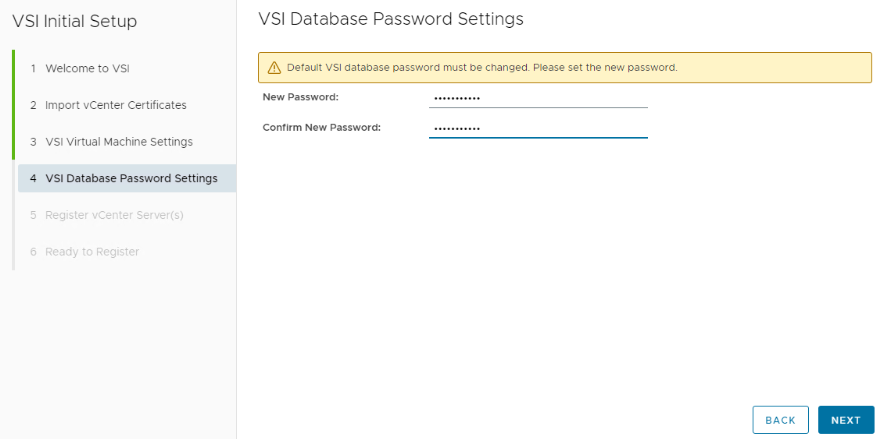
Resolution
Reset the Redis database through the command-line interface on the VSI virtual machine.
Log in to the VSI Virtual Machine. This can be done through VMware by launching a virtual console, or SSH to the VSI VM. If the VM has never been logged into previously, the username and password is root. A password change is required after login.
Run the following command to reset the Redis password:
root@photon [ ~ ]# /opt/files/iapi-maintenance-util/apis/redis/redis-config.sh --rollback
WARNING: The DOCKERHOST variable is not set. Defaulting to a blank string.
Stopping redis ... done
WARNING: The DOCKERHOST variable is not set. Defaulting to a blank string.
Going to remove redis
Removing redis ... done
WARNING: The DOCKERHOST variable is not set. Defaulting to a blank string.
WARNING: The create command is deprecated. Use the up command with the --no-start flag instead.
Creating redis ... done
WARNING: The DOCKERHOST variable is not set. Defaulting to a blank string.
Starting redis ... done
Successfully copied 2.56kB to iapi:/opt/iapi/conf/redisson.yaml
iapi
iapi
After the command is complete, Login to the VSI Web UI and the warning should be gone.
There is an alert at the top of the window to reset the Redis password.
Set a Redis password that does not have "# or !" At the start of the password, after the password is set, the screen can take up to 5 minutes to refresh.
Additional Information
Acronym Definitions:
VSI - Virtual Storage Integrator
VM - Virtual Machine
IAPI - Internet Application Programming Interface
Affected Products
PowerStore, Virtual Storage Integrator (VSI), PowerStoreOSArticle Properties
Article Number: 000227235
Article Type: Solution
Last Modified: 29 Jul 2025
Version: 3
Find answers to your questions from other Dell users
Support Services
Check if your device is covered by Support Services.