OS10 Introduction to MTU Configuration
Summary: Introduction to MTU Configuration The Maximum Transmission Unit (MTU) defines the largest packet size that an interface can transmit without fragmentation. Proper MTU configuration is crucial for network performance and stability. This document provides detailed information about MTU behavior, default settings, and configuration commands for Dell Power Switches. ...
This article applies to
This article does not apply to
This article is not tied to any specific product.
Not all product versions are identified in this article.
Instructions
Key Topics Covered
Default MTU Configuration
- The default MTU value is 9216 bytes starting from Release 10.5.4.4. Previously, it was 1532 bytes.
- Commands to configure and verify MTU values:
default mtu <value>:Sets a custom MTU value for all interfaces without a user configured MTUno default mtu:Resets interfaces to the system default MTU valueshow default mtu:Displays the system-level default MTUshow interface:Shows the current MTU for a specific interface
MTU Configuration Examples
- Examples of how to display and modify the default MTU by using CLI commands
- Configuration scenarios for Virtual LANs (VLAN) and virtual networks, highlighting the importance of consistent MTU settings across all interfaces to avoid L2 and L3 VPN flaps
Considerations and Best Practices
- Ensure uniform MTU settings across all interfaces, including logical and physical interfaces between Border Gateway Protocol (BGP) peers
- Fragmentation is not supported on most Dell Power Switches, except for specific models like the S4200-ON Series and S5148-ON platforms
- OS10 selects the lowest MTU value that is configured on the VLAN or VLAN members to be the VLAN MTU
MTU
- After upgrading to 10.5.4.4, the MTU defaults to 9216 on all VLANs and Ethernet Interfaces which do not already have a user configured MTU
Potential Issues with Incorrect MTU Configuration
Packet Loss
- If the MTU is set too low, larger packets are dropped, leading to significant data loss and network performance degradation
Network Flaps
- Inconsistent MTU settings between interfaces can cause L2 and L3 VPN flaps, disrupting network stability and connectivity
Increased Latency
- Incorrect MTU settings can lead to increased fragmentation, causing higher latency and reduced throughput

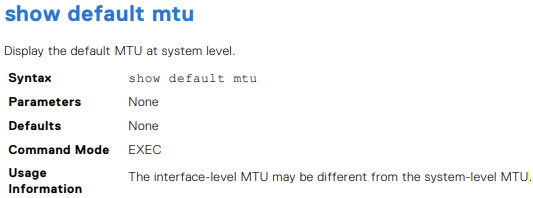
Display the default MTU.
OS10# show default mtu
Default MTU 9216 bytes
System default with no user configuration
OS10# show interface ethernet 1/1/1
Ethernet 1/1/1 is up, line protocol is down
Hardware is Eth, address is 90:b1:00:00:00:a0
 Current address is 90:b1:00:00:00:a0
Pluggable media present, QSFP+ type is QSFP+ 40GBASE-LR4
 Wavelength is 1311
 Receive power reading is no power
Interface index is 11
Internet address is not set
Mode of IPv4 Address Assignment: not set
Interface IPv6 oper status: Disabled
MTU 9216 bytes, IP MTU 1500 bytes
LineSpeed 0, Auto-Negotiation off
Flowcontrol rx off tx off
ARP type: ARPA, ARP Timeout: 60
Last clearing of "show interface" counters: 20:45:24
Queuing strategy: fifo
Input statistics:
 0 packets, 0 octets
 0 64-byte pkts, 0 over 64-byte pkts, 0 over 127-byte pkts
 0 over 255-byte pkts, 0 over 511-byte pkts, 0 over 1023-byte pkts
 0 Multicasts, 0 Broadcasts, 0 Unicasts
 0 runts, 0 giants, 0 throttles
 0 CRC, 0 overrun, 0 discarded
Output statistics:
 0 packets, 0 octets
 0 64-byte pkts, 0 over 64-byte pkts, 0 over 127-byte pkts
 0 over 255-byte pkts, 0 over 511-byte pkts, 0 over 1023-byte pkts
 0 Multicasts, 0 Broadcasts, 0 Unicasts
 0 throttles, 0 discarded, 0 Collisions, wred drops
Rate Info(interval 30 seconds):
 Input 0 Mbits/sec, 0 packets/sec, 0% of line rate
Output 0 Mbits/sec, 0 packets/sec, 0% of line rate
Time since last interface status change: 20:45:25
OS10# configure terminal
OS10(config)# default mtu 9000
OS10(config)#

- Example
OS10# default mtu 9216
OS10# no default mtu

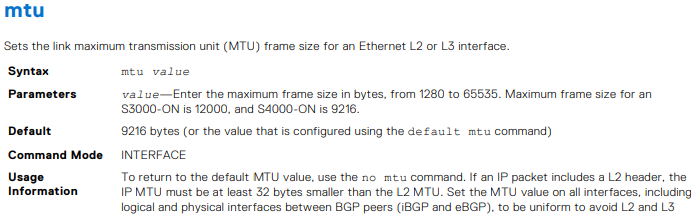

Table 54. Use cases of VLAN MTU configuration.
| Configuration |
Ethernet Interface Configuration |
show interface output |
|---|---|---|
interface vlan300 no shutdown ! |
interface ethernet1/1/6 no shutdown switchport mode trunk switchport trunk allowed vlan300 ! interface ethernet1/1/9 no shutdown switchport mode trunk switchport trunk allowed vlan300 |
OS10# show interface vlan300 Vlan300 is up, line protocol is up Address is 14:10:10:0d:00:e9, Current address is 14:10:10:0d:00:e9 Interface index is 84 Internet address is not set Mode of IPv4 Address Assignment: not set Interface IPv6 oper status: Enabled Link local IPv6 address: fe80::1010:10ff:fe0d:e9/10 MTU 1532 bytes, IP MTU 1500 bytes |
interface vlan300 no shutdown ! |
interface ethernet1/1/6 no shutdown switchport mode trunk switchport trunk allowed vlan300 ! interface ethernet1/1/9 no shutdown switchport mode trunk switchport trunk allowed vlan300 mtu 1312 |
OS10# show interface vlan300 Vlan300 is up, line protocol is up Address is 14:10:10:0d:00:e9, Current address is 14:10:10:0d:00:e9 Interface index is 84 Internet address is not set Mode of IPv4 Address Assignment: not set Interface IPv6 oper status: Enabled Link local IPv6 address: fe80::1010:10ff:fe0d:e9/10 MTU 1312 bytes, IP MTU 1280 bytes |
virtual-network 3333 ! interface vlan300 no shutdown virtual-network 3333 ! |
interface ethernet1/1/6 no shutdown switchport mode trunk switchport trunk allowed vlan300 ! interface ethernet1/1/9 no shutdown switchport mode trunk switchport trunk allowed vlan300 mtu 1312 |
OS10# # show interface vlan300 Vlan300 is up, line protocol is up Address is 14:18:77:0d:00:e9, Current address is 14:18:77:0d:00:e9 Interface index is 84 Internet address is not set Mode of IPv4 Address Assignment: not set Interface IPv6 oper status: Enabled Link local IPv6 address: fe80::1618:77ff:fe0d:e9/64 MTU 1532 bytes, IP MTU 1500 bytes |
virtual-network 3333 ! interface vlan300 no shutdown virtual-network 3333 ! interface virtual-network 3333 |
interface ethernet1/1/6 no shutdown switchport mode trunk switchport trunk allowed vlan300 ! interface ethernet1/1/9 no shutdown switchport mode trunk switchport trunk allowed vlan300 mtu 1312 |
show interface vlan300 Vlan300 is up, line protocol is up Address is 14:18:77:0d:00:e9, Current address is 14:18:77:0d:00:e9 Interface index is 84 Internet address is not set Mode of IPv4 Address Assignment: not set Interface IPv6 oper status: Enabled Link local IPv6 address: fe80::1618:77ff:fe0d:e9/64 MTU 1532 bytes, IP MTU 1500 bytes OS10# show interface virtual-network 3333 Virtual-network 3333 is up, line protocol is up Address is 14:18:77:0d:00:ea, Current address is 14:18:77:0d:00:ea Interface index is 87 Internet address is not set Mode of IPv4 Address Assignment: not set Interface IPv6 oper status: Enabled MTU 1312 bytes, IP MTU 1280 bytes |

- Example
OS10(conf-if-eth1/1/7)# mtu 3000

- Example
OS10# show default mtu
Default MTU 9216 bytes

Additional Information
OS10 User Guide Online Documentation - Support for SmartFabric OS10 Software | Documentation | Dell US
Affected Products
SmartFabric OS10 SoftwareArticle Properties
Article Number: 000228459
Article Type: How To
Last Modified: 07 Nov 2025
Version: 4
Find answers to your questions from other Dell users
Support Services
Check if your device is covered by Support Services.