Dell Networking OS10 Introduction to GRE Configuration
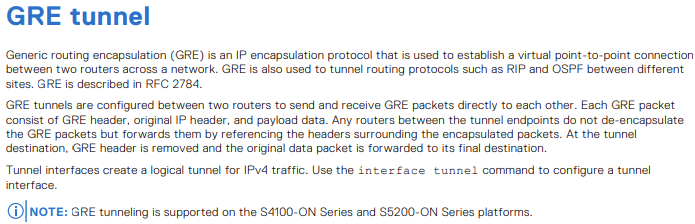
Summary: Generic Routing Encapsulation (GRE) is an IP encapsulation protocol used to establish a virtual point-to-point connection between two routers across a network. It is commonly used to tunnel routing protocols like RIP and OSPF between different sites. GRE is described in Request for Comments (RFC 2784. ...
This article applies to
This article does not apply to
This article is not tied to any specific product.
Not all product versions are identified in this article.
Instructions
Key Topics Covered
Configuration of GRE Tunnels:
- GRE tunnels are configured between two routers to send and receive GRE packets directly.
- Configuration involves setting up tunnel interfaces, specifying tunnel mode, source, and destination.
Restrictions and Limitations:
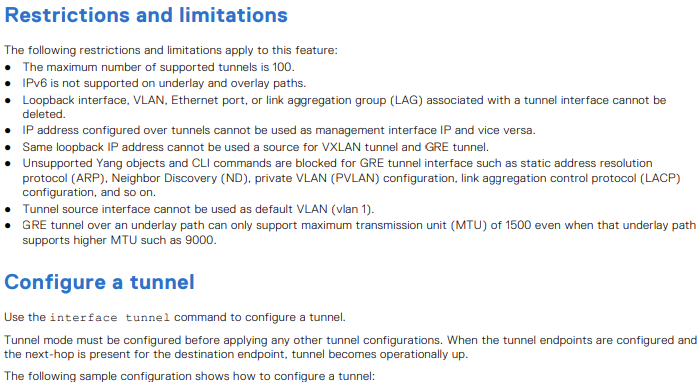
- A maximum of 100 tunnels supported
- IPv6 is not supported on underlay and overlay paths.
- Certain interfaces and IP addresses have restrictions when used with GRE tunnels.
Tunnel Keepalive Settings:
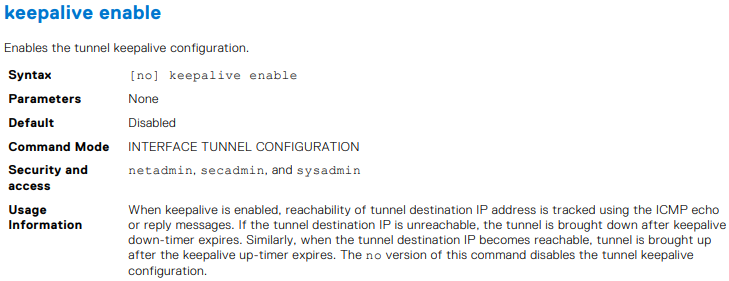
- Configuring keepalive settings to monitor tunnel endpoint reachability using Internet Control Message Protocol (ICMP) echo and reply packets.
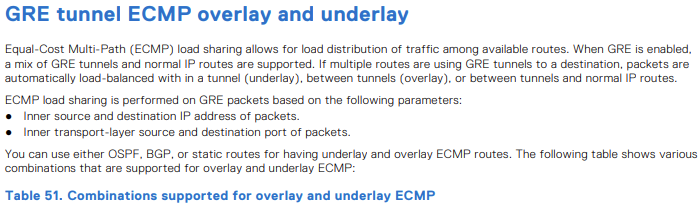
Equal-Cost MultiPath (ECMP) Overlay and Underlay:
- ECMP load sharing for distributing traffic among available routes
- Supported combinations for overlay and underlay ECMP routes.
Commands and Examples:
- Detailed command syntax and examples for configuring GRE tunnels, keepalive settings, and ECMP routes
Possible Issues with Misconfiguration
Tunnel Flapping:
- Incorrect keepalive settings can cause the tunnel to frequently go up and down, leading to instability.
MTU Mismatch:
- GRE tunnels over paths with different MTU settings can cause packet fragmentation or loss.
Routing Loops:
- Misconfigured routing can lead to loops, causing excessive traffic and potential network outages.
Best Practices
Consistent MTU Settings:
- Ensure that MTU settings are consistent across the GRE tunnel to avoid fragmentation.
Proper Keepalive Configuration:
- Configure keepalive settings to monitor tunnel health and avoid unnecessary flapping.
Clear Documentation:
- Maintain clear documentation of tunnel configurations and associated routes to prevent misconfigurations.
Use Cases for GRE Tunnels.
Connecting Remote Sites:
- GRE tunnels can connect remote sites over the Internet, allowing for secure and efficient communication.
Tunneling Non-IP Traffic:
- GRE can encapsulate non-IP traffic, making it versatile for various network protocols.
Load Balancing:
- Using ECMP with GRE tunnels can distribute traffic load across multiple paths, enhancing network performance.
Network Topology Example
Imagine a network with two remote sites, Site A and Site B, connected over the Internet. Each site has a router with a GRE tunnel configured between them.
The topology would look like this:
Site A (10.10.10.0/24) ---- OS10-1 ---- Internet ---- OS10-2 ---- Site B (10.20.10.0/24)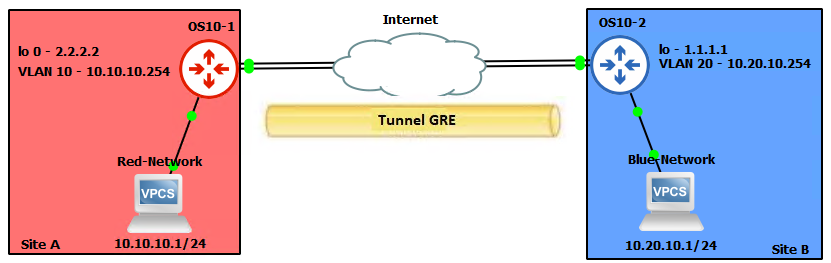
OS10(config)# interface tunnel 10
OS10(conf-if-tunnel-10)# <165>1 2022-11-11T17:55:16.614662+00:00 OS10 dn_alm 731 - -
 Node.1-Unit.1:PRI [event], Dell (OS10) %IFM_ASTATE_UP: Interface admin state up
:tunnel10
OS10(conf-if-tunnel-10)# ip vrf forwarding red
% Error: Interface tunnel10, Tunnel mode is mandatory config and must exist for other
tunnel configs.
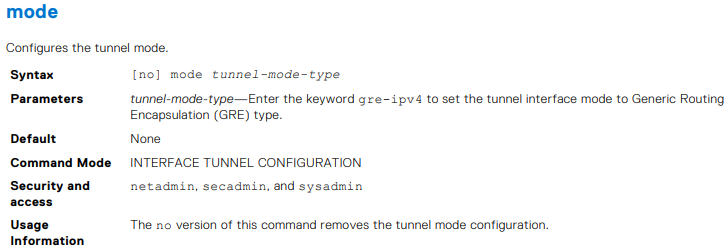
OS10(conf-if-tunnel-10)# mode gre-ipv4
OS10(conf-if-tunnel-10)# ip vrf forwarding red
OS10(conf-if-tunnel-10)# ip address 120.1.1.1/24
OS10(conf-if-tunnel-10)# <165>1 2022-11-11T17:55:31.454972+00:00 OS10 dn_alm 731 - -
 Node.1-Unit.1:PRI [event], Dell (OS10) %IP_ADDRESS_ADD: IP Address add is successful.
 IP 120.1.1.1/24 in VRF:red added successfully
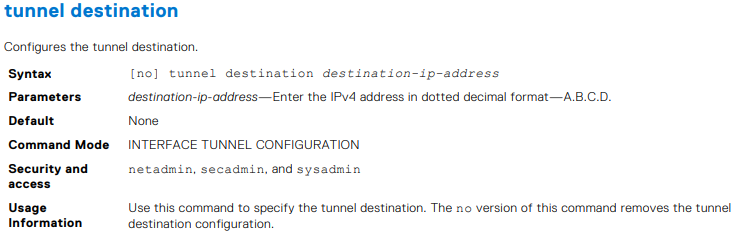
OS10(conf-if-tunnel-10)# tunnel destination 16.16.16.16
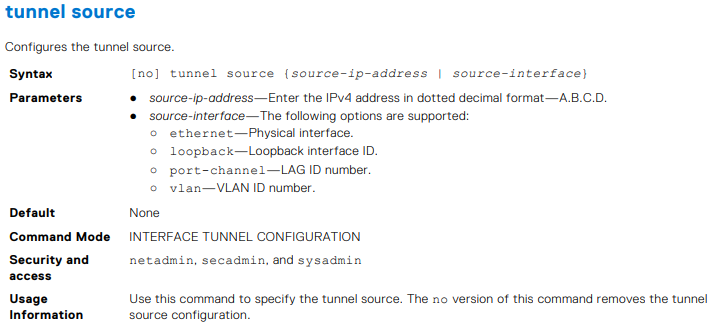
OS10(conf-if-tunnel-10)# tunnel source loopback10
OS10(conf-if-tunnel-10)# <165>1 2022-11-11T17:56:17.197783+00:00 OS10 dn_alm 731 - -
 Node.1-Unit.1:PRI [event], Dell (OS10) %IFM_OSTATE_UP: Interface operational state is
up :tunnel10

OS10(conf-if-tunnel-10)# show configuration
!
interface tunnel10
mode gre-ipv4
no shutdown
ip vrf forwarding red
ip address 120.1.1.1/24
tunnel destination 10.10.10.10
tunnel source loopback10
keepalive down-timer 10
keepalive enable
keepalive probe-interval 6
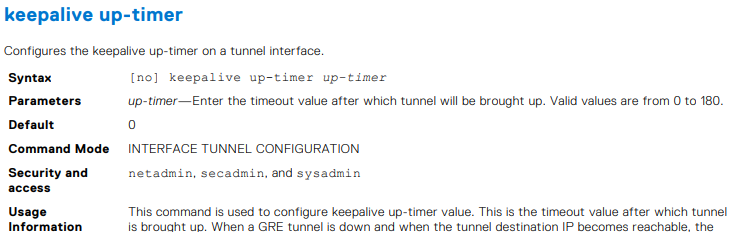
keepalive up-timer 12

| Underlay ECMP routes | Overlay ECMP routes | Supported |
|---|---|---|
| Static | Static | Yes |
| Static | OSPF | Yes |
| Static | BGP | Yes |
| OSPF | Static | Yes |
| OSPF | OSPF | No |
| OSPF | BGP | Yes |
| BGP | Static | Yes |
| BGP | OSPF | Yes |
| BGP | BGP | No |

OS10(config)# hardware overlay-ecmp-profile mode balanced-overlay-ecmp
OS10(config)# <165>1 2022-10-11T10:25:26.474891+00:00 AG1-9978 dn_alm 717 - - Node.1-
Unit.1:PRI [event], Dell (OS10) %VXLAN_OVERLAY_ECMP_PROFILE_MODIFIED: VxLAN Overlay
ECMP: Configuration is modified, Save and Reload the device for the profile to be
effect

OS10# show running-configuration interface tunnel 21
!
interface tunnel21
 mode gre-ipv4
 no shutdown
 ip address 10.10.10.2/24
 tunnel destination 5.5.5.5
 tunnel source loopback3
OS10# show running-configuration interface tunnel 22
!
interface tunnel22
 mode gre-ipv4
 no shutdown
 ip address 10.10.10.3/24
 tunnel destination 6.6.6.6
 tunnel source loopback4
OS10# show running-configuration interface tunnel 23
!
interface tunnel23
 mode gre-ipv4
 no shutdown
 ip address 10.10.10.4/24
 tunnel destination 7.7.7.7
 tunnel source loopback5
OS10# show running-configuration interface tunnel 24
!
interface tunnel24
 mode gre-ipv4
 no shutdown
 ip address 10.10.10.5/24
 tunnel destination 8.8.8.8
 tunnel source loopback6
OS10# show running-configuration route
!
ip route 77.1.1.0/24 100.1.1.2
ip route 77.1.1.0/24 10.10.10.2
ip route 77.1.1.0/24 10.10.10.3
ip route 77.1.1.0/24 10.10.10.4
ip route 77.1.1.0/24 10.10.10.5
OS10# show ip route 10.1.1.0/24
Routing entry for 77.1.1.0/24
Known via static
Distance 1, Metric 0
Last update 08:57:53
Routing descriptors Blocks:
 via 100.1.1.2 tunnel10
 via 10.10.10.2 tunnel21
 via 10.10.10.3 tunnel22
 via 10.10.10.4 tunnel23
 via 10.10.10.5 tunnel24

OS10# show ip route 67.67.67.0/24
Routing entry for 67.67.67.0/24
Known via ospf, type
Distance 110,
Metric 21
Last update 09:35:46
Routing descriptors Blocks:
 via 10.1.1.2 ethernet1/1/25:1
 via 12.1.1.2 ethernet1/1/25:2
 via 23.2.2.2 vlan2
 via 23.2.3.2 vlan3
 via 23.2.4.2 vlan4
 via 23.2.5.2 vlan5
 via 23.2.6.2 vlan6
 via 23.2.7.2 vlan7
 via 23.2.8.2 vlan8
 via 23.2.9.2 vlan9
OS10# show ip route 68.68.68.0/24
Routing entry for 68.68.68.0/24
Known via ospf, type
Distance 110,
Metric 21
Last update 09:36:35
Routing descriptors Blocks:
 via 10.1.1.2 ethernet1/1/25:1
 via 12.1.1.2 ethernet1/1/25:2
 via 23.2.2.2 vlan2
 via 23.2.3.2 vlan3
 via 23.2.4.2 vlan4
 via 23.2.5.2 vlan5
 via 23.2.6.2 vlan6
OS10# show running-configuration interface vlan 2
!
interface vlan2
 no shutdown
 ip address 23.2.2.1/24
 ip ospf 1 area 0.0.0.0
OS10# show running-configuration interface vlan 3
!
interface vlan3
 no shutdown
 ip address 23.2.3.1/24
 ip ospf 1 area 0.0.0.0
OS10# show running-configuration interface vlan 4
!
interface vlan4
 no shutdown
 ip address 23.2.4.1/24
 ip ospf 1 area 0.0.0.0
OS10# show running-configuration interface tunnel 21
!
interface tunnel21
 mode gre-ipv4
 no shutdown
 ip address 131.131.131.1/24
 tunnel destination 67.67.67.67
 tunnel source loopback3
OS10# show running-configuration interface tunnel 22
!
interface tunnel22
 mode gre-ipv4
 no shutdown
 ip address 132.132.132.1/24
 tunnel destination 68.68.68.68
 tunnel source loopback4

-
Example
OS10# clear counters interface tunnel 10

-
Example
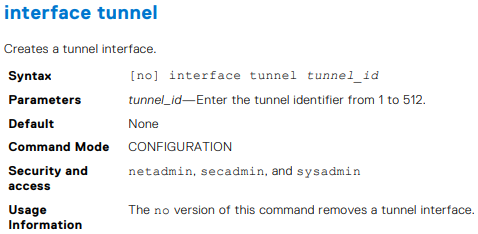
OS10(config)# interface tunnel 10

-
Example
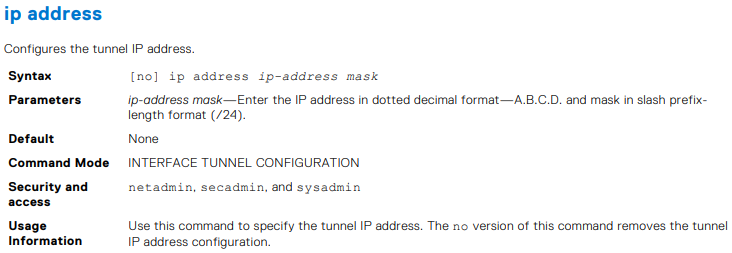
OS10(conf-if-tunnel-40)# ip address 10.1.1.1/24


-
Example
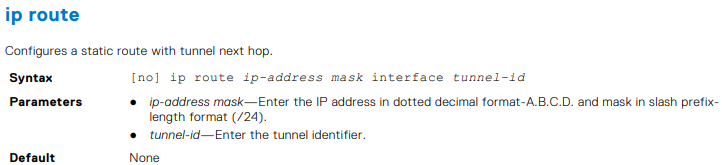
OS10(conf)# ip route 1.1.1.0/24 interface tunnel 10
OS10(conf)# ip route 2.2.2.0/24 3.3.3.3 interface tunnel 10

-
Example
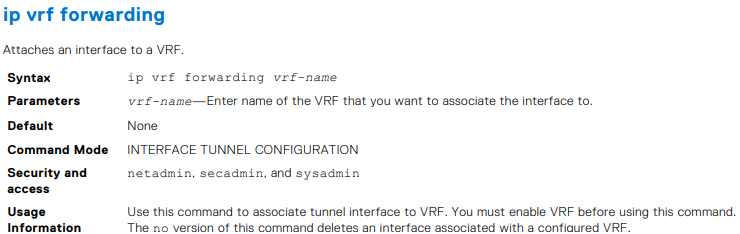
OS10(conf-if-tunnel-4)# ip vrf forwarding Vrf_red


-
Example
OS10(conf-if-tunnel-1)# keepalive down-timer 10

-
Example
OS10(conf-if-tunnel-1)# keepalive enable


-
Example
OS10(conf-if-tunnel-1)# keepalive probe-interval 10


-
Example
OS10(conf-if-tunnel-1)# keepalive up-timer 10

-
Example
OS10(conf-if-tunnel-1)# mode gre-ipv4

-
Example
OS10(conf-if-tunnel-40)# tunnel destination 10.10.10.10

-
Example
OS10(conf-if-tunnel-4)# tunnel source vlan 10

-
Example
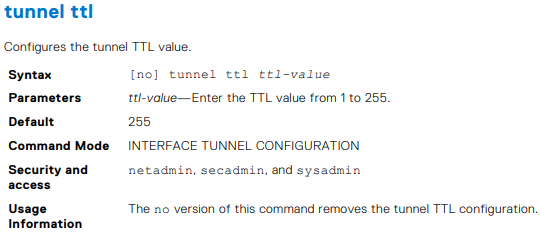
OS10(conf-if-tunnel-1)# tunnel ttl 220


-
Example
OS10# show interface tunnel 10
Tunnel 10 is up, line protocol is up
Hardware is Tunnel
Tunnel mode GREv4
Tunnel source IP 2.2.2.2, Tunnel source Intf loopback1
Tunnel destination 7.7.7.7
Tunnel TTL 255
Tunnel keepalive enabled
Keepalive probe interval 10, Up timer 5, Down timer 5
Interface index is 45
Internet address is 10.1.1.1/24
Mode of IPv4 Address Assignment: MANUAL
Interface IPv6 oper status: Enabled
ARP type: ARPA, ARP Timeout: 60
Last clearing of "show interface" counters: 00:11:22
Queuing strategy: fifo
Input statistics:
 0 packets, octets
Output statistics:
 0 packets, octets
Time since last interface status change: 00:27:11

-
Example
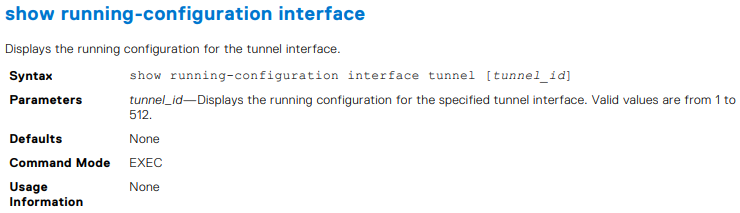
OS10# show running-configuration interface tunnel
!
interface tunnel10
 no shutdown
 mode gre-ipv4
 ip address 100.1.1.1/24
 tunnel destination 3.3.3.3
 tunnel source 1.1.1.1
!
interface tunnel20
 no shutdown
 mode gre-ipv4
 ip address 101.1.1.1/24
 tunnel destination 5.5.5.5
 tunnel source 6.6.6.6
OS10# show running-configuration interface tunnel 10
!
interface tunnel10
 no shutdown
 mode gre-ipv4
 ip address 100.1.1.1/24
 tunnel destination 3.3.3.3
 tunnel source 1.1.1.1

Example
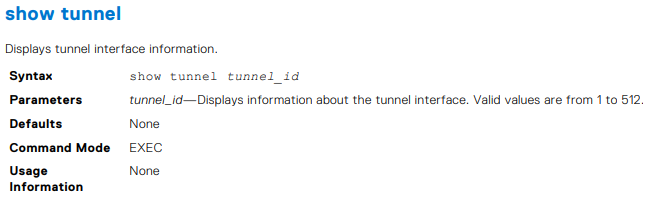
OS10# show tunnel
Name 		Mode 	Source-IP 	Destination-IP 	SrcIntf 		TTL 	VRF 	Status 	Protocol
=================================================================================================
Tunnel 1	GREv4 	1.1.1.1 	6.6.6.6 		Loopback 2 		255 	default up 		up
Tunnel 2 	GREv4 	2.2.2.2 	7.7.7.7 		Loopback 123 	255 	default up 		up
Tunnel 3 	GREv4 	3.3.3.3 	8.8.8.8 		Loopback 100 	255 	default up 		up
OS10# show tunnel 10
Name 		Mode 	Source-IP 	Destination-IP 	SrcIntf 		TTL 	VRF 	Status 	Protocol
=================================================================================================
Tunnel 10 	GREv4 	1.1.1.1 	7.6.6.6 		Loopback 2 		255 	default up 		up


-
Example
OS10# show ip int gig 1/3
GigabitEthernet 1/3 is up, line protocol is down
Internet address is 10.11.0.1/24
Broadcast address is 10.11.0.255
Address determined by user input
IP MTU is 1500 bytes
Helper address is 192.168.0.1
192.168.0.2
Directed broadcast forwarding is disabled


-
Example
OS10# show ip route
Codes: C - connected
S - static
B - BGP, IN - internal BGP, EX - external BGP, EV - EVPN BGP
O - OSPF, IA - OSPF inter area, N1 - OSPF NSSA external type 1,
N2 - OSPF NSSA external type 2, E1 - OSPF external type 1,
E2 - OSPF external type 2, * - candidate default,
+ - summary route, > - non-active route
Gateway of last resort is not set
Destination Gateway Dist/Metric Last Change
--------------------------------------------------------------------
C 1.1.1.0/24 via 1.1.1.1 ethernet1/1/1:1 0/0 01:32:53
C 10.1.1.0/24 via 100.1.1.1 loopback1 0/0 00:00:06
C 2.2.2.0/24 via 2.1.1.1.1 Tunnel 1 0/0 00:00:15
OS10# show ip route static
Codes: C - connected
S - static
B - BGP, IN - internal BGP, EX - external BGP, EV - EVPN BGP
O - OSPF, IA - OSPF inter area, N1 - OSPF NSSA external type 1,
N2 - OSPF NSSA external type 2, E1 - OSPF external type 1,
E2 - OSPF external type 2, * - candidate default,
+ - summary route, > - non-active route
Gateway of last resort is not set
Destination Gateway Dist/Metric Last Change
----------------------------------------------------------------------
C 1.1.1.0/24 via 1.1.1.1 ethernet1/1/1:1 0/0 01:32:53
C 10.1.1.0/24 via 100.1.1.1 loopback1 0/0 00:00:06
S 80.1.10.0/24 via 100.1.1.1 tunnel10 1/0 00:02:33

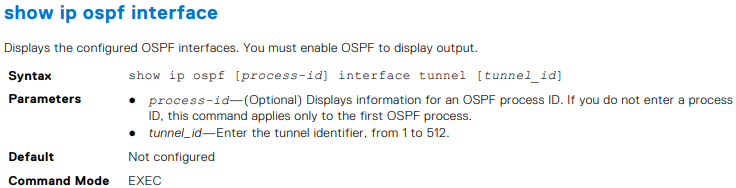
OS10# show ip ospf interface tunnel 10
tunnel10 is up, line protocol is up
  Internet Address 100.1.1.1/24, Area 0.0.0.0
  Process ID 1, Router ID 1.1.1.1, Network Type broadcast, Cost: 1
  Transmit Delay is 1 sec, State DR, Priority 1
  Designated Router (ID) 1.1.1.1 (local), Interface address 100.1.1.1
  Backup Designated router (ID) , Interface address 0.0.0.0
  Timer intervals configured, Hello 10, Dead 40, Wait 40, Retransmit 5
  Neighbor Count is 0, Adjacent neighbor count is 0
OS10# show ip ospf 1 interface tunnel 10
tunnel10 is up, line protocol is up
  Internet Address 100.1.1.1/24, Area 0.0.0.0
  Process ID 1, Router ID 1.1.1.1, Network Type broadcast, Cost: 1
  Transmit Delay is 1 sec, State DR, Priority 1
  Designated Router (ID) 1.1.1.1 (local), Interface address 100.1.1.1
  Backup Designated router (ID) , Interface address 0.0.0.0
  Timer intervals configured, Hello 10, Dead 40, Wait 40, Retransmit 5
  Neighbor Count is 0, Adjacent neighbor count is 0

-
Example
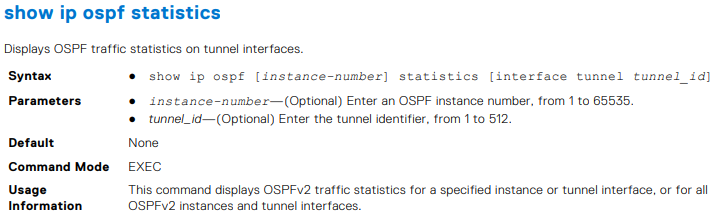
OS10# show ip ospf 1 statistics interface tunnel 10
Interface tunnel10
 Receive Statistics
 rx-invalid 	0 	rx-invalid-bytes 	0
 rx-hello 		0 	rx-hello-bytes 		0
 rx-db-des 		0 	rx-db-des-bytes 	0
 rx-ls-req 		0 	rx-ls-req-bytes 	0
 rx-ls-upd 		0 	rx-ls-upd-bytes 	0
 rx-ls-ack 		0 	rx-ls-ack-bytes 	0
 Transmit Statistics
 tx-failed 		0 	tx-failed-bytes 	0
 tx-hello 		52 	tx-hello-bytes 		3328
 tx-db-des 		0 	tx-db-des-bytes 	0
 tx-ls-req 		0 	tx-ls-req-bytes 	0
 tx-ls-upd 		0 	tx-ls-upd-bytes 	0
 tx-ls-ack 		0 	tx-ls-ack-bytes 	0
 Error packets (Receive statistics)
 bad-src 		0 	dupe-id 			0 	hello-err	 0
 mtu-mismatch 	0 	nbr-ignored 		0 	wrong-proto  0
 resource-err 	0 	bad-lsa-len 		0 	lsa-bad-type 0
 lsa-bad-len 	0 	lsa-bad-cksum 		0 	auth-fail    0
 netmask-mismatch 0 hello-tmr-mismatch 	0 	dead-ivlmismatch 0
 options-mismatch 0 nbr-admin-down 		0 	own-hellodrop    0
 self-orig 		0 	wrong-length 		0 	checksumerror 	 0
 version-mismatch 0 area-mismatch 		0

Additional Information
Affected Products
SmartFabric OS10 SoftwareArticle Properties
Article Number: 000228691
Article Type: How To
Last Modified: 03 Oct 2025
Version: 2
Find answers to your questions from other Dell users
Support Services
Check if your device is covered by Support Services.