NetWorker: Windows Server에서 NMC를 19.10+로 업그레이드하지 못함
Summary: Windows 서버에서 NMC(NetWorker Management Console) 서버 패키지 업그레이드가 실패합니다. 설치/업그레이드 중인 NMC 패키지는 19.9+입니다.
This article applies to
This article does not apply to
This article is not tied to any specific product.
Not all product versions are identified in this article.
Symptoms
- 설치를 위해 NMC(NetWorker Management Console) 패키지 설치를 선택한 경우 설치가 실패하고 롤백됩니다.
- 그만큼 .. \EMC NetWorker\Management\GST\logs\gstdbinit.log 보고서:
waiting for server to start.... done
server started
107567:gstdbinit: Unable to allocate ODBC connection
107571:gstdbinit: ODBC Error:IM003:160:Specified driver could not be loaded due to system error  126: The specified module could not be found. (PostgreSQL Unicode(x64), C:\Program Files\EMC NetWorker\Management\GST\postgres_latest\odbc\psqlodbc35w.dll).
waiting for server to shut down.... done
server stopped
- 그만큼 .. \EMC NetWorker\Management\GST\logs\gstdbinit.log 보고서:
- NMC 패키지가 설치되었지만 NMC 서버 프로세스(gstd)를 시작하지 못했습니다. 에 기록된 오류입니다. \EMC NetWorker\GST\logs\gstd.raw가 Postgres 모듈을 로드할 수 없음을 나타냅니다.
YYYY-MM-DDTHH:mm:SS 1 5 0 5560 8512 0 NMC_SERVER_HOSTNAME gstd NSR notice MM/DD/YY HH:mm:SS gstd-D1    IM003: Specified driver could not be loaded due to system error 126: The specified module could not be found. (PostgreSQL ANSI(x64), C:\Program Files\EMC NetWorker\Management\GST\postgres_latest\odbc\psqlodbc30a.dll).
YYYY-MM-DDTHH:mm:SS 1 5 0 5560 8512 0 NMC_SERVER_HOSTNAME gstd NSR notice MM/DD/YY HH:mm:SS gstd-D1 Internal error: could not get database handle.
YYYY-MM-DDTHH:mm:SS 1 5 0 5560 8512 0 NMC_SERVER_HOSTNAME gstd NSR notice MM/DD/YY HH:mm:SS gstd-D0 Internal error: could not get database handle.
YYYY-MM-DDTHH:mm:SS 1 5 0 5560 8512 0 NMC_SERVER_HOSTNAME gstd NSR notice MM/DD/YY HH:mm:SS gstd-D0 Please also see the log files in 'pg_log' directory inside the product's database directory for the database server's output messages
YYYY-MM-DDTHH:mm:SS 1 5 0 5560 8512 0 NMC_SERVER_HOSTNAME gstd NSR notice MM/DD/YY HH:mm:SS gstd-D0 Internal error: could not release database handle.
YYYY-MM-DDTHH:mm:SS 2 0 0 5560 8512 0 NMC_SERVER_HOSTNAME gstd NSR warning library error 22 os error 0
Cause
Windows 서버에 Microsoft Visual C++ 2015 - 2022 패키지가 없습니다. 패키지가 다음 아래에 나열되지 않습니다.
제어판 ->프로그램 -> 프로그램 및 기능
참고: NetWorker 19.10 설치 가이드에는 Windows에 NetWorker 및 NMC 소프트웨어를 설치하는 데 필요한 패키지로 Microsoft Visual C++ 2015 - 2022 재배포 가능 패키지가 나와 있습니다. NetWorker 설치 가이드는 https://www.dell.com/support/home/product-support/product/networker/docs 에서 확인할 수 있습니다. 종속성의 차이점에 대해서는 NetWorker 버전별 설치 가이드를 참조하십시오.
Resolution
1. Windows 호스트에 X64 Microsoft Visual C++ 2015 - 2022 재배포 가능 패키지를 설치합니다. 패키지는 다음에서 구할 수 있습니다.
https://learn.microsoft.com/cpp/windows/latest-supported-vc-redist?view=msvc-170

설치가 완료되면 패키지가 제어판 - 프로그램 ->> 프로그램 및 기능 아래에 나열되어야 합니다.
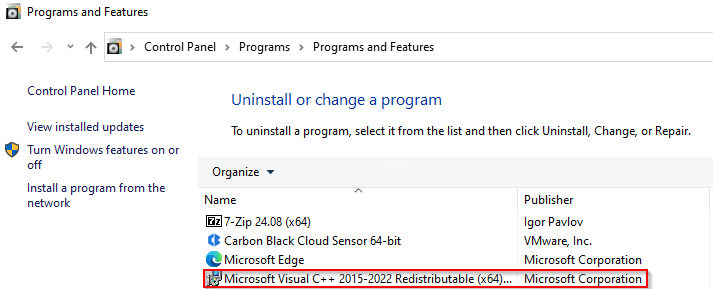
2. NetWorker 및 NMC 패키지를 설치합니다.
3. NMC 시작 관리자에서 NMC 서버에 액세스할 수 있는지 확인합니다.
Additional Information
NetWorker: NMC 데이터베이스를
복구하는 방법NetWorker 19.11로 업데이트한 후 NMC 데이터베이스 백업이 실패함
NetWorker: NMC 서비스 및 접근성 문제(일반 문제 해결 가이드)
Affected Products
NetWorkerProducts
NetWorker FamilyArticle Properties
Article Number: 000235248
Article Type: Solution
Last Modified: 18 Jun 2025
Version: 6
Find answers to your questions from other Dell users
Support Services
Check if your device is covered by Support Services.