Connectrix MDS series: Saving RUM report from a newly implemented SAN switch reports "failure: save status: the requested item was not found"
Summary: Saving a Report Usage Metrics (RUM) report from a new SAN switch reports a "failure: save status: the requested item was not found" message.
This article applies to
This article does not apply to
This article is not tied to any specific product.
Not all product versions are identified in this article.
Symptoms
- Cisco model: Multilayer Director Switch (MDS) 9396T
- NX-OS version: 9.4.2a
- New switch implementation
- No license on MDS
- Switch is configured for SLP topology 5 (no connectivity to CSSM and no CSLU)
- Customer must create a smart account, register the smart license and associate it with the SAN switches.
The following error message appears when saving a RUM report with the license smart save usage all bootflash:all_rum.txt command: failure: save status: the requested item was not found
Cause
Per Cisco TAC, enable a feature that makes switches consume any licenses to save RUM reports successfully when no license is used for the first time. You can again disable it. After enabling and disabling (such as the ivr feature, which consumes Enterprise license), you can then save the RUM report using the same command.
Resolution
- SSH to switch, enable, and disable
ivrfeature, commands:
#config t
#feature ivr
#no feature ivr
#show run license
#show license status
- Run
#license smart save usage bootflash:$(SWITCHNAME)-rum.txt - Go to Chrome (Cisco TAC recommends Chrome over Edge), open https://software.cisco.com/software/smart-licensing/alerts >tab "reports" > tab "usage data files" > upload usage data > choose the rum report from the bootflash and click upload data.
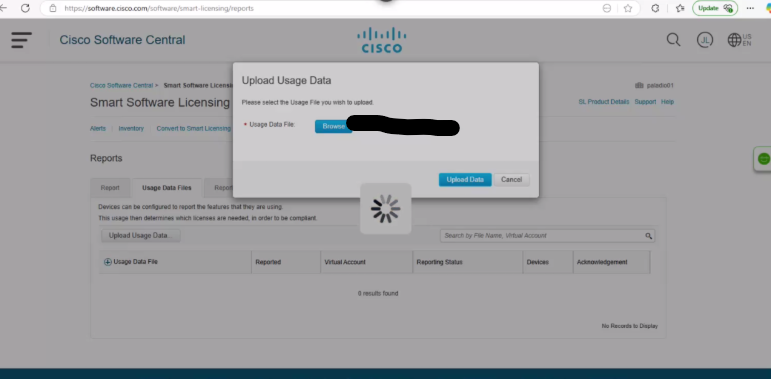
Figure 1. Upload Usage Data
- Choose the virtual account that you need:
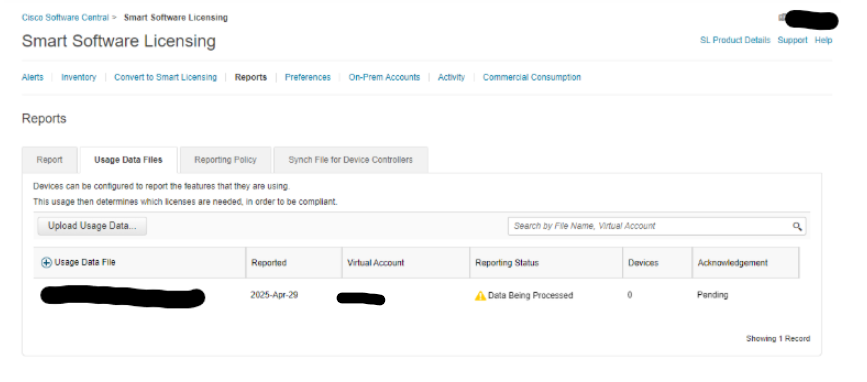
Figure 2. Smart Software Licensing
- Wait until the report status shows
no errors. If it does not update automatically, fresh the page, then click Download.
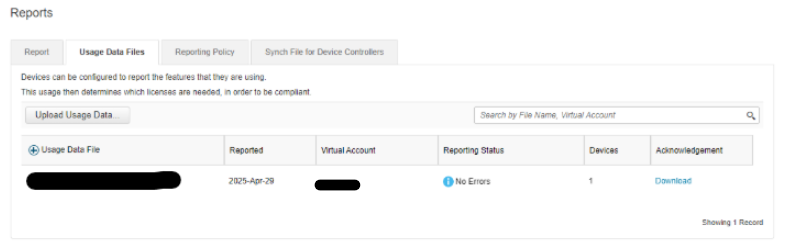
Figure 3. Download Reports
- SSH to the switch, copy this RUM report from TFTP to bootflash and run
#dir bootflash:to confirm it is in bootflash:
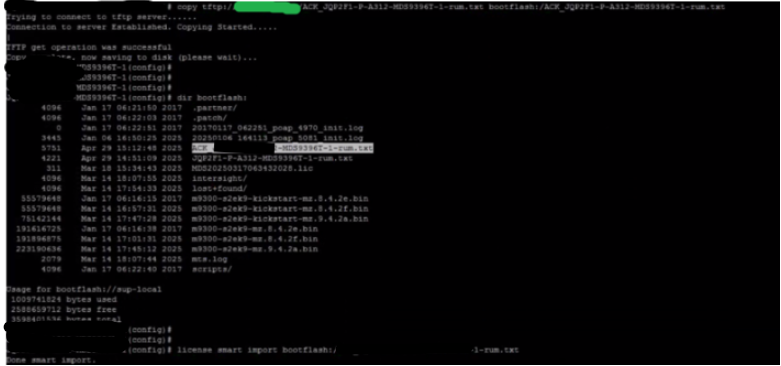
Figure 4. Copy RUM report to bootflash
Additional Information
- EMC SR#208916105
- Cisco TAC case#699031372
Videos
- Perform these steps to upload a RUM report to CSSM and download an ACK when the switch is not connected to CSSM or CSLU: Cisco MDS 9000 Series Licensing Guide, Release 9.x - Smart Licensing Using Policy [Cisco MDS 9000 NX-OS and SAN-OS Software] - Cisco
- Generating Authorization Code in Offline Mode: https://www.cisco.com/c/en/us/td/docs/dcn/mds9000/sw/9x/configuration/licensing/cisco-mds-9000-nx-os-licensing-guide-9x/smart-licensing-using-policy.html#task_iqp_s2p_gsb [cisco.com]
Affected Products
Connectrix, Connectrix MDS-Series Firmware 9.XArticle Properties
Article Number: 000319844
Article Type: Solution
Last Modified: 15 Apr 2026
Version: 1
Find answers to your questions from other Dell users
Support Services
Check if your device is covered by Support Services.