Black Screen After Closing and Reopening Alienware Lid
Summary: An Alienware laptop may display a black screen after closing and then opening the lid if the lid close action is set to Do Nothing.
This article applies to
This article does not apply to
This article is not tied to any specific product.
Not all product versions are identified in this article.
Symptoms
The computer’s internal display shows a black screen after closing and reopening the lid when both of the following conditions are true:
- The Display Mode is set to NVIDIA GPU only in the NVIDIA Control Panel.
- To check this, launch the NVIDIA Control Panel app. Switch to 3D Settings, go to Manage Display mode, and check if it is set to NVIDIA GPU only.
- The lid close action in Windows Settings is set to Do Nothing.
- To check this, right-click the Windows button and then choose Settings.
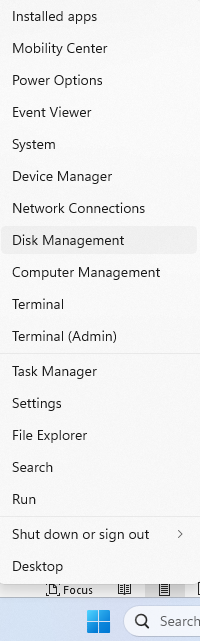
- From the upper-left, search for
LID, then go to Change what closing the lid does.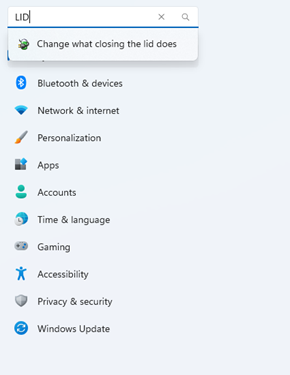
- Check if When I close the lid is set to Do nothing.

- To check this, right-click the Windows button and then choose Settings.
This issue only occurs when NVIDIA graphics driver version 32.0.15.7702 is installed.
Affected Platforms:
- Alienware 16 Area-51 AA16250
- Alienware 16X Aurora AC16251
- Alienware 18 Area-51 AA18250
Cause
This issue occurs due to NVIDIA graphics driver v32.0.15.7702.
Resolution
Long-term resolution
The engineering department is working on a fix to be released in a future NVIDIA graphics driver. The updated driver is posted to the computer's support page once it is made available. The NVIDIA graphics driver update is expected to be released in October 2025.
Workaround
There are two recovery methods for this issue.
- Plug an external monitor into the computer.
- Press the power button once, wait for several seconds, then press the power button again.
Affected Products
Alienware 16 Area-51 AA16250, Alienware 18 Area-51 AA18250, Alienware 16X Aurora AC16251Article Properties
Article Number: 000370592
Article Type: Solution
Last Modified: 29 Sep 2025
Version: 1
Find answers to your questions from other Dell users
Support Services
Check if your device is covered by Support Services.