Dell Encryption이 UI 해상도에 따라 부적절하게 확장됨
Sommaire: Dell Encryption(이전 Dell Data Protection | 암호화)가 Windows 10에서 배율을 250%로 설정하면 4k 디스플레이에서 크기가 부적절하게 조정됩니다.
Cet article s’applique à
Cet article ne s’applique pas à
Cet article n’est lié à aucun produit spécifique.
Toutes les versions de produits ne sont pas identifiées dans cet article.
Symptômes
참고:
- 2022년 5월부터 Dell Endpoint Security Suite Enterprise 유지 보수가 종료됩니다. 자세한 내용은 Dell Data Security에 대한 제품 수명주기(지원 종료/수명 종료) 정책을 참조하십시오.
- 2019년 1월부터 Dell Endpoint Security Suite Pro의 서비스가 종료되었습니다. 자세한 내용은 Dell Data Security에 대한 제품 수명주기(지원 종료/수명 종료) 정책을 참조하십시오.
- 2018년 2월 현재 Dell Data Protection | 보안 툴의 서비스가 종료되었습니다. 자세한 내용은 Dell Data Security에 대한 제품 수명주기(지원 종료/수명 종료) 정책을 참조하십시오.
- 최신 제품에 대한 자세한 내용은 엔드포인트 보안을 참조하십시오.
영향을 받는 제품:
- Dell Encryption Enterprise
- Dell Encryption Personal
- Dell Endpoint Security Suite Enterprise
- Dell Data Protection | Enterprise Edition
- Dell Data Protection | Personal Edition
- Dell Endpoint Security Suite Pro
- Dell Data Protection | Security Tools
영향을 받는 버전:
- v8.10 및 8.17
영향을 받는 운영 체제:
- Windows 10(RTM, 1511, 1607, 1703)
Cause
해당 사항 없음
Résolution
참고: 이 문제는 v8.18에서 해결되었습니다.
UHD(4K) 화면이 탑재된 특정 디바이스에서 Windows 10 내의 UI 확장이 250%로 설정된 경우, UI가 부적절하게 표시되고 Dell Data Security Console 애플리케이션 내에서 탐색하기 어려울 수 있습니다.
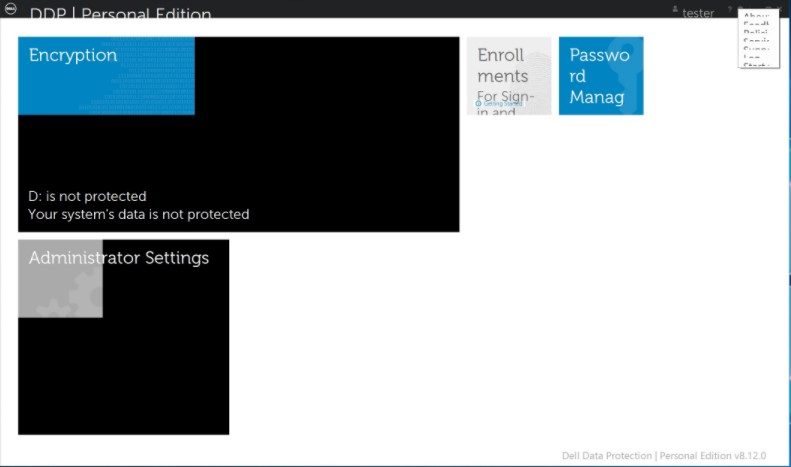
이 문제는 Windows 8 호환 모드에서 Dell Data Security Console 애플리케이션을 실행하여 일시적으로 해결할 수 있습니다.
호환성 모드를 활성화하려면 다음을 수행합니다.
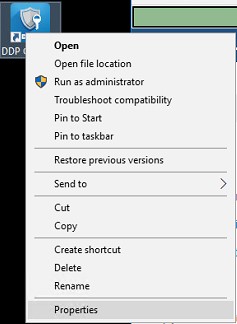
- 아이콘을 마우스 오른쪽 버튼으로 클릭하고 속성을 선택합니다.
- Compatibility 탭을 선택합니다.
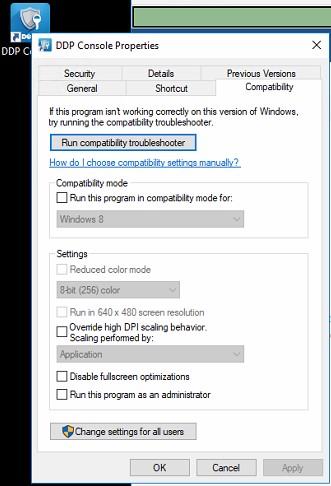
- 호환성 모드 확인란에 다음에 대해 호환성 모드에서 이 프로그램 실행이라고 표시되어 있는지 확인합니다. Windows 8에서는 이 설정을 그대로 둡니다.
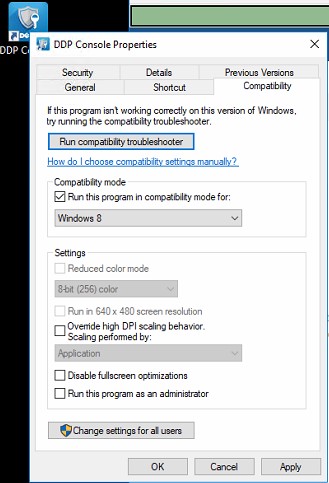
- Apply를 클릭한 다음 OK를 클릭하여 변경 내용을 적용합니다.
지원 부서에 문의하려면 Dell Data Security 국제 지원 전화번호를 참조하십시오.
온라인으로 기술 지원 요청을 생성하려면 TechDirect로 이동하십시오.
추가 정보 및 리소스를 보려면 Dell 보안 커뮤니티 포럼에 참여하십시오.
Renseignements supplémentaires
Vidéos
Produits touchés
Dell Encryption, Dell Endpoint Security Suite Pro, Dell Endpoint Security Suite EnterprisePropriétés de l’article
Numéro d’article: 000124977
Type d’article: Solution
Dernière modification: 19 avr. 2026
Version: 13
Obtenez des réponses à vos questions auprès d’autre utilisateurs de Dell
Services de soutien
Vérifiez si votre appareil est couvert par les services de soutien.