Dell Encryption 无法根据 UI 分辨率进行缩放
Sommaire: Dell Encryption(以前称为 Dell Data Protection |在 Windows 10 中将缩放设置为 250% 时,加密)在 4k 显示器上的缩放不正确。
Cet article s’applique à
Cet article ne s’applique pas à
Cet article n’est lié à aucun produit spécifique.
Toutes les versions de produits ne sont pas identifiées dans cet article.
Symptômes
提醒:
- 从 2022 年 5 月起,Dell Endpoint Security Suite Enterprise 停止维护。有关更多信息,请参阅 Dell Data Security 产品生命周期(结束支持/停售)政策
- 截至 2019 年 1 月,Dell Endpoint Security Suite Pro 已停止服务。有关更多信息,请参阅 Dell Data Security 产品生命周期(结束支持/停售)政策
- 截至 2018 年 2 月,Dell Data Protection |安全工具的服务终止。有关更多信息,请参阅 Dell Data Security 产品生命周期(结束支持/停售)政策
- 请参阅端点安全性,了解有关当前产品的其他信息。
受影响的产品:
- Dell Encryption Enterprise
- Dell Encryption Personal
- Dell Endpoint Security Suite Enterprise
- Dell Data Protection | Enterprise Edition
- Dell Data Protection | Personal Edition
- Dell Endpoint Security Suite Pro
- Dell Data Protection | Security Tools
受影响的版本:
- v8.10 和 8.17
受影响的操作系统:
- Windows 10(RTM、1511、1607、1703)
Cause
不适用
Résolution
提醒:此问题已在 v8.18 中得到解决。
在附带 UHD (4k) 屏幕的某些设备上,如果 Windows 10 中的 UI 缩放比例设置为 250%,则 UI 可能会显示不正确,并且难以在 Dell Data Security Console 应用程序中导航。
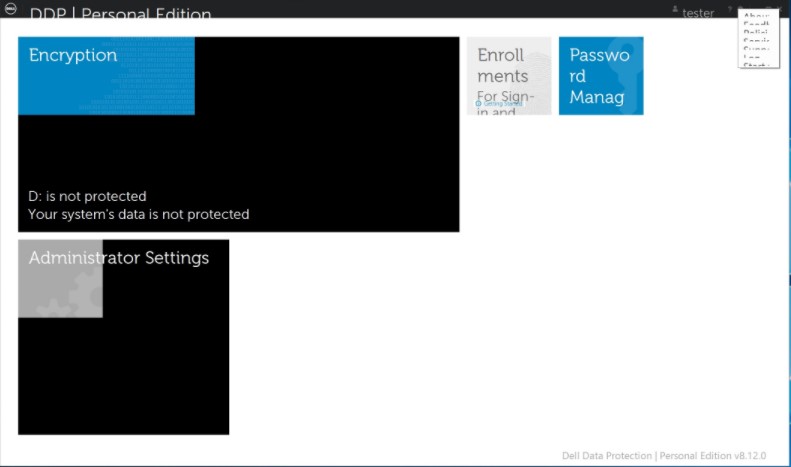
通过在 Windows 8 的兼容性模式下 运行 Dell Data Security Console 应用程序,可以暂时解决此问题。
要启用兼容性模式,请执行以下操作:
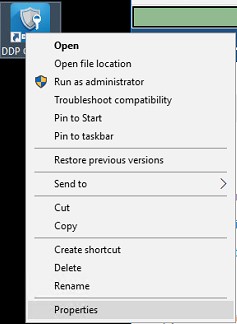
- 右键单击图标,然后选择 属性。
- 选择 Compatibility(兼容性)选项卡。
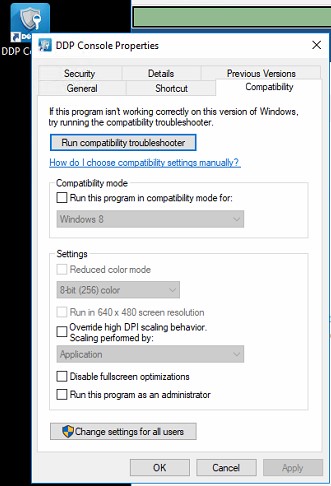
- 选中“兼容模式”复选框是否标记为“ 在兼容模式下运行此程序”:并将设置保留在 Windows 8 上。
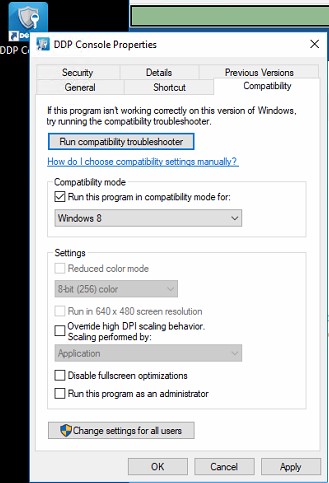
- 依次单击 Apply 和 OK 以强制执行更改。
要联系支持部门,请参阅 Dell Data Security 国际支持电话号码。
转至 TechDirect,在线生成技术支持请求。
要获得更多见解和资源,请加入戴尔安全社区论坛。
Renseignements supplémentaires
Vidéos
Produits touchés
Dell Encryption, Dell Endpoint Security Suite Pro, Dell Endpoint Security Suite EnterprisePropriétés de l’article
Numéro d’article: 000124977
Type d’article: Solution
Dernière modification: 19 avr. 2026
Version: 13
Obtenez des réponses à vos questions auprès d’autre utilisateurs de Dell
Services de soutien
Vérifiez si votre appareil est couvert par les services de soutien.