Dell Docks Do Not Function Correctly when Connected to Precision Workstations
Zhrnutie: Customers may report intermittent issues with no display on external monitors and no LAN functionality when using a Dell dual connector dock.
Tento článok sa vzťahuje na
Tento článok sa nevzťahuje na
Tento článok nie je viazaný na žiadny konkrétny produkt.
V tomto článku nie sú uvedené všetky verzie produktov.
Symptómy
Affected Platforms:
- Precision 7670
- Precision 7770
- Precision 7680
- Precision 7780
Affected Products:
- Dell Performance Dock - WD19DCS
- Dell Performance Dock - WD19DC
Steps to re-create:
- The host computer BIOS setting Power - USB Wake Support- Wake on Dell USB-C Dock is set as ON.
- No external power (AC adapter barrel or type-C) has been connected to the host computer for at least two hours.
- Connect an external monitor to the dock WD19DCS or WD19DC (a single external monitor or multiple monitors connected to the dock through HDMI, DP, or Type-C DP port).
- Power on the computer with the Dock is connected to left side (two Thunderbolt4 with USB Type-C ports).
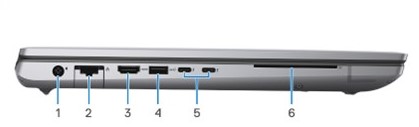
Figure 1: (English Only) Precision 7780 left view
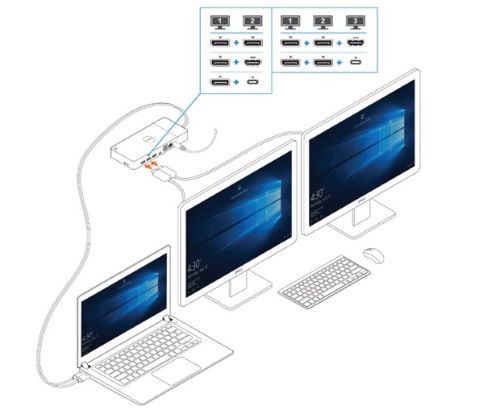
Figure 2: (English Only) Connecting the external displays
Príčina
Not Applicable
Riešenie
Updating the BIOS to the following versions prevent this issue from occurring:
- Precision 7680 and Precision 7780 BIOS: 1.12.1 or later
- Precision 7670 and Precision 7770 BIOS: 1.21.1 or later
Dotknuté produkty
Dell Performance Dock - WD19DC, Dell Performance Dock – WD19DCS, Precision 7670, Precision 7680, Precision 7770, Precision 7780Vlastnosti článku
Číslo článku: 000225065
Typ článku: Solution
Dátum poslednej úpravy: 21 máj 2026
Verzia: 6
Nájdite odpovede na svoje otázky od ostatných používateľov spoločnosti Dell
Služby podpory
Skontrolujte, či sa na vaše zariadenie vzťahujú služby podpory.